- Joined
- Feb 3, 2020
- Messages
- 11
- Reaction score
- 2
Has anyone has such an issue?
our 3cx works well in server 2012 for a long time, and today we upgraded to win server 2019, and the route doesn't change anything.
some of the media ports are failed, please see the attachment
I searched several posts but didn't figure out why, this post seems has the same issue as mine
https://www.3cx.com/community/threads/3cx-version-16-aws-windows-server-firewall-check.67830/
I don't know why it's the port of 9146 in every test, I wrote a udp server and client using 9146, the port work, so no program is using this port and no firewall issue. (of course, test after stopping the media service) ,
I'm testing through mstsc, does it use that port? I have no idea, please help!
by the way, the phone system seems works, I can call in and call out, but I'm afraid some of calls will fail due to the port issue.
our 3cx works well in server 2012 for a long time, and today we upgraded to win server 2019, and the route doesn't change anything.
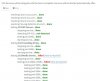
some of the media ports are failed, please see the attachment
I searched several posts but didn't figure out why, this post seems has the same issue as mine
https://www.3cx.com/community/threads/3cx-version-16-aws-windows-server-firewall-check.67830/
I don't know why it's the port of 9146 in every test, I wrote a udp server and client using 9146, the port work, so no program is using this port and no firewall issue. (of course, test after stopping the media service) ,
I'm testing through mstsc, does it use that port? I have no idea, please help!
by the way, the phone system seems works, I can call in and call out, but I'm afraid some of calls will fail due to the port issue.