3CX Windows App - No sound internally

Status
Not open for further replies.

mruffin

Forum User
Advanced Certified
Joined
Jul 28, 2019
Messages
11
Reaction score
0
I'm currently having an issue with the 3CX Windows App in which externally to our office it works fine, however internally, I can place and receive calls, but there's no audio in the calls.

Outside of the office, everything works fine, but internally (on the same network as the 3CX server), there's no audio.

Any ideas?
 
Many ideas but you haven't given much information. To start, confirm what scenarios there is/isn't audio: echo test, internal calls, external calls. Secondly confirm if the firewall check passes. Third, confirm your dial tone source and if it's a supported provider.
 
I would create a split DNS setup, so whoever connects via the internal network, the internal DNS servers resolve to the internal IP, and all public DNS servers will return the public IP.
 
Just to answer some of the questions:

- Internal *and* external calls are audio-less. Calling inbetween extensions gives no sound (although calling between IP phones works perfectly fine, it's just the app that's having difficulty)
- Firewall checks out all except port 5060 (but again.. all calls - including internal IP phone to IP phone, external app, internal and external mobile app, external web portal - work fine)
- Supported provider, however these are just extension to extension calls.
- Not sure how DNS would solve? The app connects fine, shows my extension, receives the call, rings, answers, but no audio..
 
What are the settings under for the 3CX App under Extension > Phone Provisioning?
FQDN or IP?
SIP Transport?
RTP Mode?
 
Internal or Public IP?

Try using FQDN and re provisioning the app, send a welcome email. Open the new config on the app.
 
It's an internal IP

I'll give the FQDN a crack and update here.
 
If the problem is only internal, but internally the IP Phones work fine, I would suspect something relating to the network setup.
Are the PC, IP Phones and 3CX Server, all on the same subnet and IP Range? If yes, what is your Internal IP Range, is it one of 10.0.0.0/8, 192.168.0.0/16, 172.16.0.0./12?

Also one more simple test, from the PC where the Windows app is, can you access the Management Console? One more, in the Windows App account settings, do you see the correct local IP of the 3CX Server listed?
 
Could've sworn I replied to this..

- PC/IP Phones/3CX server are all on same subnet (192.168.100.x)
- Yes, can access the management console from same PC as I'm testing the 3CX app from.
- Yes, the 3CX app has the correct IP address listed.
 
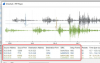
Then the next thing I would do is install Wireshark on the PC where the 3CX Windows Client is installed, start running it then make a call while local, then check where the audio is going. Maybe that could give some clues.

There is a video explaining how this works: https://www.3cx.com/3cxacademy/videos/advanced/basic-troubleshooting/
(it's towards the end of the video)
Generally you would be looking for this, to see the IPs and Ports the audio is being sent/received from:
1585549217977.png
 
Have you heard the recordings? This will tell us what the PBX sends and receives audio-wise and can be used as an additional way to check. Not sure if you are testing the app on the same pc with the same audio device during the internal calls.
 
I seem to have the same symptoms
- 3CX app working fine on my Android, I can make and receive calls fine with audio
- Windows app installed today, registered and associated with my account on the PC (just started working from home)
- Generic headset/microphone is connected to the PC via USB
- I can hear audio via Youtube etc and I can hear audio button tones and ring tones through the headset when using the 3CX windows app but as soon as the person I'm calling answers there is silence.
- I've tried making calls to an internal extension and an external number with the same result
- I've accessed the management console and under Settings>Personalize>Audio/Video there is a message stating "Permissions for audio input and video device were not granted"
- When I hover the mouse over the camera, speaker, ringer or microphone fields the pointer changes to a red 'no access' icon
- below there is a field called 'use headset integration' with the options of none, Sennheiser, Plantronics or Jabra. My headset is generic (Addcom) but I've tried all four options and none work.
 
@Paytec I think you may be confusing the management console with the webclient. The webclient by the way is a completely independent softphone, just like the 3CX Phone for Windows app is also independent.

The webclient needs permissions granted in order to access your audio devices (Chrome enforced security). I think you should decide if you want to use the webclient (recommended!) or the windows app, and start a new thread accordingly so as to not hijack this thread.
 
Status
Not open for further replies.