3CX-Windows-App sometimes in semi-live state

PBX128

Premier Customer
Joined
Oct 31, 2024
Messages
162
Reaction score
110
Hello,

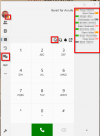
for a few days now, we have been having problems with the 3CX Windows app (version 20.0.664.0) apparently no longer reliably loading the data correctly and then remaining in a semi-live state:
1) The user account is logged in (initials are displayed at the top left)
2) However, the user account is grayed out/logged out in the app
3) The BLF are not displayed (neither the entries nor their status)
4) The “Chat” button is missing
5) The menu item “Conference” is missing
6) Outgoing calls are possible, but are not displayed graphically in the app (call goes out, but you can't see anything in the app)
7) The “Q” button is missing
8) No contacts under Team and Phonebook


Looks like that:
1734190496309.png

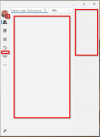
Should be like that:
1734190541773.png


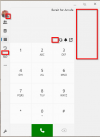
No team contacs:
1734190604258.png


What was changed before the problem occurred?
1) New 3CX Windows app installed (20.0.664.0)
2) New 3CX version v20 Update 4 was installed via the automatic update
3) Approx. 250 additional users and approx. 10 additional phones created and active on the 3CX

With 250 users less, the old 3CX-WIndows-App and 3CX v20 Update 3 there was no problem.

How can the problem be solved by users?
- Partly by simply closing the 3CX Windows app
- Partly by restarting the PC

Notes:
- The two solutions above did not work on one PC
- The problem has already occurred both when a PC accesses our 3CX from LAN (inside) and from the Internet (outside).
- On-premise operation (VMware)
- Sufficient resources (8 vCPU, 16 GB RAM, 1 GBit/s)

The problem is annoying. We hope that this bug will be fixed as soon as possible.

Thank you!
 
Hi thanks for your feedback.

Does this happen randomly or you have a way of reproducing? If not, could you kindly send us verbose logs of the app when the softphone is this state?

Go to More button > About
Click on the version number 12 times. This will take you to Settings page.
Scroll all the way down and you have a checkbox to enable verbose logging.

Reprosuce the issue and then send me the logs via private message.
 
  • Like
Reactions: Ecki
Logs are generated here:

C:\Users\{YourUserName}\AppData\Local\Packages\3CXDMCC.3CX_bhm4yemhnd70e\LocalCache\Local\3CXSoftphone
 
  • Like
Reactions: Ecki
Wow, fast answer!

Unfortunately, we have not yet been able to identify any logic as to when the problem occurs and are therefore not (yet) able to reproduce it.
 
I have the same problems. Only our server version is still: 18.0 (Build 31)
 
  • Like
Reactions: jbarrett
@AnneD please follow the above steps mentioned to allow Verbose logs and send me the file generated when on this state via Private message.
 
Hi, we are having the same problem within our environment. The software versions are as follows:
  • Server - Version 20.0 Update 3 (Build 806 Release)
  • Windows Softphone App - 20.0.664.0
Client Machines are running either Windows 11 24H2 or Windows 11 23H2. Thank you!
 
Hi @eig-support

Can you try our new Beta to check if you can replicate the issue?
https://www.microsoft.com/store/apps/9NL6L9SQ8XBB

If you can can you send us verbose logs whilst reproducing the issue?

Go to More button > About
Click on the version number 12 times. This will take you to Settings page.
Scroll all the way down and you have a checkbox to enable verbose logging.

Reproduce the issue and then send me the logs via private message.
Logs are generated here:

C:\Users\{YourUserName}\AppData\Local\Packages\3CXDMCC.3CX_bhm4yemhnd70e\LocalCache\Local\3CXSoftphone
 
Dear
We have the same problem since Customers uses the last windows app version.
Same problem in Beta version.

Please find logs in private message.
 
Last edited:
Dear,
Could you help us to solve the problem please ?
 
We are having the same issue.
(Version 20.0 Update 4 (Build 487 Release) hosted locally on VMware, V20.0.664.0 of the app running on multiple Win11 23H2 machines).
One interaction to add to the mix if not mentioned before:
If the app is started without network access, and network access then added, it will stay in that semi-connected state until you uncheck - then re-check the account in the "Manage Accounts" screen on the app. At that point it will connect normally.

However - if you start the app without network, uncheck - then re-check the account in the "Manage Accounts" screen, then add network access, the app connects normally with all the call controls.

We can get you verbose logging in these transitions if that would be helpful. We can reproduce this on demand. Thanks!
 
  • Like
Reactions: Vali_3CX
I can confirm the behavior mentioned here. We have the same problem at very irregular intervals, the app is grayed out, nothing works until the app is manually closed and started, then everything works fine. In addition, we have noticed that the app just closes randomly, you can see in the Windows event logs that it has crashed.

Our environment: Win10 22H2 .5371
3CX: 3CX Windows app (version 20.0.664.0)


@ThomB_3CX : If you are interested in eventlogs, let me know. I have 2 different machines here with the problem of going gray and crashing. Unfortunately I can't send debug logs of the 3CX.

The following is often mentioned in addition:

Application: 3CXSoftphone.exe
CoreCLR Version: 8.0.1124.51707
.NET Version: 8.0.11
Description: The process was terminated due to an unhandled exception.
Exception Info: exception code c0000005, exception address 00007FFA7FDA259D
Stack:
 
We have the same issue, with some clients. We can provide in logfiles if needed.
@ThomB_3CX what is the best course of action when having these issues, creating a ticket?
 
  • Like
Reactions: Alexandre ITELIA
Hello @Alexandre ITELIA
Just to avoid any misunderstanding, I would like to clarify the following:
A month ago we send you a beta version, we have requested for verbose logs if the problem still occur (as we couldn't reproduce the issue on our side), yet you never sent us those logs.
Keep in mind that to get assistance from our support, you need to cooperate with us.
The ticket is still open, and we will continue through it as discussed over the phone.
 
Dear
We provide logs but any answer from you about first log, please review ticket to confirm.

Now, I give you a tips about source of problem, please investigate about it to avoid this problem et patch it fastly in the ms store.

Thanks
 
Hey @Jean-ChristopheC_3CX, @ThomB_3CX I have this problem on one customer's office. Not every computer store app start unregistered at boot. I have collected some logs if you want to have a look on it ?
Windows 10 and 11, app V20.0.664.0

Thanks
 
We also have this issue with our clients.

To re-register the account, the user has to follow these steps:

  1. Click on the user icon
  2. Click on "Configure"
  3. Click on "Manage accounts"
  4. Remove the blue check mark
  5. Add the blue check mark

3CX needs to come with a quick fix for this.
 
  • Like
Reactions: SimonJay
Maybe 3CX will understand that the problem is a really problem for all end users and resellers.
Just a question for everyone, how did you explain to your customers a bug since now minimum two months without a fix for a company like 3cx...
 
Hello @Alexandre ITELIA
13 days ago we send you a procedure on the ticket to send us log's about this, we are waiting for you.
Thank's.
 
  • Like
  • Haha
Reactions: ElenaF_3CX and N_G

Forum statistics

Threads
112,292
Messages
591,737
Members
165,416
Latest member
Graham Robertson