


- Joined
- Oct 31, 2024
- Messages
- 162
- Reaction score
- 110
Summary:
If you once activate headset integration for a headset and unconnect it, headset integration for this headset should be reactivated if you reconnect it - even if it was temporarily unconnected and even if temporarily another headset was connected
Situation:
1) Connect Yealink Headset with computer
2) Open 3CX Windows App v20, go to settings and activate headset integration for yealink headset
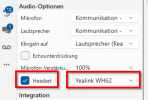
3) Use buttons on headset for call actions.
4) Remove headset from computer
5) Take your computer to another place and use a simple logitech usb headset
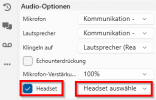
6) In 3CX-App headset integration still seams activated, but there is no headset entry shown:
6) Take you computer back to office and reconnect yealink headset
Expected behaviour:
In 3CX Windows App the headset integration is reactivated.
Actual behaviour:
In 3CX Windows App the headset integration is still "activated", but as the yealink headset isn't selected, the headset integration isn't working.
Summary:
If you once activate headset integration for a headset, headset integration for this headset should be reactivated if you connect it again, even if it was temporarily unconnected or if temporarily another headset was connected
If you once activate headset integration for a headset and unconnect it, headset integration for this headset should be reactivated if you reconnect it - even if it was temporarily unconnected and even if temporarily another headset was connected
Situation:
1) Connect Yealink Headset with computer
2) Open 3CX Windows App v20, go to settings and activate headset integration for yealink headset
3) Use buttons on headset for call actions.
4) Remove headset from computer
5) Take your computer to another place and use a simple logitech usb headset
6) In 3CX-App headset integration still seams activated, but there is no headset entry shown:
6) Take you computer back to office and reconnect yealink headset
Expected behaviour:
In 3CX Windows App the headset integration is reactivated.
Actual behaviour:
In 3CX Windows App the headset integration is still "activated", but as the yealink headset isn't selected, the headset integration isn't working.
Summary:
If you once activate headset integration for a headset, headset integration for this headset should be reactivated if you connect it again, even if it was temporarily unconnected or if temporarily another headset was connected
Last edited:
Upvote
8


