Unsupported 3CX - Yealink - OpenVPN

Status
Not open for further replies.

amir_

Premier Customer
Joined
Aug 7, 2020
Messages
185
Reaction score
46
For work from home staff, has anyone been able to get Yealink Phones to successfully register back to 3CX via OpenVPN? We have had a hell of a time testing this and Yealink support out right sucks balls.

Has anyone been able to get ANY 3CX registered phone to work via VPN ? I'm not interested in setting up SBCs on raspberry pies. We currently have about 30 Cisco phones that happily register back to CUCM via MRA. I need to replicate this process for our migration to 3CX.

Regards,

Amir
 
For home use (one phone) you should be able to setup the phones as stun / rps configuration without any local firewall changes
 
  • Like
Reactions: amir_
For home use (one phone) you should be able to setup the phones as stun / rps configuration without any local firewall changes
Hi,

I'm actually watching a video on STUN right now. Currently, we only accept inbound SIP 5060 communications from the source IP addresses of our SIP Telephony Provider.

Do you happen to know if we would have to open up our corporate firewall to SIP ANY ANY if we configured home users with Yealink phones via STUN?
 
Is there a 3CX reseller that has experience with Yealink and OpenVPN or Yealink and STUN that wants some work? If so, contact me.
 
It's been some time since I've done it (like back in v11/12) but I remember it being pretty straight forward. As long as you aren't terminating the OVPN on the 3CX box itself it should be fine. Are you having problems with getting OVPN to connect or with phones to register over the tunnel?
 
Yealink and STUN with TLS/SRTP encryption work well with the newer Yealink desktop/DECT models.
PBX must run on-prem or in the cloud (Not 3CX Hosted) and the template(s) must be modified (Not 3CX Supported).
Correct Firewall ports must be opened. https://www.3cx.com/docs/ports/
 
@cobaltit I am working on getting remote yealink phones to terminate against our OVPN server. We have windows and linux clients able to no issues but the yealink models T27G and T42S throw alot of TLS handshake errors. We have followed yealinks documentation and were working with ovpn support as well but from what im seeing the yealink phones are trying to authenticate via SHA1 and no in 2021 you cant even generate anything leser than a SHA2 from a CA so im not sure if its something we are misconfiguring or if yealink simply hasnt updated their TLSand SHA auth protocols.
 
@amir_

Have you considered some alternatives in order to get the remote workers up and running?

a) Soft clients: we offer two Windows desktop apps, a webclient that can run on any OS via browser, and mobile apps for iOS and Android

b) If you have a very specific reason (and I do mean very specific) to use deskphones then you can try
- Installing a 3CX SBC on a PC or Raspberry Pi
- Using the Yealink in STUN mode
- Providing the users with preconfigured Open VPN routers to connect their phones to


The built-in OpenVPN in the Yealinks might not be up to par but that does not mean that alternatives should not be considered
 
  • Like
Reactions: amir_
@amir_

Have you considered some alternatives in order to get the remote workers up and running?

a) Soft clients: we offer two Windows desktop apps, a webclient that can run on any OS via browser, and mobile apps for iOS and Android

b) If you have a very specific reason (and I do mean very specific) to use deskphones then you can try
- Installing a 3CX SBC on a PC or Raspberry Pi
- Using the Yealink in STUN mode
- Providing the users with preconfigured Open VPN routers to connect their phones to


The built-in OpenVPN in the Yealinks might not be up to par but that does not mean that alternatives should not be considered
I've asked my teammate David Freisl to provide an update as he finally got some answers from OpenVPN support.

Thanks
 
We got ovpn working thankfully. It was a matter of no proper documentation from yealink. VPN piece is working. Thanks you all.
 
  • Like
Reactions: JohnS_3CX
We got ovpn working thankfully. It was a matter of no proper documentation from yealink. VPN piece is working. Thanks you all.
It may be helpful to the community if you posted what it was, and how you resolved it, what you learned along the way.
 
  • Like
Reactions: Alphabetic
Sorry should of posted it earlier. Heres what we saw

We were receiving TLS and disconnects from the yealink (T27, T42S) model phones. Initially getting this set up meant following yealinks instructions around creating a TAR file and uploading it. This was documentation from 2017. The new version of openvpn you dont have to do that (create the tar file and upload it to the client) If you are running open vpn access server with yealink phones and have verified your FW ports and NAT are working but still unable to connect follow these instructions.

You can download the .ovpn profile for your device in Client Web Server (CWS). Open your Access Server in web browser https://<access-server>/?src=connect. Then login your device credentials and download profile. below image.

BFRDmajQYpOoqKZ0YzEdQJ0Te


Then rename your download profile extension from .ovpn to .cnf and upload to your device.
Let us know how it goes.

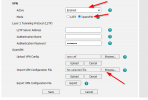
Once you have the .cnf file ext log into your yealink phone's web admin page and go to "network" on the top of the page and then "advanced" on the left hand side. Scroll down until you see "VPN" and make sure the dropdown is set to "enabled" and that you have selected "OpenVPN" then chose the option below for "IMPORT Vpn configuration" and browse to the cnf file. Then hit "upload" and then "save" Reboot the phone and that should work.


1629823137749.png
 
  • Like
Reactions: FridayIT and cmp1
Sorry should of posted it earlier. Heres what we saw

We were receiving TLS and disconnects from the yealink (T27, T42S) model phones. Initially getting this set up meant following yealinks instructions around creating a TAR file and uploading it. This was documentation from 2017. The new version of openvpn you dont have to do that (create the tar file and upload it to the client) If you are running open vpn access server with yealink phones and have verified your FW ports and NAT are working but still unable to connect follow these instructions.

You can download the .ovpn profile for your device in Client Web Server (CWS). Open your Access Server in web browser https://<access-server>/?src=connect. Then login your device credentials and download profile. below image.


Then rename your download profile extension from .ovpn to .cnf and upload to your device.
Let us know how it goes.

Once you have the .cnf file ext log into your yealink phone's web admin page and go to "network" on the top of the page and then "advanced" on the left hand side. Scroll down until you see "VPN" and make sure the dropdown is set to "enabled" and that you have selected "OpenVPN" then chose the option below for "IMPORT Vpn configuration" and browse to the cnf file. Then hit "upload" and then "save" Reboot the phone and that should work.

Just wondering, why are you using VPN vs Stun w/ TLS & SRTP for the phones?
Since you're using the commercial AS and paying a per connection fee, is that really worth it? either scenario is "unsupported" by 3cx at this time.

  1. Do you have your AS in NAT or Route mode?
  2. All use the same Profile, or different profiles?
 
@cmp1 No technical reason why OVPN was chosen. Thats just what the IPT team asked for me to set up and granted this is new territory for me to terminate external sip traffic to our internal PBX. The per connection fee is negligible. The open vpn at this point would be easier to maintain since we now have some familiarity with it. AS is in NAT mode (which is probably going to cause issues, will need to test and work with OVPN more on this) We are using the same profile from a phone config standpoint.
 
We have a Cloud SBC that we can proxy that you can use to register your remote phone. PM me if your interested and I can give you a trial.
 
We have a Cloud SBC that we can proxy that you can use to register your remote phone. PM me if your interested and I can give you a trial.
Interesting, what does it need? All ports open to your IP address "as SBC"? Is it located in US or EU too?
 
Status
Not open for further replies.

Members Online Now

Forum statistics

Threads
111,832
Messages
589,278
Members
164,662
Latest member
DejanMDS