3CXCloud hosted Free Edition and SIP Server with Door Entry Panel

Status
Not open for further replies.

RAX

Free User
Joined
Aug 21, 2020
Messages
14
Reaction score
0
Hi does anyone know if the 3cx cloud hosted server is a SIP server.

I have logged into my 3CX Management console defined 2 x Extensions , downloaded the 3cx app on 2 mobiles and called each extension over the internet. this works fine

I now I have a Net2 door entry panel i dont think its referred to as a IP Phone this is where documentation on website gets fuzzy

The Entry Panel is local to my Internet router (no fancy firewall here) and config wants to know SIP server address - where do i find this ?
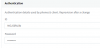
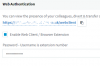
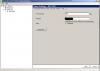
Also can someone clarify if the password in the 2nd screenshot for the Entry panel extension is the "Web authentication password" for the defined extension

Finally do i need a SBC setup as my local site only consists of a
3cx hosted solution in cloud
Net2 Entry Panel,
Net2 Physical Entry Monitor for the above.
Internet Router
2 x 3cx App Phone Clients
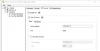
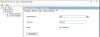
1600158151898.png
1600158170940.png
 
Yes, 3CX is a SIP server.

your SIP server address is your FQDN <fsdfsdfsdf.3cx.com>

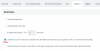
Your extension would need to have "disallow use outside of LAN" unchecked.

You would find SIP auth ID and PW under extension settings.

Though, if this will work this way is another question.

I would do a search for Net2 and 3CX as i've seen this question or similar asked before.

Also check your router doesnt have SIP ALG on
 
  • Like
Reactions: RAX
Hi Thanks
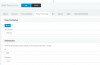
regards SIP server ID if i go into one of my extensions and phone provisioning i see the below is that what you mean or the is it the 2nd screenshot for the password.

I hope it works. as i tried the Net2 Entry Panel with Integra which is a free cloud SIP wServer ith hardly any configuration. Only issue audio quality was poor. so going back to NET2
I have searched for 3cx and Net2 but there isnt anything related to the issues i currently have - maybe once i pass the first hurdle with the username and password

Thanks

1600159535951.png
1600159834267.png
 
You wont need the full provisioning tab as that's used for setting up phones, so you'll just need dfgdf.3cx.com

I would try a combination of using the ID and password or EXT and password.

Then look at the activity logs in the 3CX management console to see if it can see the Net2 system trying to connect.

Again, make sure your ext isnt set to block outside connections.

Uncheck this:

1600160453407.png
 
Thanks ive made the change i have a spare NEt2 Entry Panel arriving and will test / configure the settings on that.

Thanks again


You wont need the full provisioning tab as that's used for setting up phones, so you'll just need dfgdf.3cx.com

I would try a combination of using the ID and password or EXT and password.

Then look at the activity logs in the 3CX management console to see if it can see the Net2 system trying to connect.

Again, make sure your ext isnt set to block outside connections.

Uncheck this:

View attachment 18110
 
Hi, just to add to this i have set this up not so long ago

1600161151730.png

Nothing under advanced

1600161303825.png

1600161339769.png

Hope this helps.

Regards
 
  • Like
Reactions: RAX and Alphabetic
Oh ok so you have changed the ID to match the extension number - that makes sense
but it does give me this when i change it my end

reading thru posts - some Phones dont like 10character userids- i shall see
1600161654127.png
 
Last edited:
I think i tried so many things to get it working and that was the end result for it to work.

Regards
 
  • Like
Reactions: RAX
Hi @RAX

You might not be able to make this work with a hosted machine, maybe with a local PBX machine so the device can register directly on the 3CX local IP.
 
Any more info on waht you mean with a local PBX .
I only want to use the 3cx mobile app and door entry panel to talk to each other
 
Local PBX = installed in you own server in your office, on the same LAN as the phones.

Hosted PBX = Installed in the cloud (ie. a Google VM or Amazon VM or Hosted by 3CX Cloud services)
 
So my 3CX is in the cloud.
NET2 Entry Panel on Local Network with access to internet - when i use it with another cloud pbx provider it seems to connect fine
Why would 3CX restrict the panels only to work with Local install of 3cx
 
im confused you said earlier the below
" You might not be able to make this work with a hosted machine, maybe with a local PBX machine so the device can register directly on the 3CX local IP. "
 
Sorry, I will explain in a bit more detail

For remote door phones (like in your case) we support the use of STUN, which is a method for a phone to detect its own public IP, and form the SIP messages correctly to include all the information needed to reach that phone (IP, audio ports). Without this capability, it cannot be guaranteed that the device will work when used remotely, it will mostly be at the mercy of the firewall.

The NET2 is not a supported device and will not be able to have this type of configuration, hence my earlier suggestion that you may have better luck in a LAN environment. We have certain requirements before a device becomes supported (like the STUN I mentioned earlier). In a LAN environment the requirements are less, so the chances of working are better, since the device does not have to bother with traversing your network's NAT.

First regenerate the credentials of the door phone extension, do not make the mistake of keeping the ones you have now - for your own safety
1600335098202.png
and in the extension settings, remove this option which blocks remote registrations
1600335030113.png
You can try adding the public IP of your PBX here:
9s73ZqZQG9O8Iyk1uKcLA7hkZcu89njb2aMGSPl9vIpKSF0ZGYmIR5WPYQ0mY-p4TZRqd9VHtGED9dhd83USS3niCBHrHO33Fef2RK1BOHYEuc7fg-WqUMMEkKoJfYb391vP5-H9


You can put the Auth. ID here
aBRqeI0blDq8vUMoBd7YKCqrZnfZ6gn0NfsCWQiqd-OzGCMaUHyvfm0vPe_u1EJQmdWcgCXQ90l_0l21FfQWF8YWXEH3ciObWdh-TFiwqVPXg_w8kZv80yYHeT_KSrYSLdnQZuAj


And the extension number and password here
828s1OLonPAT0xlgwZhBKjvZGCIPoMggeiRjzz1g4ad7nG2RlQ-JvxfKU5aDrVY4yHuUAo0EoIG6ARieN6FhhWZyw1vW6CvbLVYPVIapwmfTS-aToAwSjfEoUcTzJhrbSbpB10s2


Good luck!
 
wow thats a great guide and now makes sense a lot more

So the public IP of the PBX which is now a local install of 3CX on a raspberry PI - do i just use this internal IP

Final question if i dont want to use a mobile 3cx App. and just forward the call to a mobile number from the net2 entry panel - Is this where i need a SIP trunk which are not free - also would i be able to send a DTMT tone to open the door
 
Last edited:
Yes, use the local IP of the Raspberry Pi, this is now your registrar and it should work well since you now have a local PBX.

Also yes, a trunk gives you access to real phone numbers so the doorphone can call a real number. You can have it call an extension which is forwarded to a mobile number, just add the extension here in position ID 0 so the device can make the call when someone rings the bell
UDyqWNMS4n4-BFMrhNCHGl5LYAPN8NV1MDrgWIgBk-6elV3gDAnnTb5t7SdialoChSMM5kA8hbb_U0mHnJq1GqWP4FITe-2uuZFsC00BzPWJ2Dq2MMsN90S8l0FdmK2aCwtPzb_b


The DTMF is debatable though, it's difficult to know if it will work when a mobile sends the code through the mobile carrier, then the trunk provider and finally reaches the doorphone. This is something you will have to test manually.
 
  • Like
Reactions: RAX
Right little update 3cx running on cloud instance
I press the bell button and my IOS / Android Mobile ringsusing 3cx app , voice is quality is fine
However the Entry Panel camera display doesnt come thru on the app,. on my Iphone it just says 3cx audio when a call comes thru
Is this a codec thing?
Also no DTMF Tones work - but i can play with that

Im using Sky Q Router at home in the UK - IPv6 enabled.
The Entry Panel is on the Home Network and can access the internet (as there is no firewall)
3cx mobile apps are running via mobile data network
 
Last edited:
Right little update 3cx running on cloud instance
I press the bell button and my IOS / Android Mobile ringsusing 3cx app , voice is quality is fine
However the Entry Panel camera display doesnt come thru on the app,. on my Iphone it just says 3cx audio when a call comes thru
Is this a codec thing?
Also no DTMF Tones work - but i can play with that

Im using Sky Q Router at home in the UK - IPv6 enabled.
The Entry Panel is on the Home Network and can access the internet (as there is no firewall)
3cx mobile apps are running via mobile data network
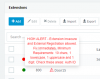
H264 is not supported on the mobile apps (iOS and Android) nor the Windows client. Only the Webclient and other devices with H264 support will show the videofeed.
 
ok so this is a 3cx issue.
I have tested this exact device with Integra SIP, and video quality is excellent, DTMF tones also work. but Audio quality was dismal with them. On 3cx audio quality is excellent
 
Status
Not open for further replies.

Latest Posts

Forum statistics

Threads
111,991
Messages
590,167
Members
164,929
Latest member
Cloudstar