3CXPhoneSystemMC01 interrupted

ZenMasta

Customer
Joined
Mar 10, 2010
Messages
254
Reaction score
10
These are the first 2 times this has ever happened and I'm almost wondering if it's a result Is this happening to anyone else?
I know the temporary solution is to
systemctl status 3CXPhoneSystemMC01.service


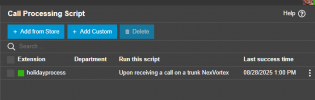
The only change to the server I have made in quite a long time is add a call processing script a couple of weeks prior... so curious if that might be related.
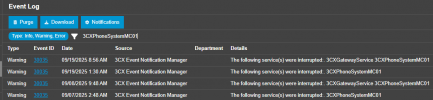
1758301265246.png

1758299012789.png
 
Hi,

The Holiday script is well tested and in production by a lot of users so I would not think of it as the cause directly, although it cannot be excluded.

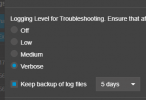
If you can, set the PBX log level to debug and see if anything of interest gets logged if it happens again, as without such logs it's difficult to focus anywhere.

I would also keep an eye if possible on machine CPU/Memory load. If the installation was marginal on resources, adding the callscript could be pushing it beyond what's stable.
 
You're right, it's likely a memory issue.. Considering 3cx knows when this service fails (I at least get an email notification), wouldn't it be worth a potential auto restart? Just happened again. only lasted 5 days this time.

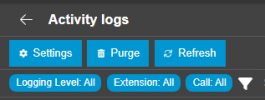
I don't see a debug option. Under Dashboard>Activity logs.

1758738787501.png1758738834009.png
 
Considering 3cx knows when this service fails (I at least get an email notification), wouldn't it be worth a potential auto restart?
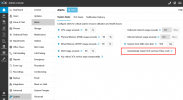
v20.0.7.1019 (still RC2):

1758745160897.png
 
Did you ever find out what was causing this? I'm running 3cx v20 Rev 9 on a Windows Server 2019 Standard Hyper-V VM. The 3cx PhoneSystem 01 Management Console service will crash several times in a row a couple times in a day, and then not at all for months at a time. There's nothing obvious in the Windows event logs and the 3cx debugging log isn't showing anything odd (although it's a real bear to go through when it's in Debug mode). I'm not sure what the cause could be or how I'd go about identifying it.
 
Hi @jeffgeno,
Do you have any third-party apps running on the same machine? antivirus software, backup agents, monitoring tools, or any other software that could potentially interfere with the 3CX services or the PBX database.
 
Nothing at all. The server is totally vanilla other than 3cx. It's a VM and the host has some backup software installed on it, but the VM itself has nothing.

It crashed 6 times yesterday, but not at all today. It's really weird. I turned on the option to restart the service automatically to recover quickly.

The only interesting thing about the server is that it's the same one we've been using for 3cx for years. It originally had v16, was upgraded to v18, and then to v20 on the same virtual hardware. But that last update was a total removal, reinstall, and restore of the database, so it's hard to imagine anything weird came along with it.
 
@jeffgeno You can check the Windows Event Viewer to see if there are any events recorded at the time the service stopped.
Look for any errors or warnings related to the 3CX service or any service failures around the exact time of the incident.
 
Last edited:
  • Like
Reactions: BrunoI_3CX

Members Online Now

Forum statistics

Threads
111,831
Messages
589,277
Members
164,660
Latest member
RJenkinsROCK