


- Joined
- Feb 8, 2019
- Messages
- 124
- Reaction score
- 18
3CX v16.0.1.273
Yealink T46S fw 66.84.0.35
3CX BLF key settings
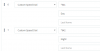
Yealink DSSKey settings after re-provisioning phone


Event log shows that pressing the BLF key on the phone forces system to in office hours, but phone does not playback OHOVERRIDE_IN message.
Event log shows that manually dialing *641 (send) on the phone forces system to in office hours and phone does playback OHOVERRIDE_IN message.
Event log looks the same.
Why does manually dialing *641 playback the message but pressing the BLF key does not?
Thank you,
Yealink T46S fw 66.84.0.35
3CX BLF key settings
Yealink DSSKey settings after re-provisioning phone
Event log shows that pressing the BLF key on the phone forces system to in office hours, but phone does not playback OHOVERRIDE_IN message.
| 07/03/2019 11:52:46 AM - Dial code from Extn:2998 has switched Out-of-Office-Hours-Override to In-Office state. All ports and trunks will forward calls to the In Office Hours routing destinations. |
| 07/03/2019 11:52:46 AM - [Flow] Call(C:385): has built target endpoint: EndCall:EndCall for call from L:385.1[Extn:2998] |
| 07/03/2019 11:52:46 AM - Call(C:385): from Extn:2998: Office hours override is active, now it is set to IN office hours |
| 07/03/2019 11:52:46 AM - [Flow] Target endpoint for *641 is EndCall:EndCall |
| 07/03/2019 11:52:46 AM - Caller sip:[email protected]:5060 has changed setting of office hours override to '1' |
| 07/03/2019 11:52:46 AM - [CM503010]: Call(C:385): Making route(s) from Extn:2998 to <sip:*[email protected]:5060> |
Event log shows that manually dialing *641 (send) on the phone forces system to in office hours and phone does playback OHOVERRIDE_IN message.
Event log looks the same.
Why does manually dialing *641 playback the message but pressing the BLF key does not?
Thank you,


