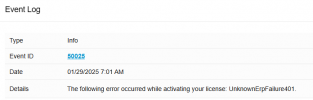
A networking problem occurred while activating your license key: (Error code: 401)

PV_Support

Premier Customer
Joined
Jan 20, 2022
Messages
21
Reaction score
8
I have seen lots of posts about this but none that resolve the issue here.
I have updated several instances from v18 to v20 and have resolved this issue in cases where the license has not expired. If the license has expired and I try to replace the key with a new one, once on v20, it does not allow a restore to v18 if the license is expired.
 
You cannot downgrade once upgraded and all new licenses are locked to v20 minimum.
 
You cannot downgrade once upgraded and all new licenses are locked to v20 minimum.
Perhaps you misunderstood the issue. The issue is when replacing a license key with a newly purchased license key in v20, I get the following error:

A networking problem occurred while activating your license key: (Error code: 401)​

What is the solution?

Firewall check is good.
 
Make sure you're on latest v20.

401 means unauthorized, so could be many things.

Is the system on prem or in the cloud? If on-prem, do you have any kind of SSL inspection enabled?
 
Cloud. Installed Version: 20.0.4.487. The only available update is 5 Alpha. SSL inspection not enabled.
 
Last edited:
Anything in the ManagementConsole.log, like ""License replace error" or alike?
 
@SLawson
I've sent you a PM for more info on this if you would
 
Hi, I am having this issue with another.
 

Latest Posts

Forum statistics

Threads
111,964
Messages
590,004
Members
164,869
Latest member
hpgitsupport