About changing the number format

Status
Not open for further replies.

atlantisegidek

Forum User
Joined
Jan 6, 2020
Messages
56
Reaction score
3
Hello everyone, my Engilish is weak, sorry about that.

I have Pro licence, 16.0.612

I want to explain my question with an example.

It looks like this, incoming calls = 05554443322
But I want to convert it to this format = 0(555)4443322

How can i do?
 
While you might be able to insert a space between digits (haven't tried it myself), you may not be able to insert a bracket, as it is not a numerical character. Many sets/displays will limit the types of characters that can be displayed in the numeric field. Some phones will automatically format numbers based on local preferences.
 
  • Like
Reactions: atlantisegidek
That is adding a rule based on the caller ID, not re-formatting the caller ID. Go to the link provided.
 
  • Like
Reactions: atlantisegidek
old format: 05554443322
I want to:0(555)4443322

I created the following way but it didn't happen :(
I think I made it wrong with the lack of English.
1590617279087.png
 
The brackets in the Source Pattern and Replace Pattern are there to delineate fields, (as a tool to reformat the numbers). I don't think you can cause them to be inserted between digits.
 
Hi,

What you need to do is use dots instead of the X's

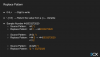
You source pattern would be: 0(...)(.*) and your replace pattern would be 0(\1)\2

This will essentially make the (...) the 1st variable which is the replace patterns \1 and everything after that (.*) will be the 2nd variable which is addressed by the \2

Please see more information in the 3CX Academy specifically for this: https://www.3cx.com/3cxacademy/videos/advanced/configuring-inbound-routing/

1590754512642.png
1590754543207.png
 
  • Like
Reactions: jmitch11 and AWS2P
Status
Not open for further replies.

Latest Posts

Forum statistics

Threads
111,952
Messages
589,894
Members
164,844
Latest member
abctel2