Solved Adding new DIDs to existing SIP Trunk, unable / can't click OK

Status
Not open for further replies.

ActionJackson

Forum User
Joined
Aug 25, 2021
Messages
18
Reaction score
3
I have an existing SIP Trunk with existing DIDs in it, everything works fine.
I am adding more DIDs.
Even when I add just one new DID and click "OK" it will auto take me to the "Options" tab.
Once on the "Options" tab, I am NOT able to click "OK".
If I click "cancel" my new DID does not get added.
I am not sure if it wants me to make a change inside the "Options" tab, it's not obvious to me.

TIA

Edit:
[18.0 (Build 461)]
I have 8 existing DIDs and am trying to add a 9th.

Edit:
I am adding it in the correct format "Please note that Telnyx sends incoming numbers in the E164 format (e.g +13012345678) so add your DIDs in the same format to avoid call routing issues."

Edit:
I tried opening the portal in incognito mode just to make sure the browser wasn't causing issues, still didn't work
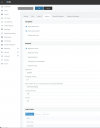

Screen Shot 2022-05-05 at 8.01.54 AM.png
 
Last edited:
I'm assuming that the DID rule, destination extension, exists, on the PBX. Have you tried using a different browser? I've seen issues in the past because of the browser being used? Have you tried restarting all services during a "down time" on the PBX.
 
Are you logged in as admin. In the top right of the screen do you have uppercase A

1651766850909.png
 
I did use a different browser.
I am logged in as admin.
I'm pretty sure that "destination extension" would be added after I add the DID to the SIP Trunk.
I have not restarted the services, I will be doing that during downtime, I was hoping this is something simpler.
 
What is the destination of the DID rule when you first attempt to create it?
 
What is the destination of the DID rule when you first attempt to create it?
I apologize, I most likely am not understanding your question correctly. Is the destination DID rule on the 3cx server or on the SIP Trunk provider?
 
What I wasn't certain about, was this statement...

I'm pretty sure that "destination extension" would be added after I add the DID to the SIP Trunk.
Which made me wonder if the destination extension, in 3CX, exists prior, to you creating the DID rule.
 
I might be wrong but I believe the OP is trying to add a DID (number) to its SIP trunk settings under the "DIDs" tab and not a DID rule.

@ActionJackson
If the management console is taking to you to the Options tab then I would assume that something there is not right and cannot be saved.

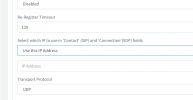
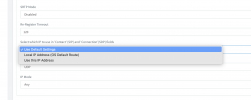
Start with the "Select which IP to use in 'Contact' (SIP) and 'Connection'(SDP) fields" option, change it from the "Use Default Settings" option to the other 2 and check if there is anything populated in the text box that will appear. If there is delete it, set the option back to "Use Default Settings" and try saving the changes again.

Also you mentioned Telnyx, so did you use the included template or did you import the trunk from somewhere?
 
I might be wrong but I believe the OP is trying to add a DID (number) to its SIP trunk settings under the "DIDs" tab and not a DID rule.

@ActionJackson
If the management console is taking to you to the Options tab then I would assume that something there is not right and cannot be saved.

Start with the "Select which IP to use in 'Contact' (SIP) and 'Connection'(SDP) fields" option, change it from the "Use Default Settings" option to the other 2 and check if there is anything populated in the text box that will appear. If there is delete it, set the option back to "Use Default Settings" and try saving the changes again.

Also you mentioned Telnyx, so did you use the included template or did you import the trunk from somewhere?
Hello YiannisH you are 100% correct on all accounts and I appreciate you replying to the thread.
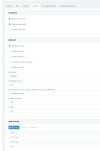
I am trying to add a new DID (number) to my SIP Trunk settings, I posted a screenshot regarding all my setting in options in my original post.

Not being able to click "OK" on the options tab I agree that clearly it is upset about something. (3 new screenshots attached)

I did a quick test and tried to "delete" one of my existing DIDs to see what would happen and it also took me to the "Options" tab and again would not let me go forward; thus I couldn't delete a DID either. So can't add DIDs and can't delete existing DIDs.

We are using Telnyx and we have been. All current/existing DIDs are telnyx.
Do I have to use a template to add an additional telnyx DID?

Telnyx was configured prior to them being dropped as a preferred vendor, so I am not sure how it was setup before.
 

Attachments

  • Screen Shot 2022-05-06 at 11.53.59 AM.png
    Screen Shot 2022-05-06 at 11.53.59 AM.png
    58.9 KB · Views: 11
  • Screen Shot 2022-05-06 at 11.53.33 AM.png
    Screen Shot 2022-05-06 at 11.53.33 AM.png
    143.8 KB · Views: 9
  • Screen Shot 2022-05-06 at 11.54.51 AM.png
    Screen Shot 2022-05-06 at 11.54.51 AM.png
    88.5 KB · Views: 10
Do I have to use a template to add an additional telnyx DID?
No you should not.

Have you tried doing the same from a different PC with Windows and a Chrome browser? Do think this is the issue but can hurt trying.

As a last resort you can always delete the trunk and recreate it. Using the template will only take a minute.
Save your auth ID and password and try to recreate it.
 
No you should not.

Have you tried doing the same from a different PC with Windows and a Chrome browser? Do think this is the issue but can hurt trying.

As a last resort you can always delete the trunk and recreate it. Using the template will only take a minute.
Save your auth ID and password and try to recreate it.
Thanks for the reply.
We have tried using different computers and different browser and it's the same issue.
We have no restarted the 3CX server and it's still the same issue.

I sent you 3 screenshots of what our Option page looks like; did any of that seem like it would cause an error?

Regarding the "last resort" I can't even delete an already created DID. After I click delete it still takes me to the options page and I'm again stuck.

Edit: could this have anything to do with my TLS certificate being expired? (But it's been expired for a long time).

Edit: Actually I just noticed that I can't make ANY changes, if I even adjust the DID, it then takes me to the options page and I'm stuck.
 
I sent you 3 screenshots of what our Option page looks like; did any of that seem like it would cause an error?
No everything looked OK there.

Regarding the "last resort" I can't even delete an already created DID. After I click delete it still takes me to the options page and I'm again stuck.
The last resort was to delete the entire trunk and recreate it, not a DID from within the trunk settings. Does the system allow you to delete the trunk?

Edit: could this have anything to do with my TLS certificate being expired? (But it's been expired for a long time).
I don't think that is the case but try the following:

Navigate to the Options tab and under the "Transport Protocol" switch it to TLS.
Once the "TLS Root Certificate" menu appears delete any certificates that might be there.

Try saving again. If that also fails then try to delete the entire trunk and recreate it.
 
No everything looked OK there.


The last resort was to delete the entire trunk and recreate it, not a DID from within the trunk settings. Does the system allow you to delete the trunk?


I don't think that is the case but try the following:

Navigate to the Options tab and under the "Transport Protocol" switch it to TLS.
Once the "TLS Root Certificate" menu appears delete any certificates that might be there.

Try saving again. If that also fails then try to delete the entire trunk and recreate it.

Thanks for the reply. I can try to remove the certificate. I am concerned about removing the Trunk. I'm concerned because I might not be able to put it back quickly. I'm guessing I will have to set up a downtime and then try to remove it and be ready to restore from backup in case it's a complete failure.

Doesn't seem like there is any more or other troubleshooting that we can do.
 
I'm guessing I will have to set up a downtime and then try to remove it and be ready to restore from backup in case it's a complete failure.
That would be the best option

Doesn't seem like there is any more or other troubleshooting that we can do.
The issue seems to be with the specific trunk so not really. The only other troubleshooting I am thinking you can do is hitting F12 in your browser and looking for an error when you try to save the trunk.
 
@ActionJackson the expired certificate can indeed cause this. Delete the certificate, or replace it with a fresh one so the form can save the changes on the trunk.

Then, if you don't actually need a certificate, you can remove it and press OK to save again - thus eliminating the certificate entirely.

Please go ahead and carry this out, and let us know of the results.
 
No everything looked OK there.


The last resort was to delete the entire trunk and recreate it, not a DID from within the trunk settings. Does the system allow you to delete the trunk?


I don't think that is the case but try the following:

Navigate to the Options tab and under the "Transport Protocol" switch it to TLS.
Once the "TLS Root Certificate" menu appears delete any certificates that might be there.

Try saving again. If that also fails then try to delete the entire trunk and recreate it.
THANK YOU FOR THE INSTRUCTIONS (removing the certificate solved the issue!)
 
  • Like
Reactions: YiannisH_3CX
@ActionJackson the expired certificate can indeed cause this. Delete the certificate, or replace it with a fresh one so the form can save the changes on the trunk.

Then, if you don't actually need a certificate, you can remove it and press OK to save again - thus eliminating the certificate entirely.

Please go ahead and carry this out, and let us know of the results.
THANK YOU VERY MUCH! Removing the certificate solved the issue!
 
  • Like
Reactions: YiannisH_3CX
Glad to see the issue has been resolved
 
Status
Not open for further replies.

Latest Posts

Forum statistics

Threads
112,324
Messages
591,897
Members
165,475
Latest member
lastshadow