Solved Agent available = not logged in ?

Status
Not open for further replies.

fgc92210

Customer
Advanced Certified
Joined
Oct 28, 2020
Messages
185
Reaction score
29
Greetings all,
3CX Pro V16.6.0.655

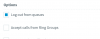
When I create a queue, add an agent in it, and select "Log out from queues", it is supposed to follow the agent status.
When my agent is Available, (s)he does not show as logged into a queue.
The only way this agent shows as logged in, is if (s)he is in lunch mode.
The system does not have an in/out of office hours as it is opened 24x7

Am I missing something?
Or is this normal behavior?

Thank you.
 
If you explicitly set "log out from queues" from the management console it will log that extension out of all queues and they will need to log themselves back in to queues.

Your agent will need to check the Q icon in either the web client or desktop app to see if they're globally in or out of queues. they can also check individual queues by going to the switchboard view.

https://www.3cx.com/3cxacademy/videos/advanced/call-queues/

Give that a read, Slide 19 onwards.

Unless ext status is available they will be logged out of all queues.
 
Hi,

I forgot to mention that they are logged off, but the Q letter is blue.
In each queue they belong to, the Q is gray, and clicking on it does not do anything.
Only way to log in is to switch to LUNCH status.
 
By default this option is enabled on all statuses but available.

1605545271467.png

So, If their status isnt available they cannot log back in to the queue no matter how hard they try.

the Q icon shows the global status of all queues.

They can log themselves in or out of all queues with this Q button - This is an explicit command that either says I AM AVAILABLE IN ALL QUEUES or I AM NOT UNTIL I PRESS THIS BUTTON AGAIN.

When they change from available, this Q remains in the same position (on/off) regardless.

Review your extension settings from the mgmt console for their statuses.
 
The extensions are all logged in, in all queues, and available.
Then I go and enable this option Log Out From Queues.
Anyone I switch to this is now logged off the queue (visually).
The management console shows that they are logged in and available.
Their global Q status is logged in
Their individual queues shows logged off, but they can't click on the buttons to log in those queues. Even though they were logged in before I checked the option.

Is this normal, or am I missing something ?
 
When you go to MGMT Console > EXT Status > LoggedOut - This is the same as the user pressing the Q icon in the web client. This is an explicit instruction that overrides all other queue statuses and it will either log them in or out of all queues depending on their queue status prior to the global log in/out.

If the extension is set to a status that has the option "log out from queues" enabled, When that extension changes to this status, they will be logged out of the queue and CAN NOT enable it themselves. It doesnt matter how many times they press the global Q button, it will not put them in the queue(s) if "log out from queues" is unchecked from that status.

Even if you let them log in and out of the queue when their status is anything but available, the call will not go through because it will follow the call routing for destination when unavailable/busy.
 
Last edited:
OMG.
I *just* understood that the Log Out From Queue option was following the Status.
I thought this option was a general option for all status.
My apologies. Doc wasn't super clear about this.
Thanks for the 2nd pair of eyes..
 
┬─┬◡ノ(°^°'ノ)
 
  • Haha
Reactions: JohnS_3CX
Status
Not open for further replies.

Forum statistics

Threads
111,974
Messages
590,081
Members
164,899
Latest member
mazet