makotelgmbh

Customer
Joined
Jul 2, 2025
Messages
4
Reaction score
0
Hi everyone,

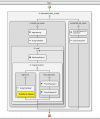
I'm trying to create a call flow with the 3CX Call Flow Designer (CFD) but I've run into a problem I can't solve. I'm using CFD version 20.2.84.0.
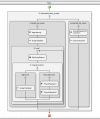
callflow.PNG


My Goal​


I want a caller during business hours to be greeted. If an agent is available, the call should be transferred immediately. If no agent is available (e.g., they are logged out to work on other tasks), the caller should be put in a loop with an announcement to wait until an agent logs back in.


The Problem​


The call is disconnected immediately after the greeting. The loop, which should be active, is never reached.


What I've Tried So Far​


I've adjusted the flow multiple times. Initially, I had the Transfer component outside the loop, which caused the call to fail. I then moved it inside the "Agent_frei" branch. However, the call still failed.

To isolate the problem, I removed the entire Transfer component to see if the call would even enter the loop. But even without the transfer component, the call disconnects right after the greeting, without playing the announcement from the "Kein_Agent_frei" branch.

I've set the condition in the CreateCondition component as follows: GREAT_THAN(GetQueueStatus1.AvailableAgents,0).


My Question​


Why does my script end immediately? Is the GetQueueStatus component or the condition configured incorrectly, causing the script to fail? Could there be a setting in the 3CX queue that causes the GetQueueStatus component to fail if no agent is logged in?

Any help would be greatly appreciated.
 
Hellomakotelgmbh,

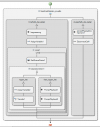
it seems to me, that you mis the part of transfer the call to the queue when free.

1756969003968.png

Paulo
 
Hello again,

If this fails, try to find the ERROR in the CFD script:

From the 3CX Admin - Dashboard - download the "Support info".
Open the downloaded .zip file, than enter the folder "Logs".

Start a text editor for file: 3CXCallFlow.log
Go to end of file, and scroll UP, to find the last call, and check for errors or reason of failure

If you need any help with this, copy the relevant part of the text file here.

Paulo
 
Hello makotelgmbh,

I have created a sort of copy in the CDF from the screenshot, and tested the script.
It seems to work fine, meaning when an agent is available, the call will be transferred to the Queue.


Paulo
 

Attachments

Why do you need to check this from a CFD app and keep the caller looping? The 3CX standard queue will do what you need. Also, doing this with a CFD app doesn't honor the caller position, while the queue will.
 
Why do you need to check this from a CFD app and keep the caller looping? The 3CX standard queue will do what you need. Also, doing this with a CFD app doesn't honor the caller position, while the queue will.
That's a very good point. My primary reason for using the Call Flow Designer was to implement a custom, sequential set of announcements before the call is answered. This is not possible with the standard 3CX queue options. I also needed the ability to have the caller wait in a custom loop with a silent pause before being transferred, which is a key part of my script. I understand that the CFD does not honor the caller position, which is a valid drawback.
 
I will attach the relevant logs to this thread. I hope they can provide more insight into why the script is still failing. I would be very grateful for your support in analyzing them to find the cause.
 

Attachments

Hi,

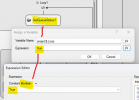
Where is "agentAngemeldet" created/assigned and then used?
 
Hi,

Where is "agentAngemeldet" created/assigned and then used?
Hello,

The variable "agentAngemeldet" is created and assigned in two places:

Creation: It's created in the AssignVariable1 component at the beginning of the flow by assigning it the value false.

Assignment: The value is assigned as true in the AssignVariable2 component when the script determines an agent is available.

Usage

The variable only documents the status of the call. It is not used to control or exit the loop. The loop is controlled by the condition GREAT_THAN(GetQueueStatus1.AvailableAgents,0), which directly checks the number of available agents.

However, the script is still not working. If an agent is available, the call is routed correctly. But when an agent is out of the queue, the call just cancels.
 
Is it by any chance set as a string and tested as a boolean? Just trying to see if it is something simple.
 
Hello makotelgmbh,

There seems to be some error in the CFD:
Callflow - Error executing last component: System.FormatException: String 'agentAngemeldet' was not recognized as a valid Boolean.

In my script (sort copy-rebuild), I did not use a Boolean, but the number of agent available in the Queue.
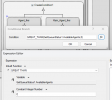
Condition "Agent_frei" - If number bigger than zero (0), than Agent or Agents are available.
The other "Kein_Agent_frei" is an empty line, no condition.

See example:

1757321607009.png

You could use the same ???

Paulo.
 

Attachments

  • 1757321443493.png
    1757321443493.png
    24.7 KB · Views: 5
If you see the details of the error in your log file:
2025/09/05 14:41:09.837|0010|Erro| [_3CX.Script] _buchungloop1_17.Main.492.[C:102.3]-UGT_buchung_Skript_802 - CallID 00000000-01dc-1e62-5ae2-283d00000066 - Callflow - Error executing last component: System.FormatException: String 'agentAngemeldet' was not recognized as a valid Boolean.
at System.Convert.ToBoolean(String value)
at _buchungloop1_17.Main.<>c.<InitializeComponents>b__22_3()
at CallFlow.CFD.LoopComponent.EvaluateCondition()
at CallFlow.CFD.LoopComponent.Start(TimerManager timerManager, Dictionary`2 variableMap, TempWavFileManager tempWavFileManager, PromptQueue promptQueue)
at CallFlow.CFD.SequenceContainerComponent.Start(TimerManager timerManager, Dictionary`2 variableMap, TempWavFileManager tempWavFileManager, PromptQueue promptQueue)
at CallFlow.CFD.ConditionalComponent.Start(TimerManager timerManager, Dictionary`2 variableMap, TempWavFileManager tempWavFileManager, PromptQueue promptQueue)
at _buchungloop1_17.Main.ProcessStart()

You're trying to convert the string "agentAngemeldet" to a boolean, in the Condition of a Loop component. That's what you need to check.
 
The interesting thing is that the OP is asking exactly the same questions at the same time in the German forum and is receiving the same answers there as well.