AI Receptionist - Basic functionality: transfer to the extension with a delay of 3 min.

CharmQuark

Premier Customer
Joined
Jan 12, 2025
Messages
27
Reaction score
4
Hello everyone!
At first my settings:
1. 48 SC Enterprise/AI
2. Hosted
3. OpenAI - payable with credit. Funding limit is not exceeded.
4. gpt-realtime-mini for Real-Time Calls
5. gpt-5-mini for Text
6. AI Agent - English, No Language Switching, No Busy Check before transfer. 7 min maximum duration of a call.
7. Instructions - Default which comes when AI Agent created.
8. No knowledge base.
What is happening. I've tried a lot of configurations, customed instructions. The AI Agent behavior is absolutely unpredictable.
I'm back to basics as described above. Nothing customized. The call flow is very simple: After AI greeting, please transfer to 'first name' 'second name'. AI Agent finds the extension, asks to confirm name, departments and says it is transferring. Then it takes 3-6 min to connect. Sometime it says - max call length exceeds. No more parallel calls to the only AI Agent.

Could you please advise where should I look for a remedy to eliminate that time?
With hope.
VK
 
Hi dear @CharmQuark
Did you update to update 9 alpha?
You need to update your pbx and get the new fixes we made. We released an update yesterday. Most probably you are on update 8.
Go to the latest update, reset to the default AI Prompt and try again.

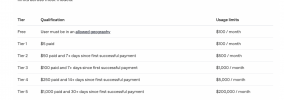
About this question: OpenAI - payable with credit. Funding limit is not exceeded. -> What Tier are you on? in other words, how much did you spend until now?
 
Thank you very much @nikolascx
I am on tier 1. I paid two time by USD20. Billing says $22.60+22.60 which means $45.20 (USD). I created account on platform.openai.com on March 11 this year.

Yes, I'm on update 8. Our phone system is in hard use and the company business is competely dependable on our Call Center. Update is automatic when the the final version is ready. I am able to see two updates now.
1774456178141.png
Do you think it is safe to update manually to Alpha? If yes, should I update both of them? 3CX AI and New 20.0. Update 9?

Thank you again. I practiced for two weeks with 3CX AI Agent with no success. It looks like there is a light at the end of a tunnel.
VK
 
@CharmQuark You are right to feel this way.
Thank you for the info you provided and for the screenshot - all is clear now.
1. openai Spending - you are on tier 1. You need to spend $50 and openAI will put you on tier 2. This is your problem. You are running out of tokens. Put another $50 on openai and login to your dashboard and confirm that you are on tier 2.
2. The 3CX version you are currently on was not tested on the mini model. Yes proceed to update and take both updates. Go for it.
3. It is important that when you test, you use the 3CX Shipped AI Prompt. (We updated the prompt and added new functionality. So any Agents with custom prompts will not get the new updates).

Thanks for reporting and yes, keep us posted.
 
Thank you very much @nikolascx .
I add $50 to my OpenAI test account and was elevated to tier 3 instantly. That solved all the problems with the transferring to an extension. No more delay at all.

I have another question. There will be a company account on OpenAI for production. So if I put $200 at the moment of account creation will I be on tier 3 minimum?

BTW the blog https://www.3cx.com/community/threa...o-the-extension-with-a-delay-of-3-min.136876/ does not say what exactly happens when Rate Limits are reached. "Call flow will break" is not a clear explanation.
Also I don't know where to find 3CXAI.log file mentioned in that blog. It may be because of I'm on hosted 3CX? Please confirm.

With my kindest regards to you @nikolascx
VK
 
Dear @CharmQuark
When you said "2 weeks of no success" I immediately connected with you. We are in the same boat.
But we learn. When you get stuck, come over here - especially now until we ship all the agents we have in mind..

Yes pump production ones with $200. It puts you at tier 3 on the way to tier 4.
Higher limits, less friction.

1774592677611.png

Leave the 3CXAI log for now. dont worry about it. Problem is solved. You have the agents to try now. They will work as you expect.
Easiest way is to generate support info and see it in there.

I suggest you update to update 9 and start shipping agents in production! Keep us posted.

We will update the blog to make it clearer - thanks for your update

God bless
 

Forum statistics

Threads
112,351
Messages
592,044
Members
165,516
Latest member
Zexus