- Joined
- Aug 20, 2020
- Messages
- 37
- Reaction score
- 8
Hi Team,
Hope you guys are doing well.
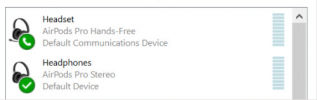
We're experiencing an issue wherein when we try to set Airpods as the speaker and microphone(WebClient and Desktop App) which is paired on PC, it doesn't have any audio. But when we use other headsets like Jabra, it was perfectly working. Airpods are working last week, however, it doesn't seem today.
3CX Version: 18.0 (Build 314)
Hosted: AWS
Steps Taken: Restarted PC, Re paired the Airpods to the PC.
Hope you could help me with this. Many thanks, 3CX Community!
Hope you guys are doing well.
We're experiencing an issue wherein when we try to set Airpods as the speaker and microphone(WebClient and Desktop App) which is paired on PC, it doesn't have any audio. But when we use other headsets like Jabra, it was perfectly working. Airpods are working last week, however, it doesn't seem today.
3CX Version: 18.0 (Build 314)
Hosted: AWS
Steps Taken: Restarted PC, Re paired the Airpods to the PC.
Hope you could help me with this. Many thanks, 3CX Community!