All Outbound email via MS365 fails - Graph sendMail error 404

RadyAir

Silver Partner
Basic Certified
Joined
Jun 17, 2019
Messages
28
Reaction score
8
Graph sendMail (MIME) returned 404: {"error":{"code":"MailboxNotEnabledForRESTAPI"

this started 10 days ago or more, affects voicemail, alerts and reports.
today we tried changing the mailbox specified in 3CX/Email to a known working Shared mailbox, and then to my own user mailbox.
same error

what is broken with MS365 Graph sendMail?

or, is this related to the more than x number of extensions exist?
 
There was a thread a couple weeks ago give or take where someone had set up M365 sync and accidentally enabled SMTP on that account which was IIRC an unlicensed account. Shared mailboxes can't log in directly AFAIK (though the user can), but you've tried your own working box also?

Does the server have a fixed IP (and not IPv6) where it can use a 365 Connector?
 
Graph sendMail (MIME) returned 404: {"error":{"code":"MailboxNotEnabledForRESTAPI"

this started 10 days ago or more, affects voicemail, alerts and reports.
today we tried changing the mailbox specified in 3CX/Email to a known working Shared mailbox, and then to my own user mailbox.
same error

what is broken with MS365 Graph sendMail?

or, is this related to the more than x number of extensions exist?
Hi @RadyAir in the 3CX go to the SMTP section and update the sender email address to a licensed user mailbox.

Then re-authorize the 3CX Microsoft 365 Integration and try it again.
 
Hi

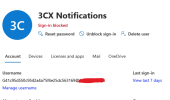
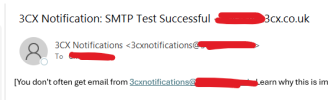
You can use a shared mailbox.

You just need to use the username of the account instead of the email address and it'll work.

1786520276769.png

1786520302647.png
 

Latest Posts

Forum statistics

Threads
111,812
Messages
589,133
Members
164,628
Latest member
FlX