


- Joined
- Sep 4, 2019
- Messages
- 34
- Reaction score
- 10
Hi
i have edited the rights for Extension 201 according to (pic1) (allow access to 3CX MC..., generate reports, allow downloads of call recording)
But When i login the MC using the same extension, i cant see the call recording, unless i enable "general system Administration".
the purpose of this setup is to give extension 201 the right only to create and edit extensions, generate call reports, download call recordings but restrict to access the the remaining options.
i have as well another scenario in mind where i can give extension 201 the full access to management console but restrict access to recording. unfortunately if i allow the access to MC and uncheck the Allow downloads of call recordings option, i keep seeing the recordings when i login to MC with the extension 201.
please advise!
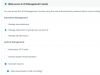
management Console accessed by admin:
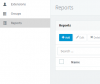
management console accessed by extension:
i have edited the rights for Extension 201 according to (pic1) (allow access to 3CX MC..., generate reports, allow downloads of call recording)
But When i login the MC using the same extension, i cant see the call recording, unless i enable "general system Administration".
the purpose of this setup is to give extension 201 the right only to create and edit extensions, generate call reports, download call recordings but restrict to access the the remaining options.
i have as well another scenario in mind where i can give extension 201 the full access to management console but restrict access to recording. unfortunately if i allow the access to MC and uncheck the Allow downloads of call recordings option, i keep seeing the recordings when i login to MC with the extension 201.
please advise!
management Console accessed by admin:
management console accessed by extension:


