Allow only those IPs listed at Allow

Bob Denny

SOHO User
Joined
Feb 21, 2009
Messages
195
Reaction score
17
Version 20.0 Update 4 (Build 487 Release) - I have both Allow and Deny entries in my IP Blacklist. I keep getting more Deny entries appearing from break-in attempts, 1-2 a day. I am on Global IP. It seems that the Allow entries are meaningless; any IP not specifically Deny-ed can get in. How can I set the PBX up to only allow specific IPs and deny all others?

This came up because my 3CX is hosted in Google Cloud, using the 3CX supplied setup, and has been working for years using the Google Cloud firewall, deny all with specific allows, until recently. The Google firewall now causes Full Cone NAT failures on the firewall check, and is thus useless. So I need to use the IP Blacklist to keep everyone out except those I specifically want.
 
This is on your firewall and not on 3cx to do this. The Firewallcheck cant work, but isnt the problem. 3cx only blocks the login not the webinterface.
 
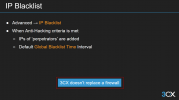
I'm sorry, I don't understand this. As I understand the IP Blacklist controls access to the PBX on IP Ports SIP:5060 SIPS:5061 Tunnel:5090 and Media:9000-10999. When someone fails authentication too many times the IP Blacklist gets a new entry
  • PBX: blocked for too many unauthenticated requests; User-Agent: xxxxx
  • PBX: blocked for too many failed authentications; User-Agent: 3CXPhoneSystem
I'm fine with the Console Restrictions I have. I just want to blacklist everything BUT certain addresses. As I explained, though 3CX supports installation on Google Cloud, using the Google Firewall is not possible because the 3CX firewall check fails on full cone NAT. This must be new because for years, we used the Google Firewall. Now we can't and I'm actually looking for answers.

Why can't I just deny all and allow what I want?

Or maybe I should approach this from another angle: I have read the Firewall & Router Configuration guide, but I cannot get the Google Cloud firewall to pass the Firewall Checker without Full Cone NAT errors. Since 3CX has a supported process for installing on a Google Cloud instance, why can't I use the firewall on Google Cloud? I have tried everything I can think of.
 
This is a firewall thing, not 3cx. The Blacklist ist just for login. SIP is blocked by the 3cx blacklist you cant modify. If you want to block more, you need a firewall in front of the pbx to do this. If you have problems configuring the google firewall, maybe your partner or 3cx can help you. But if you block everything the firewalcheck will allways fail. I would just restrict the sip port to your provider network and not more.
 
  • Like
Reactions: bitn2
I would just restrict the sip port to your provider network and not more.
This is what I want to do. Deny all then allow my provider network (our office and field sites). Hence my original question, how do I deny all then allow only specific IPs?
 
I dont know google firewall, there should be something to limit to the network of your provider.
 
I dont know google firewall, there should be something to limit to the network of your provider.
Oh there definitely is, and I ran it that way for years, then a few months ago it quit working on its own and the firewall checker started making Full Cone NAT failures. I won't bother you guys any more. I had hoped to stop the blacklist entries that are created for login and request rate by configuring the blacklist to deny all then just allow my provider network (our office and field sites). We've been going around in circles. My apologies for not being clear.
 
I am not sure i understand you correctly. You want to block EVERYTHING except your office? That wont work if you like to use mobile apps and want to make outgoing calls. You need to differenciate between login on your website or sip traffic. The restriction of port 5060 to your provider is a good idea, the restriction of everything to your office or/and your provider not. Anyway, if you restrict traffic the firewallcheck will always fail. Thats correct and no problem.
 
Oh there definitely is, and I ran it that way for years, then a few months ago it quit working on its own and the firewall checker started making Full Cone NAT failures. I won't bother you guys any more. I had hoped to stop the blacklist entries that are created for login and request rate by configuring the blacklist to deny all then just allow my provider network (our office and field sites). We've been going around in circles. My apologies for not being clear.
The filtering on certain ports is done at the firewall level. The PBX isnt a firewall, so we cant do the port filtering. We are very clear on this.

1741791254279.png

We can however protect the PBX attacks on the legitimate ports coming in. Thats where the blacklist and the rest of the anti-hacking module comes in.

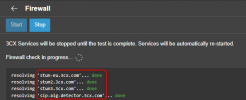
If you want to restrict the traffic on port 5060 to only your providers IP, you can do this, as well as the STUN servers which the PBX uses for the firewall test so it doesnt fail. The hosts for that can be found when you do the actual firewall test

1741791440745.png

I think it is more worrying to see when the blacklist entries stop coming through. (Without firewall IP restrictions)

As a Boeing engineer once said about the early 747 Pratt & Whitney engines, start worrying when you dont see oil drips.
 
  • Like
Reactions: bitn2
OK I give up. Right now the PBX is working as we need, I just have to watch the created blacklist entries. I am on Global blacklist. I'm sorry to have confused you (or maybe I am confused). There are 2 issues:

1. I want to deny all and allow only specified IPs in the IP Blacklist, or preferably
2. Given that 3CX supports installation on Google Cloud, and I had been using it and the Google Firewall for years, how do I configure Google Cloud Firewall to fix the new Full Cone NAT firewall checker failures? I have the firewall already set up to block everything but our office and field sites. It's been working fine until recently and nothing has changed here.

I would prefer #2 which is how we had been operating for 5 years.
 
Last edited:
1. This is only for login on the webpage, no sip traffic.
2. This isnt the correct way to use it, you cant block everything if you want to use Mobile Clients or any client outside your office. Also the firewallcheck will fail.
 
1. This is only for login on the webpage, no sip traffic.
2. This isnt the correct way to use it, you cant block everything if you want to use Mobile Clients or any client outside your office. Also the firewallcheck will fail.
OK I finally understand. #1 is the key. And I know about mobile clients we have rules for all of the blocks of IPs for places that are accessed by Verizon mobile. So I need to figure out how to make the Google Firewall work so I don't get Full Cone NAT errors in the Firewall Checker. Onward, and again sorry for the noise and hard-headed-ness.
 
OK I finally understand. #1 is the key. And I know about mobile clients we have rules for all of the blocks of IPs for places that are accessed by Verizon mobile. So I need to figure out how to make the Google Firewall work so I don't get Full Cone NAT errors in the Firewall Checker. Onward, and again sorry for the noise and hard-headed-ness.
Look at my post above, with the hosts you need to allow to be able to get the firewall check to pass, without opening all sources.

Seeing as my account and PBX is based in Europe, I have stun-eu.3cx.com. You should have stun-us.3cx.com.

You only need to limit 5060 traffic as this is the most vulnerable. The tunnel, RTP and HTTPS traffic can be opened freely, as this will allow your Apps to connect back to the PBX from wherever the users might be.
 
  • Like
Reactions: bitn2

Members Online Now

No members online now.

Forum statistics

Threads
111,831
Messages
589,277
Members
164,660
Latest member
RJenkinsROCK