AMAZON CHIME OUTBOUND 408 ERROR

Status
Not open for further replies.

jrgdnn12

Customer
Joined
Jan 26, 2021
Messages
19
Reaction score
2
Hello

I am getting and error message about 6 times sin 3 days. Do you know what it means?

Call or Registration to +1702*******@(Ln.10000@Amazon Chime Voice Connector) has failed. 0.0.0.0 replied: 408 Request Timeout; internal
SIP Server ID: 12294 01/25/2021 10:08:44 PM

I am also awaiting a reply from amazon aws support.

Thanks
 
Hi @jrgdnn12

From your description i am assuming that most calls work but you have issues with some outbound calls. Is that correct? Do you have issues when calling specific numbers or is the issue random?
Also what PBX version are you running? Any details you can provide about your setup will help us better assist you.
The error you are getting probably means the call timed out before it could be answered. This could happen if the call never reached the recipient and the PBX timed out because it did not receive a reply from the provider.

Check your activity log for more details and check if the call is sent to the provider. If it does then the provider should be able to tell you what went wrong.
 
Hello

The system has been running for about a month and 13000 calls have been made. The problem is very recent and it last for about an hour at a time. The issue appears to be random. I am running the stable up-to-date version of 3cx. The SIP trunk is amazon chime which is IP based and uses TCP.

Im still waiting for a reply from amazon chime.

In the mean time I have set up as backup outbound SIP trunk. Only has to use it once tonight and the call has to time out in chime first before it was routed to the backup SIP trunk. This is inconvenient because the wait can last as much as 30 seconds.

I have opened ALL ports for all protocols to a range of IP addresses used by amazon chime. I do this thinking it might be a firewall issue. Is doing this advisable?
 
Since you already have 13000 calls from the system i don't think this is a firewall issue unless something was changed recently. I would wait for the reply from Amazon before doing anything else in case there is an issue on their side.

What you are describing about the failover trunk indicates that the call goes out but gets no answer. For IP based trunks failover works either by getting an error so the PBX knows to proceed to the next trunk or by waiting for the full timer to expire which is 32 seconds.
Based on RFC a call is considered unanswered after 32 seconds. So you need to wait the full 32 seconds for the call to failover to the second trunk.
 
Another change i just did.

Inside the General tab of the SIP trunk configuration. where it says
"Registrar/Server/Gateway Hostname or IP". I had the port to auto discovery, now I have set it to 5060.
 
Another change i just did.

Inside the General tab of the SIP trunk configuration. where it says
"Registrar/Server/Gateway Hostname or IP". I had the port to auto discovery, now I have set it to 5060.

Also, I think the problem happens every time the amazon chime IP address changes, which is not often. I have a registrar hostname given by chime that points to those addresses
 
nside the General tab of the SIP trunk configuration. where it says
"Registrar/Server/Gateway Hostname or IP". I had the port to auto discovery, now I have set it to 5060.
This will only limit the capability of the PBX to perform full DNS requests. Setting the port to 5060 will work but the PBX will only perform A record DNS requests. It is better to re-enable auto discovery but realistically speaking it will make no difference.


Also, I think the problem happens every time the amazon chime IP address changes, which is not often. I have a registrar hostname given by chime that points to those addresses
The hostname Amazon chime provides resolves to a number of IP addresses which have the same weight and serve for load balancing and failover. I believe that the address changes every time a call fails. The PBX will go to to next one since the previous IP failed.
 
I have about five servers running using Chime and I've gotten this error randomly when I first set it up. I was able to get them working again by refreshing the trunk. Yesterday morning all my servers got this error and my customers were unable to make outbound calls. We once again refreshed the trunks and they were able to make calls again.

Today I got one of the notifications and I pre-emptively refreshed all the servers SIP connection. I have a ticket open with both Amazon and 3CX to figure out why the trunk is timing out since I don't think this is a per call timeout issue.

Got to get this one figured out. Don't want that to be a daily ritual.
 
Hi @robinsonconsulting

Since AWS Chime is an IP based trunk so there is no registration. Refreshing the registration of the trunks does absolutely nothing for IP based trunks so i believe that something else is happening in your instance.
If you have a ticket with 3CX support can you send me the ticket number in a private message so i can take a look?
Thank you
 
So far whenever I have refreshed the trunk it has started working again and I have done this dozens of times now at this point with different instances that have given this error. sending ticket number...
 
So far whenever I have refreshed the trunk it has started working again and I have done this dozens of times now at this point with different instances that have given this error. sending ticket number...
I want to confirm this. Refreshing the trunk does seem to be an immediate fix.
 
I want to confirm this. Refreshing the trunk does seem to be an immediate fix.
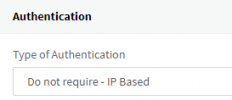
Your trunk authentication is set to IP based correct?
2021-01-27_09h54_41.png
 
I have exact same problem since Monday. I had logging enabled in AWS Chime (SIP logging and Call logging). When I turned both of it started working again .
 
I have exact same problem since Monday. I had logging enabled in AWS Chime (SIP logging and Call logging). When I turned both of it started working again .
Good to know. Thank you for the information. We are looking into it as we speak so every bit of information helps
 
I noticed this error a couple of months before I turned on SIP logging and Call Logging @AlexanderReichert . I think @jrgdnn12 is on to something with the load balancing or maybe an SBC IP change on the Chime side of the trunk. Especially since everyone and instances had the problem at the same time. Putting together logs etc for both tickets. I will let you know what I find.
 
Happened again this time. Can someone male sense of this pcap file?

thank you in advance

[Edited by administrator]
 
Please note that i deleted the capture as it contained sensitive information. Wireshark captures are not meant to be shared in public forums so please try to avoid doing that in the future.

From the capture it looks like the call is being sent to AWS but there is no reply. Eventually the PBX switches to the secondary route.

Can you try something and let me know if that makes any difference?

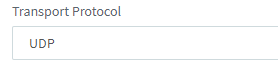
Go to your AWS Chime trunk settings and navigate to the Options tab. Scroll down to the Transport Protocol option and change the value to UDP.

1612166852256.png

Press OK to save your changes and try again. You must also access your AWS account and make the change there under the Origination tab so that you can also receive calls via UDP.
Let us know how that goes.
 
  • Like
Reactions: butzo
Please note that i deleted the capture as it contained sensitive information. Wireshark captures are not meant to be shared in public forums so please try to avoid doing that in the future.

From the capture it looks like the call is being sent to AWS but there is no reply. Eventually the PBX switches to the secondary route.

Can you try something and let me know if that makes any difference?

Go to your AWS Chime trunk settings and navigate to the Options tab. Scroll down to the Transport Protocol option and change the value to UDP.

View attachment 20419

Press OK to save your changes and try again. You must also access your AWS account and make the change there under the Origination tab so that you can also receive calls via UDP.
Let us know how that goes.
Thank you for this. I figured I was sharing too much info so I monitored the voice connect closely and kept calls per second to 1. I will now follow your advice and redo the voice connection. I will update you with any news as they happen.
 
  • Like
Reactions: YiannisH_3CX
I wanted to check in to see if those having this problem are using Amazon EC2 hosts as we are.
 
Status
Not open for further replies.

Forum statistics

Threads
111,992
Messages
590,171
Members
164,929
Latest member
Cloudstar