Amend 3CX IP Subnet

Status
Not open for further replies.

lloydcmb

Bronze Partner
Basic Certified
Joined
Aug 19, 2019
Messages
7
Reaction score
1
Hi 3CX World,

We are needing to amend our LAN subnet mask from a /24 to a /23 to accommodate more IP addresses.
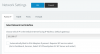
I do not see an option under Network Parameters to set this. Just an option to Select the Network Card Interface.

How does one go about this to allow 3CX to look beyond a /24 subnet and find phones / devices for correct routing?
11999
 
Windows or Debian installation.

If windows just change the subnet mask on the network card.

Guess it is the same for debian, but not sure how to do this.
 
Hi Lloyd,

Just change it on your OS but ensure to reboot afterwards.
 
Hi 3CX World,

We are needing to amend our LAN subnet mask from a /24 to a /23 to accommodate more IP addresses.
I do not see an option under Network Parameters to set this. Just an option to Select the Network Card Interface.

How does one go about this to allow 3CX to look beyond a /24 subnet and find phones / devices for correct routing?

View attachment 11999


3CX is an application. You tell it about a larger subnet the same way you tell Chrome or Word or any other application about a larger network, you don't. Networking is handled by the operating system. This screen is simply where you tell 3CX bind services to for traffic.
 
Status
Not open for further replies.

Forum statistics

Threads
111,933
Messages
589,810
Members
164,808
Latest member
jsbjsb