Android App - No ringtone but missed call notification when unlocked

Sela_KM

Bronze Partner
Basic Certified
Joined
Jan 8, 2026
Messages
5
Reaction score
0
Hey everyone,

I am experiencing an issue with a 3CX installation. We have the 3CX mobile application installed on SIM-less mobile phones connected to a Wi-Fi network, but sometimes calls do not ring on the mobile phones, and when we unlock the phone, we receive a missed call notification. I followed the 3CX instructions and changed the Android settings to allow unrestricted battery usage in the background, but the problem persists.

The mobile phones are new and no other applications are installed.The problem is not constant and is quite random. Sometimes everything works, then a call rings on all phones except one, then everything is fine again.

The Wi-Fi coverage is good. The problem has already occurred when a user was standing in front of an access point.

Thanks a lot for your help.
 
Hi thanks for your feedback.

What App version and Android OS version please?
Does the same issue present itself when outside the WiFI network via Mobile data?

Also please provide us with verbose logs via PM message so we can review the issue.

Enable Verbose logs
Go to Hamburger menu (top left corner) > Settings > Advanced
Scroll all the way to the bottom and enable Verbose Logs

Replicate the issue and send us the logs
Go to Hamburger menu (top left corner) > Settings > Advanced
Scroll all the way to the bottom and tap on 'Send log report'

Please upload the log files to your preferred cloud stage provide of choice and send me the shareable link via PM
 
Hi, did you check the pbx event log to see if there is any event about push notifications?

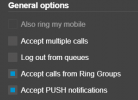
As first step, validate that the extension is using the available profile and the push notifications are allowed

1768838608927.png

Check the smartphone is not in DND and that you have allowed the notifications. Did you also test the same extension using a different smartphone? also with mobile data?

To allow users to use their 3CX apps remotely, on Android, iOS or Windows, you need to ensure that these ports are open:

Port 5090 (inbound, UDP and TCP) for the 3CX tunnel.
Port 443 or 5001 (inbound, TCP) HTTPS for Presence and Provisioning, or the custom HTTPS port you specified.
Port 443 (outbound, TCP) for Google Android Push.
Port 443, 2197 and 5223 (outbound, TCP) for Apple iOS Push.
 
  • Like
Reactions: KyriacosS_3CX
Hi thanks for your feedback.

What App version and Android OS version please?
Does the same issue present itself when outside the WiFI network via Mobile data?

Also please provide us with verbose logs via PM message so we can review the issue.

Enable Verbose logs
Go to Hamburger menu (top left corner) > Settings > Advanced
Scroll all the way to the bottom and enable Verbose Logs

Replicate the issue and send us the logs
Go to Hamburger menu (top left corner) > Settings > Advanced
Scroll all the way to the bottom and tap on 'Send log report'

Please upload the log files to your preferred cloud stage provide of choice and send me the shareable link via PM
Hello,

Thanks for your reply and your help.

I'm going on site today to run those tests and check the Android / 3CX App versions.

The phones don't have SIM cards, they can't connect to the Mobile data, but they don't leave the office.

To enable the Verbose logs and send you the files, I should follow that procedure, that's correct?

I'll send you the logs today once the tests are done.

Thanks again.
 
Thanks for that.
The mentioned procedure is for PBX logs. You could additionally provide those also yes.

But what's important here is the Client logs, as I explained above, done directly from the Android app
 
Hi, did you check the pbx event log to see if there is any event about push notifications?

As first step, validate that the extension is using the available profile and the push notifications are allowed

View attachment 50685

Check the smartphone is not in DND and that you have allowed the notifications. Did you also test the same extension using a different smartphone? also with mobile data?

To allow users to use their 3CX apps remotely, on Android, iOS or Windows, you need to ensure that these ports are open:

Port 5090 (inbound, UDP and TCP) for the 3CX tunnel.
Port 443 or 5001 (inbound, TCP) HTTPS for Presence and Provisioning, or the custom HTTPS port you specified.
Port 443 (outbound, TCP) for Google Android Push.
Port 443, 2197 and 5223 (outbound, TCP) for Apple iOS Push.
Thanks for your reply.

I checked the profiles used by the extensions, and they are indeed set to ‘Available’, and the boxes "Accept calls from Ring Groups" and "Accept PUSH notifications" are ticked.

Most of the time, the call is correctly notified and they receive the notification. But sometimes, all the phones except one ring, and when they unlock that phone, they immediately receive the missed call notification.

The users are not in DND, and we have eight telephones and they all seem to have this problem, it's not limited to one user. The phones don't have SIM cards, they can't connect to the Mobile data.

The system is hosted by 3CX, and they don't have a firewall on site.

Thanks for your help.
 
Thanks @Sela_KM I have forwarded the logs to the relevant department
 
@Sela_KM I have replied to your private message
 
Hello !

I'm having the same issue, on calls android phone doesn't vibrate.
If i switch between 4G and wifi it briefly works.
It works just fine on an older android (one ui 8 android 16 vs one ui 2 android 10).

Thanks !
 

Forum statistics

Threads
111,873
Messages
589,500
Members
164,719
Latest member
David Gharakhanian