Android No longer Receive Calls, But I Can Make Calls

Status
Not open for further replies.

MorganX

Customer
Joined
Jul 9, 2021
Messages
7
Reaction score
0
I've reinstalled the 3cx app several times and my phone still doesn't ring. If I call it I get my hold message, but my cellphone doesn't ring. I've email support and they send me info on how to setup the phone system and app. My system was setup correctly and then it stopped. I don't mind paying the $75 fee, but I need it fixed. I came from Phone.com @ $9.99, then they went to 12.99. So, I decided to venture off on my own and here I am. The only thing I miss is the actual phone support. Please help!
 
If you want support, you are generally better of reaching out to a partner (like us). You can use the partner locator for this:

https://www.3cx.com/ordering/find-reseller/

But generally when posted for help you will want to post relevant information as requested here:

https://www.3cx.com/community/threads/information-to-provide-when-requesting-help.67558/

Typically when push isn't working it's a server issue, not a client issue, so it's expected that reinstalling the client wouldn't fix the issue.
 
So, I'm reading about firebase message to help with pushing my calls through. I have no knowledge of firebase and I just want my phone to start back ringing. Will the $75 support cover firebase setup?
 
Last edited:
If you don't provide us with the information that cobaltit posted above to understand where and how you have installed 3CX, I'm afraid there is a good chance that your phone will remain in this state for quite a while longer....
 
  • Like
Reactions: Evolute IT
Hi Morgan,

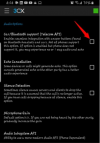
I think the following would help you with this. Go to Setting ----> Advanced -----> Uncheck the "Car/Bluetooth Support (Telecom API)"

1626083721920.png

Thanks,
RA.
 
  • Like
Reactions: Evolute IT
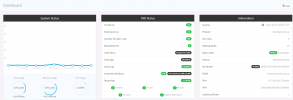
Here's my information:3cxPic.png
 
Hi Morgan,

I think the following would help you with this. Go to Setting ----> Advanced -----> Uncheck the "Car/Bluetooth Support (Telecom API)"

View attachment 22899

Thanks,
RA.
Thanks RA, I'm still not receiving calls.....No trouble making calls....
 
If you don't provide us with the information that cobaltit posted above to understand where and how you have installed 3CX, I'm afraid there is a good chance that your phone will remain in this state for quite a while longer....
3cxPic.png
 
Hi @MorganX,

What phone model are you using?

Does it work when you switch to LTE vs WiFi?

Did switching off the Telecom API off help?
 
Hi @MorganX,

What phone model are you using?

Does it work when you switch to LTE vs WiFi?

Did switching off the Telecom API off help?

I'm using the Samsung A51. I can call out on both LTE and Wifi, but I do not receive calls on either. Unticking the Telecom API did not help.

Thank You
 
Hi @MorganX,

From what I can see in the screenshot of your Management Console, you are currently on V18 build 1379. As a first step, could you please upgrade your installation to the latest V18 build which is Alpha 5?

Also, could you please confirm if your installation is a "Hosted by 3CX" installation?

Do me a favor, create a brand new extension in your Management Console, don't change anything at all, then provision your Mobile App to this new extension, then try calling this new extension from another extension.
Do you have the same issue, or does the new extension ring on inbound calls?
 
  • Like
Reactions: Evolute IT
Hi @MorganX,

From what I can see in the screenshot of your Management Console, you are currently on V18 build 1379. As a first step, could you please upgrade your installation to the latest V18 build which is Alpha 5?

Also, could you please confirm if your installation is a "Hosted by 3CX" installation?

Do me a favor, create a brand new extension in your Management Console, don't change anything at all, then provision your Mobile App to this new extension, then try calling this new extension from another extension.
Do you have the same issue, or does the new extension ring on inbound calls?
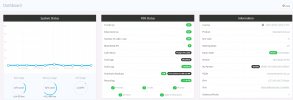
Ok, I've updated to the latest version, this was an on premise hosted and then became hosted by 3cx FREE version. I created another ext 101 and I can receive and make calls to and from both exts.
3cxPic2.png

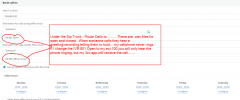
*Under the Sip Trunk - Route Calls to..........I have .wav files for open and closed. When someone calls they hear a greeting/recording telling them to hold.......my cellphone Never rings.

* If I change the IVR 801 Open to my ext 100 the caller will only hear the phone ringing, but my 3cx app will receive the call and I can answer it.
3cxPic3.png

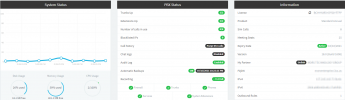
I want to use the IVR system.....is this my problem? Do I have to have the Pro or Enterprise version in order use my IVR Open and Closed?

When someone calls, I want them to listen to the greeting until I can answer the phone......

So, with my ext. selected under Sip trunk Route Calls my phone will ring, but the customer only hears the phone ring and not the greeting....

With the IVR Open and Closed .wav selected, the customers will hear the greeting, but my phone will not ring...
 
Hi Morgan,

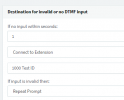
You can use the "Destination for invalid or no DTMF input" option to make your phone ring.

Please change "If no input within seconds:" as 1 sec and choose connect to Extension in dropdown list. So once the caller hear your Greetings then after 1 sec the call will route to your selected extension.

1626318842876.png

Thanks,
RA.
 
I have the same problem.Can make call with android app but cant receive. Additionally status is grayed out in app ,can't change it
 
Hi @Boby,

Are you on the latest V18 build? Update if not.

Can you create a new extension and provision it? Does the status remain greyed out?
 
HI @VasilisV_3CX. Thanks for reply.
Professional Perpetual,Version Number 16.0.9
Does version make sense ? do i need update version?'I will create new extension and test it.
 
Hi @Boby,

That's fine, no update needed. Let's start with the new extension test and take it from there.
 
Last edited:
Hi @Boby,

Are you on the latest V18 build? Update if not.

Can you create a new extension and provision it? Does the status remain greyed out?
I created new extension. didn't added any phone,there was only 3CX app.It's not working These sections are ticked.
Accept multiple calls
Accept Push Notifications
Enable PUSH for smartphones
Re-provision phone on Startup
Use 3CX Tunnel for remote connections (3CX App only)
Support Re-Invites
Support 'Replaces' header
 
Hi @Boby,

As the fix discussed above that worked for the OP did not work for you, please open a new thread to discuss your issue. Mention that you've created a new extension and you're not receiving push notifications after creating a new extension and adding it to a 3CX mobile client.
 
Status
Not open for further replies.

Forum statistics

Threads
111,982
Messages
590,121
Members
164,909
Latest member
Jacob.Ive