Another issue with Firewall Check.

Status
Not open for further replies.

peak

Customer
Joined
Jul 31, 2019
Messages
19
Reaction score
1
Hello Everyone,

I'm currently evaluating 3CX PBX version is 16.0.2.910 on a windows server core 2019 (firewall off via NetSh Advfirewall set allprofiles state off).
In front of the 3CX I have a firewall pfsense and a provider router with a static IP.

The provider router is configured in passtrough mode DMZ to the pfsense firewall.
I followed the pfsense Guide https://www.3cx.com/docs/pfsense-firewall

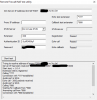
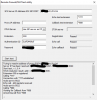
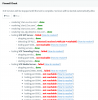
Hereafter you can find the result of the embedded firewall check.
11725

The port 5060 is open. I check from outside.

11726
I can access to the web interface from outside via the FQDN on port 5001.
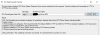
but when I use the tools "3CXWebFirewallChecker.exe" It failed.
11727

Do you have some idea? At the moment, I don't have any idea where o begin!!

Best regards,
Christian Lambricht
 
I don't see anything in the pfsense document regarding SIP ALG. If your router has such a setting it is usually necessary to disable this.
 
Hi,

Others investigations...
"3CXWebFirewallChecker.exe" tool seems to use TLS 1.0 and failed. Maybee 3cx doesn't support it anymore. Someone can confirm?

With "RemoteConnectionTest.exe" everything seems correct.
11731
and with STUN
11732

Any ideas are welcom.
 
Hi Christian,

Try adding the PBX in the DMZ instead of your pfsense, and connect it directly to them modem as a test.

Set the PBX External IP configuration to dynamic, and reboot the system to get an IP from the modem now.

Bypassing the pfsense will at least show you whether the required functionality is doable via this modem as soon as you run the firewall checker from the management console again.


PS: You can ignore the standalone checker app, for now all you need is the firewall tester that is in the management console.
 
If you get really stuck let me know and I can PM you screenshots of how we setup our PfSense Firewalls.
 
Hello everybody,

First of all, thank you very much for your help.

I move forward a little bit….To do so, I removed the "provider router" (Proximus bbox3) from the equation and use the pfsense to establshed the PPPoE connection.
With that, the SIP ALG test pass!

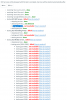
But the complete test failed because of port not reachable. see below.

@eddv123 thanks a lot for your proposal, you are welcome to do so :).

11755
 
Well the simple answer is your port forwarding isn't done correctly. At the end of the day, the test is just that. Things can work fine with out the test passing, but if things don't work AND the test doesn't pass then it's time to start troubleshooting. So first check whether you can access your management console remotely since that's an easy one. No SIP ALG to mess things up and not port ranges. If you can't, then you need to see why your port forwarding isn't working.
 
Hi,
@cobaltit Yes, I agree with you but everything seems to be configured well in the pfsense.
  • The port 5060(udp/tcp) is forwaded like the port 5001. And I can access from outside to the web interface https.
  • As you can see in the third post, I used an old tool "RemoteConnectionTest.exe" to connecte to 5060 from ouside and it is working! Moreover during this test I can see with wireshark the communication.
  • I also check with a web open port test tool to check if the port is open or not and with wireshark I can see the datagram coming from ouside going to the windows server 2019 containign the 3CX.
  • During the firewall check, I can see with wireshark some activities (STUN, etc... ) on port 5060 but as I'm not an expert, it is diffcult for me to understand what is going on.

Today, I will send screenshot config of pfsense port forwarding and some wireshark trace.


Best regards,
Christian Lambricht
 
I wasn't sure if you had tested again after removing the provider equipment. But if you can access the console from outside and the rest of the rules are configured similarly then it sounds like the configuration is good. Are you actually having any problems with your phones? It's rare but there's been a couple cases where you just couldn't make the firewall test happen but everything worked.
 
Since you have the pfsense in PPPoE you probably have the public IP assigned to it hence bypassing any filtering the modem might do.

I would suggest to try redo all the port assignments from scratch, disabling any port rewriting the firewall may be doing
 
Hi,

@cobaltit :
Yes I did all the test after removing the provider Equipment.
As I currently evaluating 3CX solution, I Don't have any SIP trunk configured at the moment, I only have configured 2 extentions (with 3CX software phone) on the internal network.
I will try with a third extension outside.

@JohnS_3CX :
For the PPPoE, yes I get a fixed IP assign directly to the pfsense now...
Before redoing the config .Why I can access the port 5060 UDP from web free Tools!
(https://check-host.net/check-udp)

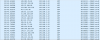
Wireshark trace datagrame forwarded to the 3cx Windows 2019 server.
11771

Thanks for your help.
 
Hi Christian

Run an NSLOOKUP with 8.8.8.8 to your FQDN and ensure it resolves to your current Public IP

Try https://ping.eu/port-chk/ with yourFQDN.my3cx.be and port 5060

If the port is correctly forwarded from pfsense to the PBX internal port (full cone NAT mode), you should see it as open.
 
Hi JohnS_3CX

NSLOOKUP
11776

the IP address reported is the correct one. in other word, it is my public fixed IP.

https://ping.eu/port-chk/
result
11775
 
Hi everyone,

Meanwhile, I continu testing.... With the same configuration that failed the firewal test, I configure 2 extensions and connnect them with softphone from ouside my company network.
Both softphone are on the same network. one is android softphone and the other one is windows softphone.
Both can register and I can make a call between.

@cobaltit : I think I'm in the case you mention!!!

Next step is to implement the trunk for test.
Do you know some provider suppliing free trunk for test purpose?

Best regards,
Christian Lambricht
 
Do you use two NICs on this server?

  1. In your network settings, if you click the interface IP is there only one in the drop down list?
  2. Does your Extenal IP show the WAN IP
11790
 
Hello John,

  1. only on IP adress is listed.
  2. Yes Static Public IP is the correct one.

11791
 
Hi Cristian,

The provider may perhaps have reserved port 5060 for their own purposes. This does not justify the media ports being blocked though so I'm doubtful on this one

So, I would set up a test pc on the modem in PPPoE. Then i would install a test instance of the PBX and since this PC is fully exposed to the internet with the windows firewall disabled, I should be able to pass the test and prove that the modem is ok at least.

Then I would look at the firewall settings again from scratch or alternatively hire a partner to set everything up and test it for me.
 
Hello Everybody,

I link a SIP trunk provider and evrything seems working.
I can make a call without any issue.

But the firewal check failed!!

I think the case is interresting for C3X dev team :)


Best regards,
Christian Lambricht
 
Working calls doesnt mean the firewall is working correctly, just working enough.

What model is the provider device, also, passthru mode and DMZ are not created equal. If your just DMZing to a local IP the PFSense is using on its WAN interface, this is likely the problem, you need the provider device to actually be in bridge mode, true passthru. If PPPOE is required, configure it on pfsense, and make sure to switch the MTU to 1492 as well if PPPOE is in use.

Most likely some of the ports are not NATing properly with the DMZ setting you are using on the provider device, we see this all the time on CenturyLink circuits with Actiontek and Zyxel modems. Their idea of DMZ is not a true DMZ and does not perform full cone nat 100% properly, nor does it perform normal nat 100% properly either, we think of them at 90% devices, as in 90% working, lol
 
  • Like
Reactions: JohnS_3CX
Status
Not open for further replies.

Forum statistics

Threads
112,359
Messages
592,099
Members
165,534
Latest member
[email protected].