- Joined
- Feb 26, 2021
- Messages
- 102
- Reaction score
- 13
Hello Team
I have a client who works with limited bandwidth and trying to answer every call as it's a new business.
Use Case - User wants to answer multiple calls on one extension. For example there is Call in queue and there 2 or more caller in queue then user wants to put first call on hold and answer the second one to arrange a call back or resolve quick general problems.
I have gone through many links where it says we can't answer multiple calls on one extension but we have a conflict as Under extension - Forwarding Rules - Allow Multiple calls option is available which creates an image an extension can answer multiple calls.
Also on 3CX Softphone- there are 4 lines such as LIne1 Line 2 Line 3 and Line 4 Can we use it as BLF or what is it used for??
User should get any notification that there is a second call in queue and should be answered on Line 2 if busy on line 1
What I have tried so far....
I have enabled allow multiple calls under Extension - Forwarding Rules - Options

I have tried Creating multiple Queue for example Queue1 and Queue 2 and Queue 3 and added user in all the queue. Assuming If there is a call in one queue and the user is already engaged on call should be notified about the call in another queue but no luck
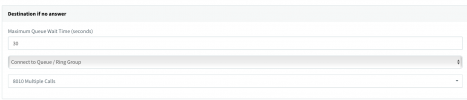
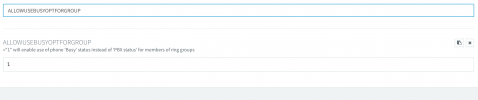
I tried Creating RingGroups thought it would allow Multiple calls to be answered.
Please see if anyone can help me it would be a great help
IF we can make calls using line 1 and line 2 Line 3 why can't we answer calls using line 1 line 2 and line 3 on 3CX softphone?
Thanks
I have a client who works with limited bandwidth and trying to answer every call as it's a new business.
Use Case - User wants to answer multiple calls on one extension. For example there is Call in queue and there 2 or more caller in queue then user wants to put first call on hold and answer the second one to arrange a call back or resolve quick general problems.
I have gone through many links where it says we can't answer multiple calls on one extension but we have a conflict as Under extension - Forwarding Rules - Allow Multiple calls option is available which creates an image an extension can answer multiple calls.
Also on 3CX Softphone- there are 4 lines such as LIne1 Line 2 Line 3 and Line 4 Can we use it as BLF or what is it used for??
User should get any notification that there is a second call in queue and should be answered on Line 2 if busy on line 1
What I have tried so far....
I have enabled allow multiple calls under Extension - Forwarding Rules - Options
I have tried Creating multiple Queue for example Queue1 and Queue 2 and Queue 3 and added user in all the queue. Assuming If there is a call in one queue and the user is already engaged on call should be notified about the call in another queue but no luck
I tried Creating RingGroups thought it would allow Multiple calls to be answered.
Please see if anyone can help me it would be a great help
IF we can make calls using line 1 and line 2 Line 3 why can't we answer calls using line 1 line 2 and line 3 on 3CX softphone?
Thanks
Last edited: