Answering calls on other extensions

Status
Not open for further replies.

Josh Hoekstra

Forum User
Joined
Jun 18, 2019
Messages
15
Reaction score
0
We have a user who wants to answer an incoming call on another extension. What settings will I need to ensure that this is working correctly?
 
Explainations are too short to answer, give us more details , what is the actual call flow scenario ?
 
They have an extension setup for their receptionist and all incoming calls come to this extension by default. One of the users would like to be able to answer this extension from their phone when the receptionist isn't available.
 
You have multiple ways to achieve this
  1. you can intercept calls doing 11036 on another phone when receptionist extension is ringing
  2. set a second phone with same extension as receptionist
  3. Create a group and insert a second extension according to ring mode you want (ring all for example)
 
Last edited:
Also other way if you use status according to office hours , away or DND, when status is DND you can forward the calls to another extension for example.
 
I think we want to go with the route of intercepting calls. Would the user just pick up their phone and dial 20? Is it always 20, or is this something that can be changed? If so, where would I go to check this setting? As well, are there any permissions I need to be aware of to ensure that this works?
 
ok 11037 is the default dial code from settings, Dial Codes. No permissions change, from any 3cx extension you can pickup the incoming calls

 
Ok. To clarify, the end user only needs to pickup their phone and dial 20 (no stars * at the beginning or end)?
 
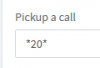
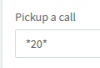
* 20 *
as shown in the field, in your Settings. The forum is italicizing it if I type it...
 
@Josh Hoekstra

As i said , and if you begin with 3cx the default setting is:

Limit Call Pickup to Extension Group - OFF (default)
When the global option is not checked then you will be able to pick up calls ringing on other extensions regardless of extension group membership and what is checked under the extensions rights tab. Basically everyone can pick any call in the system at any point by using the dial code 20 from their IP Phone or by the use of a dedicated BLF key assigned by the administrator to the device.
 
I have checked those settings and still seem to be unable to answer the calls. I have attached a picture of the dial codes and am hoping for some clarification of the exact code to dial. The reception extension is
1000. 11136

As well, are there any other settings I can check to make sure this works?
 
No matters which extension is ringing, the idea is a phone is ringing , you want to pickup the call , so you just need to dial *2 as you change the default value to this.

Nothing else, just try.
 
If you set up a BLF of that receptionist extension on the handset you want to pick up from and then press the BLF when that ext is ringing does it pick up?
 
@JohnS_3CX

in previous screen copy Josh seems to have customised the default code * 20 * to *2 don't know if this dial code can be replaced by another one 3CX can use to do the pick up.
 
Thanks for the assistance. I went onsite today to test the issue and have a couple of updates. I tried star 2 star, star 2, star 2 extension number, and star 2 then the BLF for the reception phone and received the same error for these options ('not found'). There were two things I noted onsite. One, nothing happened (when I entered star 2, and the other options) until I hit send. Is that necessary, or should the star code work without the send button. As well, the BLF for the reception extension did not light up when the phone (on the users phone) when the reception phone was ringing. Could there be an issue there as well?
 
OK, more details are necessary here. Are you using IP phones or 3CX clients? Are all the extensions part of the same group? Do BLF keys normally light up for everyone else when an extension is on call or ringing? Which PBX version are you running?
If you just press the blf key for the receptionist does that pickup the call?
 
We use IP phones (specifically Yealink). All of the extensions are part of the same group. The BLF lights don't light up for any extension, and the BLF button for the receptionist doesn't pick up the call.

One thing to note, the users extension has the perform operations permission, but in the group settings that permission is turned off under the 'User Rights' section. Will the group permissions override the extension permissions?
 
Does the extension have the rights "Can see group members" and "Can see group calls"?

One thing to note, the users extension has the perform operations permission, but in the group settings that permission is turned off under the 'User Rights' section. Will the group permissions override the extension permissions?
No that will not override the extension permissions.
 
Status
Not open for further replies.

Forum statistics

Threads
112,359
Messages
592,097
Members
165,533
Latest member
[email protected].