Archive recordings in M365 SharePoint stopped working

anonymouse

Bronze Partner
Joined
Apr 28, 2019
Messages
51
Reaction score
19
Version 20.0 Update 8

It was working fine for months but it has now stopped for some reason.
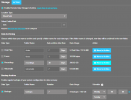
  • M365 integration says "Status OK. Real Time Notifications from 3CX to Microsoft 365 are working and in sync".
  • Tried deleting the 'app' from Microsoft Entra and re-creating it via reconfigure on 3CX.
  • Reconfigured integration a few times already - have made sure 'On behalf' is ticked.
  • Cannot see any errors in Event Logs or Activity Logs.
  • Backups, chat files, faxes and voicemails archive fine without issue (have enabled and pressed 'move to archive', they upload successfully).
  • Pressing 'Move to archive' for Recordings just spins for 1 second then stops.
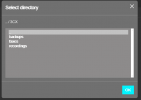
  • The option 'Select Folder/Path' shows the sharepoint directory and folders correctly.
  • Manually tried to archive a recording but it does nothing.
  • Folder name 'recordings' does match the folder name in SharePoint inside '3CX' folder path.
Any help would be appreciated, especially where to find logs.

1774899619375.png

1774899917361.png
 
Last edited:
Since you have already reviewed the FTP server and no errors were identified, we would suggest opening a Support Ticket so we can review the current configuration along with the system logs to better understand the issue.

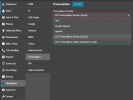
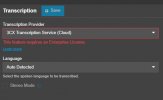
That said, please log in as System Owner and navigate to Admin > Integrations > Transcription. Could you please confirm whether the transcription service is enabled? If so, please set it to OFF and save the changes:

Once this is done, please attempt to archive the recordings again and let us know whether the issue persists.
 

Attachments

  • 1771527641034.png
    1771527641034.png
    44.4 KB · Views: 4
  • Like
Reactions: anonymouse
Since you have already reviewed the FTP server and no errors were identified, we would suggest opening a Support Ticket so we can review the current configuration along with the system logs to better understand the issue.

That said, please log in as System Owner and navigate to Admin > Integrations > Transcription. Could you please confirm whether the transcription service is enabled? If so, please set it to OFF and save the changes:

Once this is done, please attempt to archive the recordings again and let us know whether the issue persists.

Transcription was ON, and turning it OFF has resolved the issue. Is this a bug or intended?

1774945325420.png
 
  • Like
Reactions: BrunoI_3CX
We are glad to hear that the issue has been resolved.

Please note that the 3CX Cloud Transcription feature was previously in open beta and officially concluded with the release of Update 8. Free 3CX AI Transcription Beta Ending: https://www.3cx.com/blog/releases/free-ai-transcription/

As a result, for systems where this feature had already been enabled, it needs to be manually disabled to ensure everything works correctly.
 
We are glad to hear that the issue has been resolved.

Please note that the 3CX Cloud Transcription feature was previously in open beta and officially concluded with the release of Update 8. Free 3CX AI Transcription Beta Ending: https://www.3cx.com/blog/releases/free-ai-transcription/

As a result, for systems where this feature had already been enabled, it needs to be manually disabled to ensure everything works correctly.
After disabling the setting, when can we safely enable transcription again?
 

Latest Posts

Forum statistics

Threads
112,281
Messages
591,677
Members
165,402
Latest member
noufir