AT&T IP flex not supported anymore 3cx?

Status
Not open for further replies.

Song

Bronze Partner
Joined
Nov 12, 2018
Messages
379
Reaction score
24
Hi,

I migrated from v18 to v20. and now when i go to the voice att trunk . I click on it it just go to the main menu so strange. I clicked on my other trunk and it does popup with the option to edit it. Any chances I can see the setting? I tried to create a at&t trunk , but no luck. I select US and i do not see at&t in there anymore. Is this taken away? and not supported anymore?

thank you
 
Hi @Song

AT&T is not a 3CX-supported provider. This can also be checked on the link below.
https://www.3cx.com/partners/voip-providers/

Regarding not being able to edit the sip trunk settings, this is because the Sip trunk template in use does not exist on V20 and the PBX is unable to open a template that does not exist.
You will need to delete the sip trunk and re-create it using a generic sip trunk template.
 
  • Like
Reactions: GregG_3CX
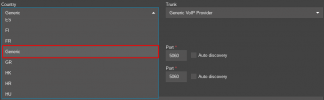
thank you so much!! when i add a new trunk. I do not see the option to select a generic sip trunk template. all they have is the one listed on the site. how do i go about doing that? thank you
 
Under the Country you should be able to see the generic option.
1712690406920.png
 
got it thank you!!!.
 
You are welcome
 
got it thank you!!!.
Hi Song,
If you get a chance, I would like to hear how the upgrade worked for you.
I have a V18 client on AT&T IP Flex and will upgrade them at some point.
I was going to do the upgrade on a test machine and work out the issues.
If you have any insights, I would love to hear them and probably other users would to.
Thanks !!
 
Hi Song,
If you get a chance, I would like to hear how the upgrade worked for you.
I have a V18 client on AT&T IP Flex and will upgrade them at some point.
I was going to do the upgrade on a test machine and work out the issues.
If you have any insights, I would love to hear them and probably other users would to.
Thanks !!
Victor,
First do screen shot of your configuration of the AT&T sip trunk from v18. because once you upgraded to v20 you will not able to edit the setting. Again, I am trying to figure things out now. I have created a generic sip trunk and added AT&T info in there. But I don't know if all the setting are correct. If you can do my a favor and do screen capture of your AT&T under the general area and also under the option. I wanted to see if it'll match up on the v20 generic setup. before i delete my AT&T old sip trunk and add new one in. Seriously something is not working correctly, we have been having issues ever since the upgrade of v20. some calls are not going in. I contacted ATT and they says it is your PBX. This is what ATT says, "
All calls were through AT&T network, AT&T IPBE sent 4 Invite's to signaling IP and no response back was received.
Issue was coming from your PBX."
So I don't know what this mean.
I do see something in the log warning.

Level
Warning
Event ID
30051
Date & Time
04/09/2024 11:04 AM
Details
Unidentified Incoming Call. Review INVITE and adjust source identification:
and
Event ID
12294
Date & Time
04/09/2024 11:19 AM
Details
Call or Registration to 1562928xxxx@(Ln.10000@AT&T) has failed. sip:1.1.2.1:5060 replied: Request Timeout (408)
 
Level
Warning
Event ID
30051
Date & Time
04/09/2024 11:04 AM
Details
Unidentified Incoming Call. Review INVITE and adjust source identification:
This means the call from ATT came in to 3CX and 3CX doesn't have any matching info for the caller source. PBX in verbose mode will show how it came in and then you can make the trunk match.
Event ID
12294
Date & Time
04/09/2024 11:19 AM
Details
Call or Registration to 1562928xxxx@(Ln.10000@AT&T) has failed. sip:1.1.2.1:5060 replied: Request Timeout (408)
This means that 3CX is sending the call to 1.1.2.1 and there is no reply. Is your ATT box really at 1.1.2.1?
 
This means the call from ATT came in to 3CX and 3CX doesn't have any matching info for the caller source. PBX in verbose mode will show how it came in and then you can make the trunk match.

This means that 3CX is sending the call to 1.1.2.1 and there is no reply. Is your ATT box really at 1.1.2.1?
Yes. 1.1.2.1 is the ATT box we send it to for outbound and inbound. So maybe ATT box is having issues and needed to reboot?
pbx is in verbose mode. where do you download the verbose mode file to troubleshoot.

thank you
 
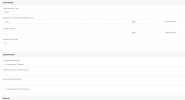
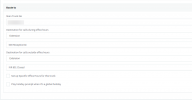
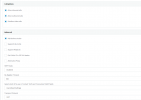
Hi Song,
Here are my settings. The number is blurred in Main Trunk No.
Hope this helps.

1712761522651.png1712761522651.png


AATTBlurNumber.png
1712761750453.png


msedge_y1aFBwY0Ut.png
 
Yes. 1.1.2.1 is the ATT box we send it to for outbound and inbound. So maybe ATT box is having issues and needed to reboot?
pbx is in verbose mode. where do you download the verbose mode file to troubleshoot.

thank you
Hi SweetAction,
You will see my AT&T IPv4 number is the same.
I think AT&T uses IPv6 from the customer endpoint to the AT&T network.
Thanks for jumping in to this thread, your knowledge is appreciated.
 
thank you so much.. i download it. do you know which file to look at? there are so many file in there under log directory.
Usually the managementconsole.log file is where I start
Hi SweetAction,
You will see my AT&T IPv4 number is the same.
I think AT&T uses IPv6 from the customer endpoint to the AT&T network.
Thanks for jumping in to this thread, your knowledge is appreciated.
I'm happy to help. The OP still needs to figure out why ATT CPE isn't replying.
 
Usually the managementconsole.log file is where I start

I'm happy to help. The OP still needs to figure out why ATT CPE isn't replying.

Hi SweetAction,

Not sure if this makes a difference, with AT&T you have to have 2 network cards in your 3CX computer.
https://www.3cx.com/community/threads/at-t-dedicated-internet-voice-bundle-adivb.83715/#post-390801

All this reminds me I am going to do packet captures before I switch so I can see what a valid phone call looks like in this configuration.
 
We're also an AT&T IP Flex customer and all the complexity using AT&T IP Flex has somewhat forced us to move our 3CX hosting to the cloud. The trunk configuration is just one part of the complexity. Look at the firewall configurations and exceptions you have to create as well. The worst part is that 3CX on IP Flex won't even support all of 3CX's capabilities like using SMS from the PBX and who knows what else.
 
Hi SweetAction,

Not sure if this makes a difference, with AT&T you have to have 2 network cards in your 3CX computer.
https://www.3cx.com/community/threads/at-t-dedicated-internet-voice-bundle-adivb.83715/#post-390801

All this reminds me I am going to do packet captures before I switch so I can see what a valid phone call looks like in this configuration.
Likely they need to add a static route to the Debian OS so it knows which nic to send the traffic out of then.
 
I'm getting alot of this error. can someone show me how to fix this. I'm getting alot of complain ever since we upgraded to v20. that many vendor cannot call in. some can call in but other are having issues. I'm getting alot of this errror?
30051Unidentified Incoming Call. Review INVITE and adjust source identification:
%1.
WarningThis is a problem when the Source is not trusted.
3CX expects SIP call traffic to come from a certain IP Address and with a certain format and fails to satisfy 3CX checks. For security purposes 3CX will not allow this request and show this message.

Is there a way for 3cx to allow un trusted source? if so where do i set that at?
Here is a detail call log.

Unidentified Incoming Call. Review INVITE and adjust source identification: INVITE sip:[email protected].xxx:5060 SIP/2.0 Via: SIP/2.0/UDP 205.209.104.2:8030;branch=z9hG4bK2f6f7ce6-489e-9624-4ehav8672khwyelu;rport=8030 Max-Forwards: 70 Contact: <sip:[email protected].xxx:8030> To: <sip:[email protected].xxx:5060> From: <sip:[email protected].xxx:8030>;tag=35ojpkn3qb7bazw2 Call-ID: 2ZAd7BTUbU7a7xpKhcHavWnigQdBuwnFrB25abvF CSeq: 1 INVITE Content-Type: application/sdp User-Agent: Cisco-SIPGateway/IOS-12.x Content-Length: 741 v=0 o=- 15515429xx 15515429xx IN IP4 205.209.104.xxx s=cisco-sipgateway/ios-12x c=IN IP4 205.209.104.xxx t=0 0 m=audio 20002 RTP/AVP 9 104 98 3 8 0 101 97 100 108 15 4 105 106 107 103 103 103 18 a=rtpmap:9 G722/8000 a=fmtp:9 bitrate=64000 a=rtpmap:104 G726-16/8000 a=rtpmap:98 iLBC/8000 a=fmtp:98 mode=20 a=rtpmap:3 GSM/8000 a=rtpmap:8 PCMA/8000 a=rtpmap:0 PCMU/8000 a=rtpmap:101 telephone-event/8000 a=rtpmap:97 SPEEX/8000 a=rtpmap:100 SPEEX/16000 a=rtpmap:108 SPEEX/32000 a=rtpmap:15 G728/8000 a=rtpmap:4 G723/8000 a=rtpmap:105 G726-24/8000 a=rtpmap:106 G726-32/8000 a=rtpmap:107 G726-40/8000 a=rtpmap:103 L16/8000 a=rtpmap:103 L16/44000 a=rtpmap:103 L16/44000 a=rtpmap:18 G729/8000 a=fmtp:18 annexb=no a=sendrecv
thank you
 
Last edited:
Formatted:

Unidentified Incoming Call. Review INVITE and adjust source identification:
INVITE sip:[email protected]:5060 SIP/2.0
Via: SIP/2.0/UDP 205.209.104.2:8030;branch=z9hG4bK2f6f7ce6-489e-9624-4ehav8672khwyelu;rport=8030
Max-Forwards: 70
Contact: <sip:[email protected]:8030>
To: <sip:[email protected]:5060>
From: <sip:[email protected]:8030>;tag=35ojpkn3qb7bazw2
Call-ID: 2ZAd7BTUbU7a7xpKhcHavWnigQdBuwnFrB25abvF
CSeq: 1 INVITE
Content-Type: application/sdp
User-Agent: Cisco-SIPGateway/IOS-12.x
Content-Length: 741
v=0
o=- 15515429xx 15515429xx IN IP4 205.209.104.xxx
s=cisco-sipgateway/ios-12x
c=IN IP4 205.209.104.xxx
t=0 0
m=audio 20002 RTP/AVP 9 104 98 3 8 0 101 97 100 108 15 4 105 106 107 103 103 103 18
a=rtpmap:9 G722/8000
a=fmtp:9 bitrate=64000
a=rtpmap:104 G726-16/8000
a=rtpmap:98 iLBC/8000
a=fmtp:98 mode=20
a=rtpmap:3 GSM/8000
a=rtpmap:8 PCMA/8000
a=rtpmap:0 PCMU/8000
a=rtpmap:101 telephone-event/8000
a=rtpmap:97 SPEEX/8000
a=rtpmap:100 SPEEX/16000
a=rtpmap:108 SPEEX/32000
a=rtpmap:15 G728/8000
a=rtpmap:4 G723/8000
a=rtpmap:105 G726-24/8000
a=rtpmap:106 G726-32/8000
a=rtpmap:107 G726-40/8000
a=rtpmap:103 L16/8000
a=rtpmap:103 L16/44000
a=rtpmap:18 G729/8000
a=fmtp:18 annexb=no a=sendrecv
 
Status
Not open for further replies.

Forum statistics

Threads
112,141
Messages
590,936
Members
165,158
Latest member
ascheney74