Audio delay with SBC

Status
Not open for further replies.

Alphabetic

3CX MVP
Silver Partner
Advanced Certified
Joined
Jul 1, 2016
Messages
6,695
Reaction score
2,672
Hi Guys,

I have my first set up with an SBC on a Pi and the customer is stating their caller is complaining of a delay hearing them.

My set up: 3CX in the cloud with on-premise SBC with 7 Fanvil handsets.

Broadband is 100d 100u. 3CX passes firewall test.

Can anyone advise?

Should I have "PBX delivers audio" for the EXT when behind an SBC?

thanks,
 
Should I have "PBX delivers audio" for the EXT when behind an SBC?


Not needed, only in remote STUN mode (if using more than a single handset).

Delay can be effected by things such as - network hardware, QoS (or lack of), network traversal or something like that, I cannot see how the Pi would cause this I have set up a lot of these myself without issue.
 
Funnily enough when I test it with them it works fine.

I've enabled call recording anyway so I can have a listen the next time it happens.
 
FYI: If you are call recording the audio path will go via the PBX anyway but I would probably enable "PBX delivers audio" as a pre-caution anyway.
 
thanks.

I'll give them a few days with call recording on and see what happens. If I hear nothing I will turn off recording then turn on PBX delivers audio.
 
Is the delay on internal calls, external calls, all calls? If you use recording, or force PBX delivers audio, then internal calls (those between sets behind the SBC) must all pass through the PBX rather than going direct set to set. This may introduce a delay. The choice of Codec may also be a factor.
 
  • Like
Reactions: DSXVOICE
Customer said specifically external calls.

I havent played with the codecs so they'll be at the default order. SIP provider supports them.

I've listened back to calls in the last 3 hours and there are no delays so i'll have to wait for customer to feedback.
 
You may want to run some latency tests from the site, just to eliminate that. I assume that this is the only SBC off of that PBX, so no other site to compare with.
 
That is correct. It is also our first SBC set up.

Do you have a recommendation on how to perform latency test?
 
Some test references have been posted in the past. I'd have to do some searching to see if I kept any links to them. If you check Google there are a number of tests available. Some require you to download a programme, which I don't recommend, unless it is a recognised company.

What type of Router/firewall is being used at the site? Others may have had the same experience, with the same model, if that is what is causing the problem
 
Are you using a supported provider? Can you test the trunk account on a different pbx where you are connected locally and already know it has no delay issues, to ensure that the provider isn't the source of the delay?

Since it's only for external calls this might be a good test to save you a lot of time troubleshooting the specific installation.
 
hi @JohnS_3CX

I am using Voiceflex which is a supported SIP provider. On all our 3CX Installations we use Voiceflex.

The customer states the issue appears to have gone with me enabling call recording.

I have since taken off call recording and made 1 test call out and it was fine. However, I got a colleague going to site so i can continue to do test calls with him.

In the interim, could you please tell me if this info is any good.

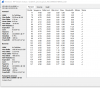
Test external call out with call recording off

Capture from handset

9812

Capture from 3CX

9813

Am I right in assuming that theres minimal latency between PBX in the cloud and the SIP provider but there is high latency between handset and the local SBC?
 
It would appear so, but you would need to isolate whether the delay is because of:

  1. The endpoint
  2. The infrastructure between the endpoint and the SBC
  3. The SBC itself

We can assume for the time being that the SBC is ok on the WAN side at least as seen in picture 2. Right now you are seeing the MAX Delta which is the worst packet so an RTP Stream analysis would show more detail
 
So we've swapped the router onsite, download speeds are 500D 500U.

I've restarted the SBC.

I've made test calls EXT to EXT and called in several times with my colleague and can not replicate the reported issue.

Call Recording and PBX Delivers Audio is now off.

Voiceflex have analyised a few calls and said everything seems fine.
 
Hi @JohnS_3CX

I'm not sure what I'm looking at here, could you offer some advice?

9817
 
@JohnS_3CX Hi John.

on my testing PBX i've got 2 x Fanvil's on STUN. EXT to EXT test shows the same max delta so this might be a bit of a red herring.

I'm going to let the customer test again since removing PBX delivers audio and replacing the router and i'll see how it goes.

i'll be in touch.
 
@kieferschild sure, let us know how it goes after the testing
 
hi @JohnS_3CX Customer said they're still having the issue. However, when i called them there was no problem.

Customer said issue didnt happen when call recording was on.

I've just been made aware that they've had a call and neither party could hear one another.
 
There's no evidence yet that your SBC is at fault, let's start from the basics and work our way down to the network level.

Please confirm the following first:
  • Whats is your exact 3CX version? (for example V15.5.15502.6)
  • What machine specs is it hosted on (any chance the pbx running at full load for some reason)?
  • What specific phone models are you using?
  • What FW exact version do they run?
  • Are phones provisioned with the default supported templates of 3CX via SBC mode? (seen in extension provisioning tab as 3CX SBC remote)
  • What version of the SBC are you currently running? (ssh command is: apt-cache policy 3cxsbc)
 
Status
Not open for further replies.

Latest Posts

Forum statistics

Threads
112,358
Messages
592,092
Members
165,528
Latest member
florentrobineau