Audio do not work in PWA after V20 update

Status
Not open for further replies.

Shahinur Kabir

SOHO User
Joined
Jun 25, 2024
Messages
10
Reaction score
0
Following the V20 update, audio is inaudible on PWA and Web client, although it functions well on the mobile app.
Any help on this issue?
 
Are you able to perform an echo test?
 
There is no option to do echo test. Could you please tell me where it?
 
dial *777 to perform the echo test
 
Dialed *777 but cannot hear any thing.
 
This can indicate that the remote location firewall is blocking audio.
 
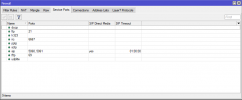
Setting up on-premises and using local IP routing to a real IP on a MikroTik router is feasible. Configuring this should not be a problem with the appropriate steps.
 
here is my port forwarding
 

Attachments

  • image.png
    image.png
    16.7 KB · Views: 8
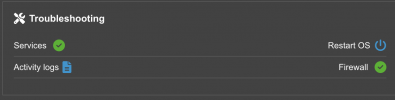
First of all, from the PBX side, is the firewall checker passed successfully?
 
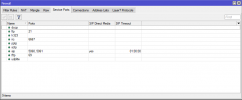
This is my port forwarding at Mikrotik
 

Attachments

  • image.png
    image.png
    16.7 KB · Views: 3

Attachments

  • Screenshot 2024-07-02 at 10.46.53 AM.png
    Screenshot 2024-07-02 at 10.46.53 AM.png
    29 KB · Views: 7
You will need to run captures from the PBX and the pc and make test calls.
This will help you identify the issue.
 
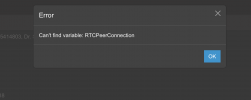
Cmd reroute-to: target leg (C:725, leg 3) is not found!
 
Hello, now this one show. Any one help me what to do for this?
 

Attachments

  • Screenshot 2024-07-11 at 7.15.44 AM.png
    Screenshot 2024-07-11 at 7.15.44 AM.png
    37.2 KB · Views: 7
This means that there is a disconnection on your web client, if you refresh does this resolve the error?
 
After refresh same. is it for ISP provider problem?
 
Are you able to perform an echo test (*777)?
 
Status
Not open for further replies.

Latest Posts

Forum statistics

Threads
111,952
Messages
589,894
Members
164,844
Latest member
abctel2