Audio problem VM/MOH

Status
Not open for further replies.

connexeon

Joined
May 20, 2010
Messages
6
Reaction score
0
Hi all,

We are testing a new fanless system with SSD and Windows Embedded. 3CX installs perfectly and test calls between extensions work fine. Voicemail or music on hold (probably any playback of recorded stuff) sounds very stuttering. The performance of the system (CPU and memory usage) look fine, also network performance should not be an issue.

Any idea on what causes this? Thank you.

Regards,
Hannes
 
Other than an SSD, you don't say what hardware (CPU, Memory), your system consists of.
 
Hi!

leejor said:
Other than an SSD, you don't say what hardware (CPU, Memory), your system consists of.

These are the specs of the system:
Mainboard Intel D945GSEJT Johnstown Mini-ITX (1.6 GHz Atom processor)
2GB memory Transcend SO-DIMM DDR2 800
40GB SSD Intel 320 Series SATA
Microsoft Windows Embedded Standard 2009
 
I've put together several systems using versions of Intel Mini ITX along with 2 Gb of memory, with no issues, running 3CX. I can't see why a SSD would introduce any problems as it is much faster than a mechanical drive. I was thinking about replacing one of my drives with a SSD once the prices come down a bit. I'm in the process of installing one on a laptop using Windows 7. I have heard that Win XP, and other earlier operating systems, can not take full advantage of the speed offered by a solid state drive, and that might be the problem

There may be a setting in the BIOS that is causing some sort of a read/buffer issue. Do a search for your MB model and using SSD's. If you've gone over everything else, try cloning the SSD onto a regular hard drive, and run that. If the problem is gone, then you know that it is the SSD and an incompatibility on your system (motherboard), or, with the settings in Windows, that is causing the problems.
 
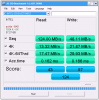
Thanks for your suggestions. We ran some benchmarks on the SSD and it looks like there's a poor read performance. This is probably the cause of the problem. This SSD should perform much better I think, so we're looking into a problem with the drivers/bios settings.
 

Attachments

  • Capture.PNG
    Capture.PNG
    34.8 KB · Views: 1,239
I'd be very interested in hearing what you find, as, I too want to eventually switch over to SSD's in the next few years as the cost justifies the switch.
 
Hello,

Check that your hard drive is configured for optimized performance :
- Open the device manager
- Under Disk Drives, open the properties for your disk
- In the "Policies" tab, tick "Optimize for performance" and "Enable write caching on disk"
- Click on Ok
- Under "IDE/ATA/ATAPI", open the properties for the all channels
- Enable DMA Transfer in the Advanced Settings Tab
You should also check that you are using the good drivers for your chipset. (check intel support site)

You can also disable NTFS last access update, which can be very time consuming on slow computers.
You can find this registry tweak under :
HKLM\SYSTEM\CurrentControlSet\Control\FileSystem
set NtfsDisableLastAccessUpdate (DWord) to 1 to disable
then reboot.
(source : http://technet.microsoft.com/en-us/library/cc959914.aspx )

At last, check that disk power management is disabled in bios and windows power management.

As leejor said, windows xp is not recommended for ssd drives because it does not support the TRIM command.

Regards,

Patrice
 
Patrice said:
Hello,
Check that your hard drive is configured for optimized performance
Thanks for your input. I've checked your suggestions and all these settings are already set this way. I also checked the Intel site for updated drivers, but we are already using the latest. We're looking into AHCI / PCI IDE mode now.
 
Hi,

Maybe this little app can help you? It tweaks Windows 2K/XP/Vista and 7 for you.
There is a free and a paid (Pro) edition
http://elpamsoft.com/Downloads.aspx?Name=SSD%20Tweaker

Good luck.
 
complex1 said:
Maybe this little app can help you?
Hi,

Thanks for your suggestion.
We already tried SSD Tweaker to tune some settings but we did not gain (enough) performance unfortunately.
 
Hi,

I have done some searching on Dutch benchmark sites for the Intel SSDSA2CT040G3 and I think the best you can do is change the SSD for, or another and faster one, or replace it for an old fashion hard drive.
So what leejor earlier mentioned “If you've gone over everything else, try cloning the SSD onto a regular hard drive, and run that.” I will if I was you do that first before going further.

Good luck.
 
Status
Not open for further replies.