Reducing extentions: digital receptionist forward to mobile.

RvRijbroek

SOHO User
Joined
Nov 21, 2023
Messages
2
Reaction score
0
Hi all,

I'm trying to reduce the no of extentions on my installation given the enforced (new/old) rules (https://www.3cx.com/blog/news/max-extension-policy/).
I currently have 16 extentions and 4 sim calls.

2 of those extentions are used during out-of-office times to forward calls with the digital receptionist to 2 seperate mobile phones.
I don't know how to solve this without using dummy extentions.
But with these dummy extentions, i'm exceeding the allowed no of extentions.
 
Each extension (whether a user or system extension) can be configured with a specific routing rule for outside office hours. I don’t think you need two dedicated extensions for this purpose; you can simply configure all extensions to route calls to the external number outside office hours.

Alternatively, you could use one of the eight available system extensions (SCs).
 
Each extension (whether a user or system extension) can be configured with a specific routing rule for outside office hours. I don’t think you need two dedicated extensions for this purpose; you can simply configure all extensions to route calls to the external number outside office hours.

Alternatively, you could use one of the eight available system extensions (SCs).
Thanks for your reply.

I'm aware of Call Forwarding & scheduling. But call forwarding depends on the status, not office hours. The schedule tab I don't see transfer options.
Next to that, the digital receptionist is also taking calls during office hours when no extention is logged on.
Call Forwarding -> exceptions needs a caller id. Otherwise this would be great.

Can you point me in the right direction please?

To clarify the situation.
when either situation is true the call is forwarded to 1 of 2 Digital receptionists (depending on inbound phonenumber).
1) Not in Office hours.
2) No extentions logged on to that queue.

The Receptionists offer 2 options:
1) transfer to voicemail (also dummy extention now, Need to change that later to queue voicemail).
2) transfer to mobile (separate mobile for each digital receptionist).

Edit: I need to mention that we are using hotdesking.

Many thanks.
 
You're right, Call Forwarding in 3CX depends on the user's status, rather than directly on office hours.

However, you can configure the extensions so that their status automatically switches to DND outside office hours. Then, under the forwarding rules for the DND status, you can define the routing you need, including forwarding the call to an external/mobile number.

So, in your case, I would look at using the automatic status switching based on office hours rather than creating dedicated dummy extensions.

For example:

During office hours:
Available = normal routing / queue behavior.

Outside office hours:
Automatically switch to DND = use the DND forwarding rule to route the call to the required mobile number.

Since you have two inbound numbers that ultimately need to reach two different mobiles, you can keep the routing separated as required, but the automatic status change should help you achieve the out-of-office behavior without consuming additional extensions just for scheduling.

The hotdesking setup is an important detail as well, but I think the first thing to test is the automatic status switching combined with the forwarding rules for DND. That should get you much closer to the routing you're trying to achieve.
 
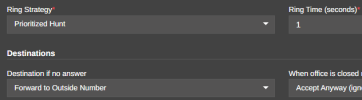
Departments and Ring Groups can use their various destinations to forward to an outside number. If the situation is that your out of office goes to an IVR, and there are two options that forward calls to mobile, then set up a ring group for each with no members, and set the Out of office destination for each to "Forward to outside number". Call handling extensions aren't counted as users so you can get creative with them, I also use them instead of dummy extensions for voicemail boxes now.

Where you'll get tripped up is if you need internal logic using the simultaneous ring functionality to go "if it's not answered within X on the mobile then go to internal voicemail", but in that case the only real solution would be a user extension set that way.
 

Members Online Now

Forum statistics

Threads
111,852
Messages
589,389
Members
164,691
Latest member
Daz1964