- Joined
- Mar 14, 2022
- Messages
- 3
- Reaction score
- 0
Hi,
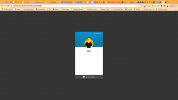
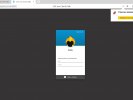
The live chat widget is installed on my website, however the authentication form is not showing (email and name or any combination thereof) and just a white space is shown. If I enable the GDPR setting, the tick box is shown but nothing else.
It is the same when I visit the chat link directly and it makes no difference which configuration I use.
I need to be able to pre-populate the name and email fields, and have read the thread on this, however the fields are not showing and even with the correct configuration the name still comes through as the generic webvisitor.
Am I missing something in the settings here?
Matt
The live chat widget is installed on my website, however the authentication form is not showing (email and name or any combination thereof) and just a white space is shown. If I enable the GDPR setting, the tick box is shown but nothing else.
It is the same when I visit the chat link directly and it makes no difference which configuration I use.
I need to be able to pre-populate the name and email fields, and have read the thread on this, however the fields are not showing and even with the correct configuration the name still comes through as the generic webvisitor.
Am I missing something in the settings here?
Matt