Solved Auto Switch

Status
Not open for further replies.

manuelwatchnet

Forum User
Joined
Mar 21, 2019
Messages
4
Reaction score
2
Hi

We are new to 3cx and I have been reading the forum
my issue that I have is that my cloud base 3cx doesnt follow the auto switch rules. It doesn't go to DND

Where do I disable Profiles Custom 1 or Custom 2?


Manuel
9927
 
  • Like
Reactions: craigreilly
Darn good question... I know where to change the name of those - but never seen an option to Disable it.
 
I don't think you need to disable them, just not use them. As in when the auto-switch time happens, any extensions actively set to those statuses won't auto-switch but extensions set to the other statuses will. At least that's how I interpret it. Have you confirmed it's not a time zone issue so it is in fact switching just not at the time you expect?
 
As @cobaltit mentioned the status will not auto switch if the extension is set to one of the 2 custom statuses at the time of the switch. You do not need to disable them just don't use them if you do not need them. Make sure that your server time is correct to and that your office hours are setup correctly.
 
Hi

Correct me if I am wrong

This is for tech support queue only between 900-1715 weekdays

incoming IVR ---> dummy extension ---> Auto switch

900-17:15 : forward to queue
DND: voice mail

I put all types of calls the same on "Available (forward to queue)" and "DND (voice)"

Didnt touch Business Trip, Lunch and and Away

On auto switch I just want the dummy extension to go to queue on 900-1715 and voicemail
before and after
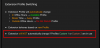
9994

Question:
1. how long will it take for the status to see away or dnd when I make the changes I notice it take 24 hours. is there a way for force it to see the schedule change

2. Is there a step missing?

3. @YiannisH_3CX "You do not need to disable them just don't use them if you do not need them".
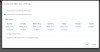
In case I miss it where is it that you enable or use it? is this the area?

9995

My server time and my phone time is correct. check that first


Manuel
 
1. how long will it take for the status to see away or dnd when I make the changes I notice it take 24 hours. is there a way for force it to see the schedule change
If you make a change to the time and you are in that time frame then the PBX will trigger the switch the next time the hours come around.
For example if its 10:10 and you set office hours to 09:00 am - 17:00 pm then the PBX will miss the switch of the 09:00 am as it missed the trigger.
But if it is 08:00 am and you set office hours to 09:00 am - 17:00 pm then the PBX will set your extension to available at 09:00 am.

2. Is there a step missing?
From your description no. The extension should switch to Available between office hours and DND the rest of the time.
3. @@YiannisH_3CX "You do not need to disable them just don't use them if you do not need them".
In case I miss it where is it that you enable or use it? is this the area?
Custom statuses can be manually selected either by the admin or by a user. Since your extension is not set to one of the 2 custom status then the auto switch should take place.

A few things to note: If your extension is unregistered and Available then calls will go to the "If I am busy or my phone is unregistered, forward calls to: " destination.
If you only have 2 destinations then you do not need a Dummy extension. You can set office hours to an inbound rule
You can also achieve the same with exceptions that do not rely on the status of the extension. You can set them up under the forwarding rules of your dummy extension.
 
Thanks that solves a lot of issues I am having
"Exceptions" was the solution I was looking for the whole time.
being new to this is MY biggest issue.
 
  • Like
Reactions: YiannisH_3CX
Glad to see the issue has been resolved.
 
Status
Not open for further replies.

Members Online Now

No members online now.

Forum statistics

Threads
111,832
Messages
589,285
Members
164,662
Latest member
DejanMDS