


- Joined
- Aug 6, 2018
- Messages
- 35
- Reaction score
- 4
Hello,
I am trying to create a script that I can use to automate the shell install of 3CX.
Here is what I have so far.
I have the last line commented out, as it always stops before completing if there is no user input. It asks for license to be accepted and then the following.
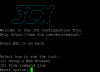
Is there a way to accept license and choose option 1 automatically? Something like a one line command?
Example
Thanks!
I am trying to create a script that I can use to automate the shell install of 3CX.
Here is what I have so far.
Bash:
#!/bin/sh


apt-get update
apt-get --with-new-pkgs upgrade -y

# Install 3cxpbx
wget -O- http://downloads-global.3cx.com/downloads/3cxpbx/public.key | apt-key add -
echo "deb http://downloads-global.3cx.com/downloads/debian stretch main" | tee /etc/apt/sources.list.d/3cxpbx.list
apt-get update
apt-get -y install net-tools dphys-swapfile
#apt-get -y install 3cxpbx
I have the last line commented out, as it always stops before completing if there is no user input. It asks for license to be accepted and then the following.
Is there a way to accept license and choose option 1 automatically? Something like a one line command?
Example
acceptlicense=y runtool=1 apt-get -y install 3cxpbxThanks!


