AWS Lightsail is there always automatic way to install ?

Status
Not open for further replies.

AWS2P

Silver Partner
Basic Certified
Joined
Jan 9, 2014
Messages
5,076
Reaction score
1,096
Hi,
I have 2 new PBXs to install and I'd like to know if existing automatic process from 3CX to AWS lightsail is always there or has been removed ?
 
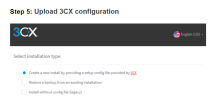
If now it needs to be manually done only, in my case I need to reinstall a PBX with new 3CX key and new FQDN, so for now I did a backup of existing PBX without these infos but now in the manual process of reinstal, in STEP 5 it ask this :
1681205422658.png

Do I need first to choose like it was a new pbx to be able to create a new hostname/FQDN ? and once done to restore the settings from the backuped PBX config ?
 
Last edited:
No, restore the backup and it will ask for FQDN and key during setup.

Also, this document is supposed to be for partners only. Not public.
 
Hi Fred,
Thanks so I just need to buy the new key and do the install according to the provided doc and just restore directly.

It seems to me 3CX CEO said it will be possible to retrieve automatic process for AWS lightsail too but no idea when it will ?
 
Hi Fred,
Thanks so I just need to buy the new key and do the install according to the provided doc and just restore directly.

It seems to me 3CX CEO said it will be possible to retrieve automatic process for AWS lightsail too but no idea when it will ?
There won't be a process for Lightsail other than the doc they released, which is the "official" way to deploy to Lightsail.

And yeah, just buy your license, during the wizard it will ask for it since it will detect no license in the backup.
 
There won't be a process for Lightsail other than the doc they released, which is the "official" way to deploy to Lightsail.

And yeah, just buy your license, during the wizard it will ask for it since it will detect no license in the backup.
Would you mind sending me the doc please as I can't seem to find it.
 
No, restore the backup and it will ask for FQDN and key during setup.
Hello Fred, @ConceptsWeb
I did yesterday, but unfortunatelly it's not what you said, portal ask for a backup with FQDN and KEY , mine was without and in that case 3CX process stops .
So i needed to install without backup and choosing a new FQDN and once first start of instance done, do a restoration of my backup to retrieve all settings.
 
Hello Fred, @ConceptsWeb
I did yesterday, but unfortunatelly it's not what you said, portal ask for a backup with FQDN and KEY , mine was without and in that case 3CX process stops .
So i needed to install without backup and choosing a new FQDN and once first start of instance done, do a restoration of my backup to retrieve all settings.
That is not normal. We did the other way hundreds of times.

Having a backup without key/FQDN should have allowed you to chose a new one during setup even if restoring from a backup.
 
Perhaps on 3CX portal something has changed, as it is specified as required , i did the try even i was without FQDN and key and the process stopped and displays that it was unable to find a fqdn and key in backup.
But it never ask for a new one, changing my way to no restoration that time I 've been asked for FQDN creation and it linked itself to the concerned key.
 
Perhaps on 3CX portal something has changed, as it is specified as required , i did the try even i was without FQDN and key and the process stopped and displays that it was unable to find a fqdn and key in backup.
But it never ask for a new one, changing my way to no restoration that time I 've been asked for FQDN creation and it linked itself to the concerned key.
Hi, this has always been the same, deploying to a self-hosted or to a 3CX Hosted machine via the portal and being able to upload a backup, requires that the backup contains the license key information and FQDN.

If you want to change the FQDN or license and the backup does not contain this information then you will need to deploy as a new machine, upload the backup to a location that can be reached from the backup and restore section found within the management console, and restore your backup post-install.
 
  • Like
Reactions: Evolute IT
Ahh! So I am not crazy. The setup wizard will support it, but not the cloud deployment wizard.

Gotcha! I never use that wizard lol
 
  • Like
Reactions: Charles_3CX
We are right both ;)
 
  • Like
Reactions: Charles_3CX
Status
Not open for further replies.

Forum statistics

Threads
111,974
Messages
590,081
Members
164,899
Latest member
mazet