Solved Azure and AWS | SIP Trunk Registration Failed

Status
Not open for further replies.

lmphago

Customer
Basic Certified
Joined
Jun 8, 2022
Messages
4
Reaction score
1
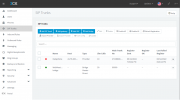
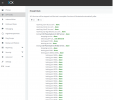
Hi, I have deployed 3CX on both Azure and AWS. The Firewall Check shows all green on both Azure and AWS but the SIP Trunk does not connect.
 

Attachments

  • SIP Trunk Registration Failed.png
    SIP Trunk Registration Failed.png
    49 KB · Views: 9
  • Firewall Check.png
    Firewall Check.png
    47.6 KB · Views: 9
What do the logs say?
 
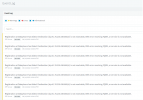
Set the activity logging level to Verbose and check what the logs say when the PBX attempts to register. Did you follow the 3CX guide for Dataphone?
 
Set the activity logging level to Verbose and check what the logs say when the PBX attempts to register. Did you follow the 3CX guide for Dataphone?
Yes, I used the Dataphone guide which was fairly easy. See the error log attached.
What do the logs say?
Hi, see the attached screenshot. How do I get around this?3CX Error log.png
 
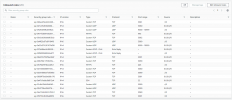
1655219655605.png
.
.
Above is the list of ports I enabled
 
From the error you are getting I believe you either do not get a reply back from Dataphone for your registration attempts. That could be because they need to whitelist your IP or the requests are not reaching them.
I would reach out to Dataphone and ask why registration is not working.
 
From the error you are getting I believe you either do not get a reply back from Dataphone for your registration attempts. That could be because they need to whitelist your IP or the requests are not reaching them.
I would reach out to Dataphone and ask why registration is not working.
Hi, thanks for your assistance, its working now, guess all Dataphone had to do was to whitelist my IP.
 
  • Like
Reactions: YiannisH_3CX
Glad to see the issue has been resolved.
 
Status
Not open for further replies.

Latest Posts

Forum statistics

Threads
111,991
Messages
590,167
Members
164,929
Latest member
Cloudstar