Backup to FTP will not resolve to URL addresses only IP addresses

Status
Not open for further replies.

rjamesm2884

Free User
Basic Certified
Joined
Feb 23, 2019
Messages
174
Reaction score
16
Someone needs to find out why 3CX will not backup to URL address. I'm trying to backup to Wasabi cloud storage with their FTP address s3.wasabi.com and it fails to resolve the address, however if I point it the IP address of that URL it resolves and connects putting the backup at risk if they change their IP address. Can someone explain why 3CX is behaving this way? Is this bug?
 
Hi James,

The 3CX system can accept FQDN for FTP. The issue you face might be one of DNS resolution possibly since the FQDN needs to resolve before the system connects.
 
Hi James,

The 3CX system can accept FQDN for FTP. The issue you face might be one of DNS resolution possibly since the FQDN needs to resolve before the system connects.
Ok so how do we resolve this? Because it's an issue if we only point to IP address.
 
Try using the terminal in the MGMT console and perform an NSLOOKUP to see if the DNS resolves.
 
Try using the terminal in the MGMT console and perform an NSLOOKUP to see if the DNS resolves.
NSlookup resolves in terminal but the FTP client on the 3CX server will not resolve FQDN only the address of the machine.
 
What is your DNS server? Can you change it to 8.8.8.8 and try again?
 
What is your DNS server? Can you change it to 8.8.8.8 and try again?
Ill give it a try im running this server on a VPS on MS Azure on Debian. I have updated the DNS server on the machine but i'm not sure if I will need to reboot the server. I tried doing a NSlookup and it resolves on terminal but on the backup manager in 3CX I get Cannot connect to FTP using the FQDN.
 
Ill give it a try im running this server on a VPS on MS Azure on Debian. I have updated the DNS server on the machine but i'm not sure if I will need to reboot the server. I tried doing a NSlookup and it resolves on terminal but on the backup manager in 3CX I get Cannot connect to FTP using the FQDN.

Hello, we have updated the DNS servers to 8.8.8.8 and we are able to resolve using terminal NSlookup however the issue is persist with error "Backup location configuration error. Please proceed and verify the configuration."

Again the server we are trying to use is s3.wasabisys.com confirmed working on FTP clients with our credentials. 3CX FTP client will not connect.
 
Now it shows like it connects but it fails intermittently. We are getting these errors now.

Your 3CX backup failed due to the following reason(s):
System.Net.Sockets.SocketException (111): Connection refused
at FluentFTP.FtpSocketStream.Connect(String host, Int32 port, FtpIpVersion ipVersions)
at FluentFTP.FtpClient.OpenPassiveDataStream(FtpDataConnectionType type, String command, Int64 restart)
at FluentFTP.FtpClient.OpenDataStream(String command, Int64 restart)
at FluentFTP.FtpClient.OpenWrite(String path, FtpDataType type, Boolean checkIfFileExists)
at FluentFTP.FtpClient.OpenWrite(String path)
at _3cxFilesystemImplementations.FTP.FtpFilesystem.CreateFile(String filename)
at ManagementConsoleJS.Services.BackupService.Backup(BackupDescription backupDescription)

Again this works and backsup if we don't use the FQDN and instead the IP address of one of the servers.
 
Hi James,

The 3CX system can accept FQDN for FTP. The issue you face might be one of DNS resolution possibly since the FQDN needs to resolve before the system connects.
The issue persist FQDN are not working with FTP only IP addresses. DNS server were changed NSLOOKUP resolves, FTP client doesn't work with FQDN. Please advice.
 
The issue persist FQDN are not working with FTP only IP addresses. DNS server were changed NSLOOKUP resolves, FTP client doesn't work with FQDN. Please advice.
Can you connect via FTP using Filezilla from your local machine?
 
Can you connect via FTP using Filezilla from your local machine?
Yes sir! All the time works like a charm on FileZilla. Not on 3CX possible bug here.
 
Yes sir! All the time works like a charm on FileZilla. Not on 3CX possible bug here.
Does your FTP server have logging or can it be enabled?
 
I don't believe so this is cold storage with Wasabi.
Are you sure you are using the correct domain as I cannot resolve:
1604525680442.png

If so I would suggest speaking to Wasabi and asking them if they can check the logs there side.
 
I would suggest speaking to Wasabi and asking them if they can check the logs there side.

I could but it doesn't seem a Wasabi problem if FileZilla works. I don't see FTP logs in the 3cx verbose mode. I already changed the DNS to Google and today to Cloudflare DNS, nslookup in terminal resolves.
 
I could but it doesn't seem a Wasabi problem if FileZilla works. I don't see FTP logs in the 3cx verbose mode. I already changed the DNS to Google and today to Cloudflare DNS, nslookup in terminal resolves.
It seems stange I cannot seem to resolve this:
1604525891313.png

It would still deffinatly be worth speaking to Wasabi as they may be able to atleast point you in the right direction even if it isnt there issue.
 
It seems stange I cannot seem to resolve this:
View attachment 18969

It would still deffinatly be worth speaking to Wasabi as they may be able to atleast point you in the right direction even if it isnt there issue.


I apologise it's s3.wasabisys.com
 
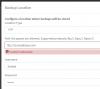
This would suggest that I have resolved and reached the server since it replies with invalid credentials
1604562390718.png

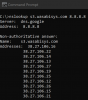
Also this would suggest that you may be ending up on any given IP below, and I don't know that they are all serving FTP
1604562511056.png

So I'm not sure that there is any issue with your PBX here, you will have to look into the networking side of things, and WireShark is your friend
 
Status
Not open for further replies.

Latest Posts

Forum statistics

Threads
111,991
Messages
590,166
Members
164,929
Latest member
Cloudstar