Solved Backups takes more and more space

Status
Not open for further replies.

David_K

Bronze Partner
Basic Certified
Joined
Apr 3, 2019
Messages
198
Reaction score
27
Hello

On a 3CX server, I see backup files (as zip) taking more and more space.

Where can I check the size of what's included and maybe do some cleanup?

Thanks !
 
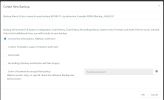
If you navigate to Dashboard>>Backup and Restore and click on "Backup" which are the options included in the backup?
 

Attachments

  • 1671620414346.png
    1671620414346.png
    69 KB · Views: 16
Everything is checked, as usual on all our installations.
Could have been recordings that eats storage, but there are no recordings
 
You can download one of your backup files and open the zip file using a 3rd party zip application like 7zip, and check how much space each folder takes.

This will give you information on what is making the backup so big, and be able to make adjustments.
 
OK that was my idea also.
I did it, and 97% of the files are in the "provisioning" folder, most of them in "firmware" and "firmware_new"
It probably keeps all old fimware forever? Where can I clean this?
 
You can uncheck the option for "Custom Templates, Logos, Firmwares and Faxes" in Backup and Restore > Backup Schedule.
 
Hi @David_K

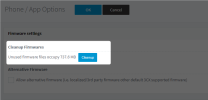
You can cleanup old firmwares from the system by going into Phones>>Options>>Cleanup firmwares
1671640635553.png
 
Thanks @AndreasPo_3CX

I did cleanup the unused firmware and the backup file is now 90% smaller :)
 
  • Like
Reactions: Evolute IT
Status
Not open for further replies.

Forum statistics

Threads
111,974
Messages
590,081
Members
164,899
Latest member
mazet