Bad audio quality on softphones, ok with regular phones

Status
Not open for further replies.

Imille-3cx

Free User
Joined
Feb 21, 2019
Messages
7
Reaction score
0
Hi everyone,

sorry if this has been asked before but I couldn't find anything related here.

We are running a brand new 3cx installation with also a new Patton gateway.
IP phones (cordless and wired) work fine but audio quality on 3cx softphone is terrible.
I tried everything, from prioritizing traffic over the network to changing the codecs. Nothing works, audio is still terrible. This happens both on WAN and LAN, calling landline phones and also from extension to extension.
Actually I can hear fine (incoming audio is ok) but outgoing audio is terrible.

Do you have any suggestion?
Thanks for help!
 
Which OS for the softphone? I'm running into the same issue with the Android softphone - current and beta are horrible audio quality, but using a third-party SIP client on the phone works great with 3CX (audio-wise). It's like the mic is not in the right mode or something. The Windows client is a bit better, but still not great.
 
Which OS for the softphone? I'm running into the same issue with the Android softphone - current and beta are horrible audio quality, but using a third-party SIP client on the phone works great with 3CX (audio-wise). It's like the mic is not in the right mode or something. The Windows client is a bit better, but still not great.

I tried 3cx softphone on macOS and Android.
I also tried third party (x-lite) but I couldn't log in at all, don't know why.
 
Are you using the same type of microphone/headset, on all softphones? Have you tried changing any, to something else?
 
Are you using the same type of microphone/headset, on all softphones? Have you tried changing any, to something else?

I'm pretty sure it's not hardware related. I use the same devices for calls via Skype, Hangouts or other softwares and everything is good.
This happens only with softphones over the same network and using the same extensions.
 
Since it is a one way problem (outgoing sound issue), it sort of eliminates a network or Codec issue. The fact that other sets are fine also removes the network from the list of suspects. That leaves the audio source, which might require substituting hardware to determine what is causing this.
Are all of the PCs having the issue, the same (make/model/OS)? Do they all use the same audio hardware? Have you tried provisioning a laptop with an extension, then just using the built in microphone, as a test. It won't sound great, and you'd have to turn down the audio to prevent an echo, but if it sounds better than the current set up, you may have to look at the audio components on the PC's. Many run audio driver programs in the background, and there may be a setting in there, that is incompatible with the 3CX softphone.
 
Are all of the PCs having the issue, the same (make/model/OS)? Do they all use the same audio hardware? Have you tried provisioning a laptop with an extension, then just using the built in microphone, as a test. It won't sound great, and you'd have to turn down the audio to prevent an echo, but if it sounds better than the current set up, you may have to look at the audio components on the PC's. Many run audio driver programs in the background, and there may be a setting in there, that is incompatible with the 3CX softphone.

I can try this, but since we are using a lot of different hardware (laptops, mobile phones) and OSs, mainly macOS and Android, I was going to address the issue on a wrong configuration of the network or the 3cx installation.
Also the sound is terrible but audible, it's not that there's something wrong that completely stops the audio from being heard...
I'm kinda lost :D
 
Sorry, I missed the part about it being an Android and iOS issue. I assumed it was a 3CX Windows only problem. That being the case. What happens if you use the handsets off your local network, either another Wifi hotspot, or over 3/4G?
 
So the soft phone defaults to a different codec and then desk phones. I'll check the codec in use.
 
Sorry, I missed the part about it being an Android and iOS issue. I assumed it was a 3CX Windows only problem. That being the case. What happens if you use the handsets off your local network, either another Wifi hotspot, or over 3/4G?

Good question!
I get some extra latency over 4G, which is ok I guess, but voice is still terrible, very metallic and stuttering.
 
So the soft phone defaults to a different codec and then desk phones. I'll check the codec in use.

Do you have any suggestion?
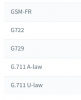
These are the default codecs; I tried to sort them in different ways but I had no luck.

9630
 
Sorry for this new message but looks like I can't edit my previous post.
Are default codecs in Settings/PBX ignored by the softphones? I did not selected "PBX Delivers Audio" on my extensions config.
 
Very broadly speaking,

When the PBX does not deliver audio (ie. it is an internal call where two devices speak directly to each other over LAN), then the priority under Extension>Phone Provisioning>3CX Client>Codecs will apply.

If you have PBX Delivers Audio selected on each extension, then priority under PBX>Codec Priority for Local/Internal Calls will apply.

Obviously in external calls and some other scenarios the pbx delivers audio whether you select it or not since it has to go via your provider or via a tunnel, so generally speaking, this is regarding internal calls.

Again this is in a very broad sense, there are scenarios where something different will apply
 
Unless there are network limitations (usually when "off-net"), that require the use of lower bit-rate Codecs on the softphones, then I would set the order, the same as the desk sets. Traditionally one of the G711 Codecs are first choice. Depending on the set capability, some users prefer to use the newer HD Codecs internally. Check to see what your provider is specifying on the trunks, it usually works best if all devices stick to the same Codec and that no transcoding (the PBX required to translate from one Codec to another)occurs. In some cases, some devices do not perform well using low bit-rate Codecs. That may, or may not, be the case here.
 
  • Like
Reactions: nub
One this that hasn't been mentioned here is whether you are splitting and prioritising Data and voice traffic on the local LAN (and layer 3 router) if so this could be a result of bandwidth allocation as your 3CX soft clients will reside on the data network (which is normally left for the default VLAN).

If bandwidth is not an issue or you only have a low number of endpoints this is less likely however.
 
Status
Not open for further replies.

Forum statistics

Threads
111,914
Messages
589,711
Members
164,783
Latest member
GothamUser