- Joined
- Nov 13, 2009
- Messages
- 17
- Reaction score
- 2
Hello 3CX team,
We have a Bitrix24 cloud version, and we´ve installed 3cx-plugin in Bitrix24 and made all the steps indicated in this instruction:
https://www.3cx.com/docs/bitrix24-crm-integration/
The Contact Synchronization works. All inbound and outbound calls are registered in the client´s cards in CRM and also it creates a new contact automatically when a call is received from an unknown number.
Click to Call doesn´t work.
In the instruction is written about 3CX Desktop App for Windows, we´ve installed, but it doesn´t has any connection with Bitrix24.
In this forum we found information about web-client 3cx and we´ve installed it.
We’ve tested in Google Chrome the link of this type:
https://xx.xx.xxx.xxx:5001/webclient/#/call?phone=1234567
and it works with 3cx-web-client.
We also found in this forum that we should desactivate Bitrix24 outbound calls.
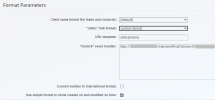
We’ve chosed these variants bellow, but it doesn’t work.
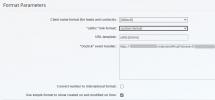
1.- Are we on the right way? As there is no official instruction how to make outbound calls work, may be we should do totally another steps? Which one?
We’ve seen that in this forum somebody use the special Chrome plugin to call from any telephone number from the web-page, we’ve tried it and it works with 3cx-web-client, but it’s not a click-to-call integration. Or it’s the only way to make it work now?
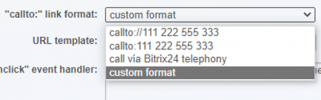
2.- If it’s correct that we try to use 3cx-web-client, could you help us with the adjustments that will make it work with Bitrix24? I’ll show screens if you could tell us about the correct choice:
2.1. Custom format
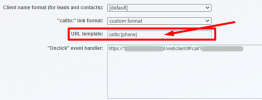
2.2. Should we write it like this? It seems that the format of a handler is another one:
We have a Bitrix24 cloud version, and we´ve installed 3cx-plugin in Bitrix24 and made all the steps indicated in this instruction:
https://www.3cx.com/docs/bitrix24-crm-integration/
The Contact Synchronization works. All inbound and outbound calls are registered in the client´s cards in CRM and also it creates a new contact automatically when a call is received from an unknown number.
Click to Call doesn´t work.
In the instruction is written about 3CX Desktop App for Windows, we´ve installed, but it doesn´t has any connection with Bitrix24.
In this forum we found information about web-client 3cx and we´ve installed it.
We’ve tested in Google Chrome the link of this type:
https://xx.xx.xxx.xxx:5001/webclient/#/call?phone=1234567
and it works with 3cx-web-client.
We also found in this forum that we should desactivate Bitrix24 outbound calls.
We’ve chosed these variants bellow, but it doesn’t work.
1.- Are we on the right way? As there is no official instruction how to make outbound calls work, may be we should do totally another steps? Which one?
We’ve seen that in this forum somebody use the special Chrome plugin to call from any telephone number from the web-page, we’ve tried it and it works with 3cx-web-client, but it’s not a click-to-call integration. Or it’s the only way to make it work now?
2.- If it’s correct that we try to use 3cx-web-client, could you help us with the adjustments that will make it work with Bitrix24? I’ll show screens if you could tell us about the correct choice:
2.1. Custom format
2.2. Should we write it like this? It seems that the format of a handler is another one: