- Joined
- Mar 10, 2010
- Messages
- 254
- Reaction score
- 10
I found a guide that says you can block numbers.
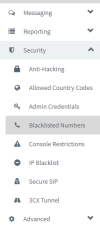
The instructions are below, but I don have a blacklisted numbers section when I go to settings. I'm on Professional annual 18.0 Update 5 (Build 418) Version
Is this an old guide, or not available on my license.
"
Log in to the 3CX Management Console.
2. Go to Settings.
3. Click Blacklisted Numbers.
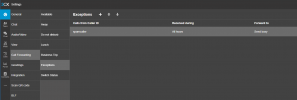
4. Click “Add.”

5. There will be two fields to fill out: “Incoming caller ID to be blocked” and “Description.” In the first field,
enter the full phone number or caller ID that you want to block. The “Description” field is for you to know why you blocked the number.

The instructions are below, but I don have a blacklisted numbers section when I go to settings. I'm on Professional annual 18.0 Update 5 (Build 418) Version
Is this an old guide, or not available on my license.
"
Log in to the 3CX Management Console.
2. Go to Settings.
3. Click Blacklisted Numbers.
4. Click “Add.”
5. There will be two fields to fill out: “Incoming caller ID to be blocked” and “Description.” In the first field,
enter the full phone number or caller ID that you want to block. The “Description” field is for you to know why you blocked the number.