Blacklisting a number

Status
Not open for further replies.

ZenMasta

Customer
Joined
Mar 10, 2010
Messages
254
Reaction score
10
I found a guide that says you can block numbers.

The instructions are below, but I don have a blacklisted numbers section when I go to settings. I'm on Professional annual 18.0 Update 5 (Build 418) Version
Is this an old guide, or not available on my license.
"
Log in to the 3CX Management Console.
2. Go to Settings.
3. Click Blacklisted Numbers.
4. Click “Add.”
Add Button

5. There will be two fields to fill out: “Incoming caller ID to be blocked” and “Description.” In the first field,
enter the full phone number or caller ID that you want to block. The “Description” field is for you to know why you blocked the number.
Blacklist a Number
 
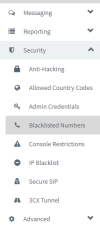
It's under security -> blacklisted numbers
1667584234735.png
 
  • Like
Reactions: jed and Evolute IT
Ah, I see. Thank you!
 
  • Like
Reactions: jed
Good day all,

I'm positive that this question has been asked numerous times before and we desperately require access to this feature for our end users so that they can restrict SPAM Callers.

My question is: How can we provide USER or EXTENSION level access to this Blacklist to allow the person to add numbers into the blacklist (whilst obviously allowing the system administrator to keep access to this list on the 3CX Server) - without providing the end users access to other Management Console features.

and Why has this not an option that has been made available as yet [if not] - System administrators can take responsibility of managing the list.
 
  • Like
Reactions: MMDTerry
Blacklisted numbers are manageable via the 3CX Call Control API. If 3CX doesn't get around to providing user-level access, we could build a web-based tool that enables end-users to manage the list. I actually have the same problem and I suspect many customers would like an easy way of adding a number to the blacklist.
 
  • Like
Reactions: Ibby-WaveLengths
Good day all,

I'm positive that this question has been asked numerous times before and we desperately require access to this feature for our end users so that they can restrict SPAM Callers.

My question is: How can we provide USER or EXTENSION level access to this Blacklist to allow the person to add numbers into the blacklist (whilst obviously allowing the system administrator to keep access to this list on the 3CX Server) - without providing the end users access to other Management Console features.

and Why has this not an option that has been made available as yet [if not] - System administrators can take responsibility of managing the list.
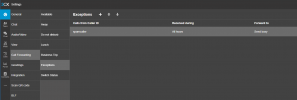
As a temporary workaround, use the exception builder to allow an end user to "block" a number:

1687445092693.png
 
As a temporary workaround, use the exception builder to allow an end user to "block" a number:

View attachment 36104
Thank you for this, we're definitely going to try it out with the clients that need this feature.

Also I have to apologize, as I forgot to mention that the "Spam" number/s in question need to be blocked system-wide and not only applicable to the user inserting the exception - basically nobody in the organization or company needs these calls.
 
Thank you for this, we're definitely going to try it out with the clients that need this feature.

Also I have to apologize, as I forgot to mention that the "Spam" number/s in question need to be blocked system-wide and not only applicable to the user inserting the exception - basically nobody in the organization or company needs these calls.
In that case, I recommend voting here: https://www.3cx.com/community/threa...to-be-able-to-manage-blacklist-numbers.50366/
 
Status
Not open for further replies.

Members Online Now

Forum statistics

Threads
111,832
Messages
589,284
Members
164,662
Latest member
DejanMDS