Block External Login

Status
Not open for further replies.

amannick

Gold Partner
Joined
Feb 26, 2021
Messages
102
Reaction score
13
Hello

I am working with a client who like to create 3CX usage as per his business hirerarchy.

Agent - Should be able to login with in the local office premies or allowed up and can only be able to make and receive calls
Queue Manager - Should be able to manage Queue status such as calls in queue and make reports


Thanks
Aman
 
So, your question is.... "The agent, has the opportunity to login, from outside the company (home?), but we wish to prevent this."

It that correct?
 
To log in from the local premises only, means that you have to block access from your firewall towards the HTTPS and Tunnel ports. Note that this blocks:

- 3CX clients (Windows/Android/iOS/Webclient)
- Bridges (presence, and voice if using Tunnel)
- SBC
- Remote IP Phones from outside your LAN (provisioning, and voice if using SBC )
- 3CX WebMeeting functionality
- Messaging

Depending on whether you use SIP Trunks or Gateways, you can also block the SIP port too (which also blocks voice on STUN phones)

This will greatly reduce the capabilities of the system however, so keep that well in mind before you proceed.
 
Last edited:
To log in from the local premises only, means that you have to block access from your firewall towards the HTTPS and Tunnel ports. Note that this blocks:

- 3CX clients (Windows/Android/iOS/Webclient)
- Bridges (presence, and voice if using Tunnel)
- SBC
- Remote IP Phones from outside your LAN (provisioning, and voice if using SBC )
- 3CX WebMeeting functionality
- Messaging

Depending on whether you use SIP Trunks or Gateways, you can also block the SIP port too (which also blocks voice on STUN phones)

This will greatly reduce the capabilities of the system however, so keep that well in mind before you proceed.
Hello John

Thank you for your revert. If we apply rules on our firewall will it be implemented on entire server or just few users. As my requirements is to give login rights as per the hierarchy.

For example

I am running a call centre and i have following roles

Agent - Level 1

Team Leader - Level 2

Manager - Level 3

So Eventually i don't want to give access or login privileges of 3cx web client, mobile app or windows app to Level 1 or Level 2.

Level 1 and Level 2 can only access in office premises (Local IP or Public IP of the office)

However Manager who has a level 3 can access all the service from anywhere!!

Let me know if it can be done...


Thanks
Aman
 
Hi Aman,

Unfortunately this will apply to everyone, it's a way of locking down the system to prevent outsiders (at the expense of some functionality). Not sure if I understood your original question correctly the first time round..

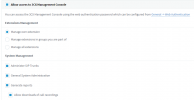
As for reports, please take a look at your extension's rights tab and see what options you can give.

Then create a test extension, assign the rights, and log in with it to see exactly what that user will see.
1614763586406.png


I would suggest you take a look at our training module here, which will walk you through the entire thing:
https://www.3cx.com/3cxacademy/videos/intermediate/extension-groups/
 
Hi Aman,

Unfortunately this will apply to everyone, it's a way of locking down the system to prevent outsiders (at the expense of some functionality). Not sure if I understood your original question correctly the first time round..

As for reports, please take a look at your extension's rights tab and see what options you can give.

Then create a test extension, assign the rights, and log in with it to see exactly what that user will see.
View attachment 20991


I would suggest you take a look at our training module here, which will walk you through the entire thing:
https://www.3cx.com/3cxacademy/videos/intermediate/extension-groups/
Hey John Thank you or sharing this .... However I have already tried and tested no luck :(
 
When you say not luck, can you tell me what you tried and what happened so that I can better understand?
 
Status
Not open for further replies.