Bridge Presence not showing

Status
Not open for further replies.

SebastianS

Customer
Joined
Feb 25, 2022
Messages
9
Reaction score
0
I am using 3cx 18.0.2 hosted by 3cx. I have sucessfully configured a master and slave bridge.
Using the public documentation I was able to see presence on the slave side of 3cx but not on the master side.

Then I started to fiddle a bit and try to remove an add all users on the master side (presence tab, receive information). Didn't work.
Then I started to remove an add all users on the slave side(presence tab, receive information). No results.

I also tried to remove and add the Group under "publish information" on both sides. With the result I now can't even see presence on the slave side anymore.

Where to I start to look for errors? Is there a log? How can I activate it? Can I check URLs the clients are using if they are available?
 
Look under the presence tab under the bridge setting on both sides and make sure you've filled out the relevant information.

https://www.3cx.com/docs/manual/connecting-pbx-bridges/

Step 3 on this document is what you need.

check your extension group has "publish group info to all extensions" ticked
 
Did not work. I even ticked the box "publish group info to all extensions" in the group settings.
 

Attachments

  • master.PNG
    master.PNG
    23.9 KB · Views: 57
  • slave.PNG
    slave.PNG
    19.8 KB · Views: 55
Are your extensions that you want to see in your default group?
 
Last edited:
Yes they are. I don't really use groups right now. So everyone is in the default group.
 
Do any of your extensions have "hide from address book" enabled?

try adding :443 on the end of your URL
 
All extensions are visible in the adress book and none of them have the option ticked "Hide this extension from 3CX company phonebook and 3CX Apps".
I tried adding 443 but after reloading the tab the 443 is gone. I guess that's the standard port.

Are there logging mechanisms I can try to identify the problem?
 
I tried adding 443 but after reloading the tab the 443 is gone. I guess that's the standard port.
If you're using port 443 it will indeed automatically be removed.

You mention 3CX Hosted PBX in your initial description, are both of them hosted? If not, are both using port 443 for HTTPS?
 
yes both are 3CX hosted and using 443 for HTTPS.
 
Could you please try the following:

1. Create a test extension on both PBXs.

2. Create a test extension group on both PBXs.

3. So you have PBX A: Group A : Ext A and PBX B: Group B: Ext B

4. Add Ext A only to Group A and Ext B only to Group B and give them both full rights.

5. In the Extension Group rights make sure all rights are selected and also enable " Publish group information to all extensions" for both groups.

6. In SIP Trunks, make sure the Master and Slave Bridge are configured as follows:
PBX A:
1645805095566.png

PBX B:
1645805086390.png

7. Log into the Webclients of both these extensions and make sure "All Groups" is selected in the upper right of the "People" section. Can the extensions see each other?
 
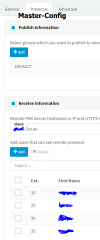
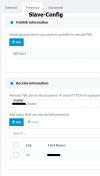
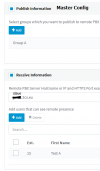
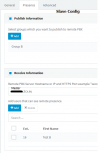
Ok now we are a Step closer. User "Test A" and "Group A" belongs to the Master PBX. User "Test B" and "Group B" belongs to the Slave PBX.
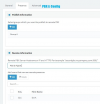
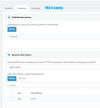
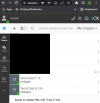
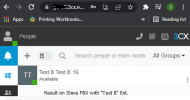
I can now see "Test B" as user "Test A" on the Master PBX. But I can't see "Test A" as User "Test B" on the slave Server.
 

Attachments

  • Master-Config.png
    Master-Config.png
    11.6 KB · Views: 46
  • Slave-Config.png
    Slave-Config.png
    14.1 KB · Views: 44
  • Result-Master.png
    Result-Master.png
    25.4 KB · Views: 46
  • Result-Slave.png
    Result-Slave.png
    18.8 KB · Views: 42
I'll PM you for a bit more information on this.
 
Issues seems to have been resolved after reconfiguring the bridge configuration on the Slave PBX and did not re-occur even after numerous attempts.

Please do let us know if this resurfaces.
 
Hello Chris, thank you for replying and take a look at my config.
When you say "reconfiguring", can you tell in detail what you did?
Did you delete the slave config and added a new one?
Or did you just fiddle some settings, applied it, then removed them to the old one so essentially nothing changed?
 
Or did you just fiddle some settings, applied it, then removed them to the old one so essentially nothing changed?
In essence, this. Can you confirm everything is still in working order?
 
Status
Not open for further replies.

Forum statistics

Threads
111,974
Messages
590,083
Members
164,901
Latest member
Silent_Guru