Bridging 3cx with Panasonic KX-TDE200 and calling extensions

Status
Not open for further replies.

Petru Lupascu

Joined
May 31, 2018
Messages
6
Reaction score
0
Hello everyone,
Recently I have been trying to to connect the 2 phones systems in order to be able to call each others extensions. So far I have been able to establish a bridge between them with 3cx as the Master and registering the Panasonic to it. To set it up on Panasonic I followed

https://translate.google.com/transl.../integracija-atc-panasonic-tde200-s-asterisk/

However, even if everything seems set and the bridge is up I still cannot make any calls from 3cx to panasonic or otherwise. I tried capturing the call from 3cx side, and what I saw was Only invites being sent to the Panasonic. At the moment both systems are under the same LAN so there is nothing in between them.

I would be gratefull for any hints or suggestions !
Thanks!

 
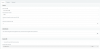
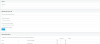
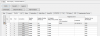
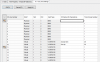
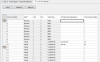
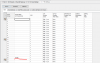
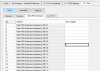
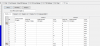
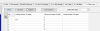
HI again, here are some more details on the problem, the pictures of the Bridge setup from 3cx side and from panasonic side.bridge_master.PNG
-------------------------------------------------------------------------------
bridge_master_settings.PNG

------------------------------------------------------------------------------------------
outbound_rule.PNG
-----------------------------------------------------------------------------------
call_timeout.PNG -------------------------------------------------------------------------------------
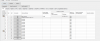
p_SIPTRUNKcard_portproperty_cp.PNG
----------------------------------------------------------------------------------
p_SIPTRUNKcard_portproperty_Main.PNG --------------------------------------------------------------------------------
p_SIPTRUNKcard_portproperty_Account.PNG -------------------------------------------------------------------------------
p_SIPTRUNKcard_portproperty_Register.PNG
------------------------------------------------------------------- ---
p_SIPTRUNKcard_portproperty_cp.PNG
 

Attachments

  • p_SIPTRUNKcard_portproperty_cp.PNG
    p_SIPTRUNKcard_portproperty_cp.PNG
    20.9 KB · Views: 64
  • p_COline_setting.PNG
    p_COline_setting.PNG
    25.8 KB · Views: 66
and the internal Panasonic routing
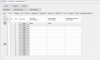
p_COline_setting.PNG
----------------------------------------------------------------
p_group_Settings.PNG
-------------------------------------------------------------------------p_NumberingPlan.PNG
---------------------------------------------------------------------
p_TIE_table.PNG
------------------------------------------------------------------
p_DialingPlan.PNG
-------------------------------------------
p_DID.PNG


Thank you very much for help!
 
I assume that the Panasonic does not having any sort of log system to allow you to see how it is "dealing" with an Invite.

Are you sending the correct number of digits?

Have you used Wireshark, to see if there is any sort of response from the Panasonic PBX?

Does the trunk appear to be registered at both ends? 3CX should show a log of the successful registration, and in this way you can confirm that they are actually communicating with each other.
 
I doesn't have a way to log the details , only an error log which shows me that a Data Link could be established and judging by the time stamp it is to the Master bridge.

Regarding the number of digits and possible combinations I tried all the possible scenarios and still no result.

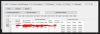
With wireshark , I get this :ws_capture.PNG
calling the extenssion directly(not the DID number ) gives the same INVITE.

And yes , the trunk is registred at both ends.
upload_2018-8-29_18-21-7.png
I have it to reregister every 5 min now, and I can see it active from both ends.
 
Since you can't see what the Panasonic is doing with incoming calls, start off getting the calls from the Panasonic to 3Cx working first, as you can see if anything is being received.. If you send any digits from the Panasonic, even incorrect length numbers, you should see a log at the 3CX end unless nothing is being sent. If that is the case, then there are some options that need changing. I'm not familiar with the Panasonic unit, so can't offer any suggestions. You might want to see if there is a Panasonic forum, where someone has attempted to connect to either 3CX, or another SIP PBX . There might be a setting that is being missed.

Is the Panasonic designed to trunk to another PBX, or only to VoIP providers? If only to a VoIP provider, then you may have to take that into account when designing the dial plan between the two.
 
Fully possible, done many times, but better do it with Generic SIP trunk without registration, otherwise you will have issues with seeing extension numbers or caller-ids.
I have tried already creatin a generic sip trunk m but on the Panasonic side the channel goes from INS to fault
 
Last edited:
  • Like
Reactions: Petru Lupascu
You probably doing something wrong -- both trunks (in 3CX and Panasonic) should be without registration. If so, you should not get FAULT state, check whether you have free channel licenses.

The 3CX trunk should be to Panasonic_IP_address:35060 (port 35060 is default in Panasonic) and the Panasonic trunk should be to 3CX_IP_address:5060
Hi Edi,
I managed to create the bridge from 3cx to Panasonic with a new DSP card on Panasonic, but as you mentioned , the caller id doesn't go through.
Can you please give a a bit more details about how to make the connection without registration between tthe trunks? So far on the Generik Sip Trunk it shows that it is up however the channel on the Panasonic SIPGW can't be brought in service, I still see the Fault in the status.
 
Status
Not open for further replies.

Latest Posts

Forum statistics

Threads
111,894
Messages
589,604
Members
164,763
Latest member
Techmansam