Call Divert

Status
Not open for further replies.

RSTUPT

Free User
Joined
Jun 28, 2021
Messages
10
Reaction score
0
Good Morning Guys

Hope you have fantastic day

I have a client who is a GP who has 4 Doctors underneath him

Lets just say there are 4 doctors and Reception

Some of the doctors are on call in the evenings so is there away to put the system on divert for 2 numbers or 3 numbers at a time for example

DOC A and B works 2 Evenings so when reception puts the DNB on it will ring on both numbers for doc on call
Same if DOC B and C is on on the next 2 Evenings some of them differ by date

Is there a night service that can be setup to accommodate this for different doctors on call with their cell phone numbers?
 
Hi @RSTUPT,

A couple of questions to clear up exactly what you'd like so that we can provide you with the best solution:
  1. In this scenario, does each doctor have their own DID (number) or does a patient call a single number and it should forward to doctors based on availability?
  2. Would you want it to ring all of the available doctors at the same time or should there be a specific order?
  3. Would you want an IVR (digital receptionist) to sift through the calls (for GP A press 1, for GP B press 2 etc)?
Is there a night service that can be setup to accommodate this for different doctors on call with their cell phone numbers?
There is indeed. You can control this with the statuses of the extensions. Configuring the DND status allows you to enter a mobile number to forward to. You can also distinguish between internal and external calls per status, so for example, if the GP is not working (DND) you can have that external calls are diverted to voicemail if they don't want to be bothered, but internal calls (from another GP that may be important) make it through to them.
 
They call one number and then it should be forwarded to the doctors who are on call
 
@RSTUPT,

You can set this up using call queues, simply create a queue and add all of the doctors as agents. Under the Notifications tab add the receptionist as the queue manager. The queue manager can log extensions in and out of the queue, controlling whether they are polled when the queue is called. The extensions can log themselves in and out of the queue as well (as simple as clicking the Q button in the Web Client).

The queue can have the polling strategy set to 'Ring All'.

From the SIP Trunk, under the "Route calls to" section, make sure incoming calls are routed to your queue.
 
@RSTUPT,

You can set this up using call queues, simply create a queue and add all of the doctors as agents. Under the Notifications tab add the receptionist as the queue manager. The queue manager can log extensions in and out of the queue, controlling whether they are polled when the queue is called. The extensions can log themselves in and out of the queue as well (as simple as clicking the Q button in the Web Client).

The queue can have the polling strategy set to 'Ring All'.

From the SIP Trunk, under the "Route calls to" section, make sure incoming calls are routed to your queue.
Thank you but will it work when the reception puts a DND on the switchboard then it must ring on the doctors extenstions on call and must get changed when they on duty and not on duty or how does it work ? As I Said DOC A and B work 3 nights on call and DOC C and D work 3 Nights they dont want to change the numbers all the time or remove anything at the Moment the DND goes only to one number
 
Hi @RSTUPT,

So given that you only want 2 doctors on call and 2 doctors working a later shift, we only need 2 things to begin with:
  • A call queue set up. (which will handle the both the standard day calls and the after hours on call calls)
  • Specific office hours set up under Settings >> Timezone, Office Hours & Holidays (this is for the hours where no one will be available - when the on call doctors finish for the evening, until the next shift comes in).
The call queue will mean that you won't need to set extensions to DNDs at all, simply log the extensions out of the queue and they won't receive any calls directed to that queue (thus creating your shifts), the on call doctors won't log out until they stop their shift, at which time the PBX will automatically switch itself to Out of Office hours.
 
Yes but if a call comes in after hours it should ring automatically at the doctor on duty cell phone instead of at the practice reception ?
 
Can you clarify the call flow?

When a call comes in it reaches the receptionist first, correct?

The receptionist forwards the calls internally to the 4 doctors. When the practice closes, 2 doctors should receive the practice's calls on their mobiles?

If I have not summarised this correctly, please let me know how you'd want the call flow to work.
 
Can you clarify the call flow?

When a call comes in it reaches the receptionist first, correct?

The receptionist forwards the calls internally to the 4 doctors. When the practice closes, 2 doctors should receive the practice's calls on their mobiles?

If I have not summarised this correctly, please let me know how you'd want the call flow to work.
As soon as the Reception puts the divert on or DND on the switchboard it must go to the doctors on call
they dont want to change it everytime so they will have a list of Doctors
and if Doc a and B is on call the call must go directly to them instead of the switchboard
 
Step by step, this is how you could set this scenario up.
  1. Management Console >> Extensions >> GP A >> Forwarding Rules >> DND status >> Forward external calls to number: Mobile number. Do this for GPs B, C and D.
  2. Management Console >> Call Queue >> Create a call queue where all GPs are agents, the receptionist is a queue manager (from Notifications section).
  3. Management Console >> Inbound Rules >> Select your DID (number) and add the Queue to the "Destination for calls outside office hours" section.
  4. Management Console >> Settings >> General >> check the box "Allow forwarding to external numbers in Ring Groups and Queues"
  5. Management Console >> Settings >> Timezone, Office Hours & Holidays >> Set your office hours, this will automatically change extensions to DND when the office closes.
Now the only thing that the receptionist needs to do before leaving is log out for the doctors who are not on call, and ensure the ones on call are logged in.
 
My brother and sister are both physicians and they would NEVER want a patient to be able to call them directly at 3:00 a.m.. Rather, they would want to have the patient leave a voicemail, and then be notified that a patient is requesting a callback. This approach allows them to review the symptoms, confer with a colleague, perform some research, and THEN call the patient back. The last thing you want is for a patient to wake up the physician who answers the phone with a very groggy "hello".

Further, relying on the receptionist to (1) always remember to set the DND status, and (2) remember who is scheduled to be on-call is a recipe for frequent mistakes.

As self-serving as this may sound, I encourage you to take a look at our 3CX On Call Manager tool. This tool allows you to set up recurring schedules, with an unlimited number of groups. For example, you don't want to pester the pediatrics Doc when the patient needs internal medicine. As mentioned, sending callers to an IVR where the patient selects either the Doc they want or the needed specialty is typical.

I should also point out that we support both live answer (queues) as well as voicemail call-back so you can handle incoming calls either way.

We also handle escalation. So, if the Doc on-call doesn't answer because their cell phone died in the middle of the night, you can escalate up to 30 levels with multiple physicians in each level. We can send notifications by phone, email, and SMS. This is important because the more channels of communication, the more likely the Doc is going to get the notification.

Finally, we log everything that happens so you know when the call came in, who was notified, how they were notified when escalations were necessary, and you can even add notes to document what actions were taken.

Ultimately, what you need is a fully automated solution (in my opinion), because when you rely on people to handle it, mistakes will be made, and particularly in your environment, that's not a good thing.
 
  • Like
Reactions: Evolute IT
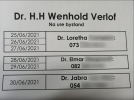
2021-06-29_09h34_53.png

Hi Guys this is the example of what needs to be done

DOC 1 3 Days
DOC 2 2 days
DOC 3 1 DAY
 
Last edited by a moderator:
Hi @RSTUPT,

Have you tried the steps I provided above?
 
Great, you can PM me the logs and screenshots to take a look at.
 
Applogies we misunderstoond the client . The client has a DND number programmed when they put the DND on the switchboard how do they change only that one number when needed?
 
Hi @RSTUPT,

When you say they have DND number programmed, you mean they have 1 number that should be called when the PBX is set to out of office hours?
 
Hi @RSTUPT,

When you say they have DND number programmed, you mean they have 1 number that should be called when the PBX is set to out of office hours?
Correct They had 1 number programmed but they want to change it regularly when it suits them
 
As mentioned in PM, you can change the number in both the Web Client and the Windows Client.

In the Web Client: Settings >> Call Forwarding >> Do Not Disturb >> Forward to External Number.

In the Windows Client: Settings >> Status Configuration >> Do Not Disturb >> Forward to External Number.
 
  • Like
Reactions: Evolute IT
Status
Not open for further replies.