Call Dropping. Looking for Delay of Disconnect Feature

Status
Not open for further replies.

Rob Fabian

Customer
Joined
Mar 22, 2022
Messages
8
Reaction score
0
Hello,

It seems as though we are experiencing random call droppings. I believe it is our network because if we experience any kind of packet loss (even for a second) it will drop. I am looking to see if there is any kind of feature that allows for a bit of a delay before disconnecting or changing protocols or anything like that. This is hosted within 3CX cloud if it makes a difference,

Thanks!
 
Hi Rob,

Try using the 3CX mobile app as a test.

Since making VoIP calls over WiFi or LTE is less reliable than ethernet, the mobile app has a built-in feature that keeps the session going for a while and tries to recover the connection for you (within reasonable limits).

You will hear beeping when this event occurs, and when the connection is re-established the beeping will stop. Or if it's too bad, the call will finally drop.

Use this as a method to test this case.
 
  • Like
Reactions: VoIPTools
Hi John,

Thank you for the information. Unfortunately, I won't be able to test this until tomorrow but what if the network is the issue? At least according to our logs of a 24-hour ping test, it seems like we're only dropping 104/198,107 packets which is a 0.00052% packet loss and that seems normal. I know that on applications such as teams and zoom it will just have bad call quality for a second (or something like that). Is there no way of doing something similar for the whole application itself? This is a really big issue for us. We use a combination of the mobile app, desktop app and desk phones.

Thanks!
 
I think we are jumping ahead here Rob. We don't have enough evidence to blame it on the network just yet do we?


Start by telling us:

- What the users are using to make calls with: mobile app? desktop app? IP phones?
- Are they all in the same office space?
- Are they connecting their pc over WiFi / Ethernet?
- What type of internet connection do you have?
- Are external calls via trunk dropping or do internal calls user to user also have issues?
- Why did you become focused on the network straight away?
 
Hi John,

- The users are using a mix of all. Primarily IP phones and the desktop app.
- Yes they are in the same office space
- Ethernet for the vast majority (but all are having issues)
- Fiber 150 up and down
- External and internal calls are having issues. We set up an internal VM SBC but it did not seem to make a difference.
- Sorry I have done a bit more troubleshooting than I have mentioned. I have done ping tests during calls and when I lose a packet or 2 or get a high delay, it seems to drop the call at least half of the time. Also with it being an internal and external issue with having the SBC in place, it makes me think network.

Thanks!
 
I also have a txt file that I copied from a verbose log session on a call that dropped if you would like to take a look. However I would prefer not to post it over the chat thread.

Thanks,
 
Hi Rob!

Ok that's some good info there, thanks for sharing! This makes a lot more sense now and I can better understand your line of reasoning.

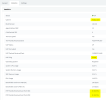
It was an excellent idea to install an SBC for the IP phones, and it can provide you with some valuable troubleshooting data to confirm or disconfirm your suspicions.
1675843636454.png

Since you are running over fiber, it sounds a bit strange that you would be facing such drop outs. I'm wondering whether the ISP equipment is having an issue or if it's a simple matter of someone causing a high usage spike on your network, causing the service to drop. You should try to prioritize the SBC on your network, which would result in IP Phones no longer dropping calls, while everybody else using the apps will still face the issues. This would serve as evidence that it is a usage spike issue. Some questions:

- Do you have some way to put the SBC IP on the highest network priority?
- Have you made sure that the machine running the SBC has ample resources?
- Does the SBC VM have enough cores / ram allocated?
- Have you contacted your ISP about the issues you are facing? They might have some statistics showing service degradation
- Do you perhaps have a load balancer or backup connection, and your internet path switches back and forth between the two causing you to go online via a different public IP? This would perfectly fit your description
 
I would be looking for a similar feature, have user roaming (connected to the hosted environment) with the desktop app, and MS Teams & 3CX Mobile app handle this a lot better than the desktop app

Thanks
 
Hi John,

Apologies for the delay.

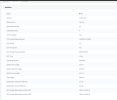
Here is a screenshot of the SBC connection (but it has only been up for a day)
1676986672334.png

Unfortunately I can not change the QOS as everything is running on VLAN 1 (mix match of old switches, non managed switches
and network racks that don't fit modern switches)

The SBC does have enough resources

I have not contacted the ISP yet because it seems like the issue is in the building

We do not have a load balancer or secondary internet line.

Thanks,
 
Status
Not open for further replies.

Forum statistics

Threads
111,974
Messages
590,081
Members
164,899
Latest member
mazet