Call Flow Script: Play Custom Holiday Message Based On Date

You don't need to get personal. This forum is about technical problems, questions, and answers. All your questions have already been answered.

Except for rhetorical questions, I cannot read new questions.

I also don't need to discuss with you what you consider good or bad, even if you keep trying. You don't need to personally attack me. This is not welcome here. I don't do that with you either. If you don't like how I'm helping you, you could have simply written that briefly. You could have also just stopped writing, that would help as well. Additionally, there is the ignore function. I think I will use it. Maybe that will help you.
 
OK, lets settle down...

Let me clarify a few things.

The holiday configuration in Version 20 has been designed in a way to give you both the ability to configure your holidays globally as well as individually per department.

To have a better understanding of this, let me just recap what we had in previous versions.

In previous versions we had the global holidays with their respective prompts. During a holiday period this would play the prompt and then divert the call to the HOL Digital Receptionist (IVR)

This worked well for smaller companies who were all under one roof, one timezone.

However this brought MANY challenges to those companies who were in multiple locations, different timezones, different countries etc. Each would have their own holidays for example. Lets say that you have in office in NYC and London. As they are in different countries, their holidays were different. This was a nightmare for the admins configuring the PBX.

With Version 20 we also introduced the multitenancy which would have multiple smaller companies. Having global holidays was not an option. So we needed to redesign the archtiecture of the system for the holidays.

This made us introduce the Call handling options within the Queues, Ring Groups, Departments, and Digital Receptionists.

This was a perfect opportunity for the individual departments (or companies in the multitenancy) to have their own holiday prompts when the company is closed for a holiday.

They would generally modify their own prompt whenever a holiday came around, or just keep the same one permanently.

You would think the story ends here. But no....

Then we have the bigger corporations and enterprises that have multiple departments, who prefer to have a more customised prompt per holiday. Having to individually go to each department, Queue ring group etc to change the holidays every time can get quite frustrating.

So we needed to find a solution to make it easy for them.

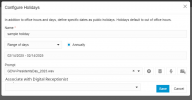
So we added the capability to have a prompt per holiday in the departments, under the holiday configuration.

The reason why we did it as a script is for the simplicity that if we ever need to make a change, this would just be a modification to the script, not to the internal code of the system. This make it more efficient, and allows us to roll out updates alot more swiftly.

When you install the script, you dont really need to do anything. Just add it and apply it to the trunk(s). Let the system do the rest. There is ZERO modification necessary for the script.

The PBX will however play the prompt and then go to the normal holiday destination routing the DID was originally configured to go to, and will do if it is not a holiday.

In this case, you can just omit to play the prompt in the holiday routing in your queue.

Hope this clears alot of things up.
 
As someone who installs, setups up, and manages 3CX instances, I think the current options with the script make sense and provide versatility in deployments.
If I could offer one suggestion, the option to add a prompt to a holiday should be grayed out or missing if the script hasn't been installed.
In a recent example, we've been getting unusual weather in the southeast US and offices are closing at abnormal times. When someone who isn't as experienced with 3CX but has the "Manager" role, sees the option to add a holiday with a custom prompt, they assume this is a working option. Then later when they discover the custom prompt isn't being played, they think something is broken and blame us or 3CX.
 
It is not as bad as its made out to be.

The script provides a lot of flexibility over v18. So the additional step comes with quite some benefits. Again the script is only needed if you want to have custom messages per holiday, pre configured for the year. Most people dont

But yes some warning message about the script would be good.

You can create custom out of office message for a time from the webclient for example in exceptional situations for example a big storm. That's why we added it to the webclient.

We will look into this admin improvement after we finish update 6 which includes the improved reporting
 
Will this eventually be possible for a single DID as well?

I am currently testing this and have set it up for "When this DID is called" and to a specific department, and while it does honor and follow the Department holiday settings configured in the Office Hours -> Holidays part, when the holiday is over the call just gets dropped.
So i am assuming it doesn't work with DID.

We only have one trunk with multiple DID's, so it's not entirely favourable to set it up for that entire trunk or all departments.
Unless i'm missing something to make it work for a single DID / specific department(s)?
 
Not sure if you're replying to me, but upon looking at the holiday_select.cs code you provided and what comes from the official store in v20 there only is a difference in where you specifically define

Code:
private readonly string holiday_included_extensions = "200,210,220,800";

and the addition of the AND in the public override async Task function

Code:
if (defaultDestination != null && holiday_included_extensions.Contains(defaultDestination.Number))

Not sure how that would help with only using this script for a specific DID and department?
1738144813434.png
 
Not sure how that would help with only using this script for a specific DID and department?
Please excuse me, I was so lazy and thought you could interpret the code or get a translator to read the text in German - my mistake.

The information in the holiday_included_extensions parameter refers to the target - user, ring group, queue or IVR - for which the department holiday settings are played and executed.

To clarify: a call comes in on the SIP trunk, the (original) script tracks the call based on the DID, CID and the standard route of the SIP trunk, then the extension takes effect and checks whether this target - this extension number of the 3CX - is included in the parameter and only then the part with the individual playback of the holiday announcement will be executed if a holiday is entered and is valid for the target department. Calls to other extensions will therefore not receive the individual holiday announcement.

You don't have to use the solution I offer. You can also develop and test something yourself. The original 3CX holiday.cs is a very good template for your own extensions.
 
Last edited:
  • Haha
  • Like
Reactions: GregG_3CX and N_G
Would you consider creating another iteration of the holiday call processing script that does the following?

In my case, we have all calls coming in to a Ring Group first, with a 1 second Ring Time. Then the conditions of "no answer", "office closed", "break", "When on holiday route to" are evaluated. We have a different Digital Receptionist assigned for holidays compared to office hours, or office closed. It allows for different press1 for, press 2 for, options.

The revised script would do the following when that "on holiday route to" condition is true.
1. Call comes in on a trunk. In my case for a particular tenant/department.
1. Find the pre-recorded audio file that was recorded or uploaded with that holiday (available in Version 20.0 Update 5 (Build 527 Beta))
2. If the specified Digital Receptionist exists, and is assigned in the "When on holiday route to" section of the Ring Group
3. Compares and if missing, attaches that holiday audio file to that Digital Receptionist that allows a caller to interact during the message (press 1, 2, etc,) just like the v18 HOL IVR worked.

The admin, when installing the script, would specify the extension number (instead of transfer number) associated with the Digital Receptionist they want the audio file to be connected to.

This existing script does nothing more than play the audio file. The caller has no interaction capability.
Our customers have a different IVR setup during holidays, such as not being able to reach the reception desk, contact an off-hours answering service, etc.
 
Would you consider creating another iteration of the holiday call processing script that does the following?

In my case, we have all calls coming in to a Ring Group first, with a 1 second Ring Time. Then the conditions of "no answer", "office closed", "break", "When on holiday route to" are evaluated. We have a different Digital Receptionist assigned for holidays compared to office hours, or office closed. It allows for different press1 for, press 2 for, options.

The revised script would do the following when that "on holiday route to" condition is true.
1. Call comes in on a trunk. In my case for a particular tenant/department.
1. Find the pre-recorded audio file that was recorded or uploaded with that holiday (available in Version 20.0 Update 5 (Build 527 Beta))
2. If the specified Digital Receptionist exists, and is assigned in the "When on holiday route to" section of the Ring Group
3. Compares and if missing, attaches that holiday audio file to that Digital Receptionist that allows a caller to interact during the message (press 1, 2, etc,) just like the v18 HOL IVR worked.

The admin, when installing the script, would specify the extension number (instead of transfer number) associated with the Digital Receptionist they want the audio file to be connected to.

This existing script does nothing more than play the audio file. The caller has no interaction capability.
Our customers have a different IVR setup during holidays, such as not being able to reach the reception desk, contact an off-hours answering service, etc.
The script is designed to play the audio prompt and then forward the call based on which DID was dialled. It is just that the script applies at the trunk level.

So if you dial the DID of a Queue, it will play the prompt then send it to the Queue, and process the Holiday destination in the queue.
 
Hello Nick - appreciate your quick reply. That being the case, could a new script do nothing more on an inbound call than apply the correct holiday message to a designated Digital Receptionist, then let the regular call handling flow continue, as in my case (ring group, then follow the path matching the situation, in office, out of office, holiday)?
 
Hello Nick - appreciate your quick reply. That being the case, could a new script do nothing more on an inbound call than apply the correct holiday message to a designated Digital Receptionist, then let the regular call handling flow continue, as in my case (ring group, then follow the path matching the situation, in office, out of office, holiday)?
Essentially, the script would play what is defined under the department holidays, then route the call through to where the person was originally intended to go. If you have a holiday message in your Digital receptionist, it will play this as well. If you have it to accept anyway, then it will still process the digital receptionist.

Think of the holiday prompt script as a sticky beak (busy body) who will say its thing, and then pass the call through anyway.

The script will play first, then send the call. It will not process it after the Digital Receptionist. Unless you write a new script to do whatever behaviour you want.
 
  • Like
Reactions: GregG_3CX
Nick, in my case, I don't need an introduction script to play an audio file, then another Digital Receptionist audio file to play. Just the one holiday message, in the wrapper of a Digital Receptionist so a caller can press an option based on what they need.

Two approaches would be:
a. A feature request, where 3cx provides a drop-down box when configuring a holiday where the user can specify which filtered object plays the message for that Department, such as the Digital Receptionist I have configured for my tenant/department. I heavily favor this approach as it gets us very close to the v18 HOL methodology and allows for some bit of customization for the user to specify what Digital Receptionist is going to play that message. It's also a baked-in and supported block of code.

b. Roll my own code. However, unlike VB in Visual Studio, I don't know of an object library with properties, etc. to help the process along. This is by my far least favorite because it's essentially a rabbit-hole. I'm not a one-off case and have limited C# skills. I've read that many others want the basic HOL functionality back. Option a does that but allows for the isolation by Department.

Your thoughts?
 
It sounds like you also want to replace the prompt on the digital receptionist? Can you just create a second DR with the options you want, and route calls to that using "When on holiday route to"? So have both "DR-Office Open" and "DR-Holiday."
 
Hey Steve - The current Holiday setup has a placeholder for an audio file, however, it doesn't actually do anything other than act as a trigger letting the system know it should be in holiday mode for that department. If I don't then jump over to the non-related DR (programatically speaking) and also apply the audio file I want in there, the holiday setting audio doesn't play. If i have to do that 2nd step every time I configure a Holiday for a department, what is the point of the placeholder for audio when you configure a Holiday? I'm looking to connect the two programmatically.
 
That's why I was imagining two. Perhaps I'm just not understanding. My thought would be:

call -> office open DR -> message and choices

call -> office open DR but it's after hours -> office closed DR -> message and choices

call -> holiday recording (we're closed, happy new year) -> office open DR but it's a holiday -> holiday DR -> message and choices
 
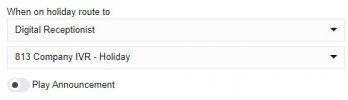
Your 3rd option is what their add-on script does now. I have no need for an intro script to play saying we're closed for a holiday, then another process to follow. My audio file is designed to be used in a Digital Receptionist, where as the caller is listening to it, they can press options. What I want is so simple, but getting there is cumbersome. The system already has a handler in a Ring Group to do something on a holiday (see attached pic), and a mechanism to set up holidays along with what audio file to play. What's missing from v18 is the association between the two.
 

Attachments

  • Screenshot 2025-02-14 104559.jpg
    Screenshot 2025-02-14 104559.jpg
    1.7 KB · Views: 6
Feature request for connecting a configured holiday with an existing Department Digital ReceptionistHoliday-DR-DropDown.pngHoliday-DR-DropDown.png
 
Last edited:
Your 3rd option is what their add-on script does now. I have no need for an intro script to play saying we're closed for a holiday, then another process to follow. My audio file is designed to be used in a Digital Receptionist, where as the caller is listening to it, they can press options. What I want is so simple, but getting there is cumbersome. The system already has a handler in a Ring Group to do something on a holiday (see attached pic), and a mechanism to set up holidays along with what audio file to play. What's missing from v18 is the association between the two.
Screenshot 2025-02-14 104559.jpg
 

Latest Posts

Forum statistics

Threads
111,991
Messages
590,167
Members
164,929
Latest member
Cloudstar