Call from Bridge Error -[Flow] Target endpoint for xxxxxx can not be built!

Status
Not open for further replies.

JCubio

Free User
Joined
Oct 7, 2019
Messages
134
Reaction score
13
Hi,

I'm having issue with the bridging.
Im getting this error when I tried to call outside numbers via the bridge

Here's the Scenario:
  1. Local and Cloud PBX bridged
  2. Local PBX on has Bridge trunk configured
  3. Cloud has sip trunk (mvoice) and bridge

Testing and result
1.Called outside number from cloud extension = working
  1. Called extensions between bridge = working
  2. Called outside number from local = not working
  3. Number called from Local reflects in the cloud but with error
[Flow] Target endpoint for xxxxxx can not be built!

Scenario 2:Reverse setup
  1. Add the mvoice trunk in the local pbx and remove it from the cloud
  2. All test results are positive.

Any clue on how should I troubleshoot this one?

Note: It's our first time setting up 3CX

Thanks in advance
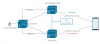
 
Could this be a matter of the outbound rules simply not matching the number (missing outbound prefix?) being sent over the bridge ? Are there any restrictions on the rules?
 
Could this be a matter of the outbound rules simply not matching the number (missing outbound prefix?) being sent over the bridge ? Are there any restrictions on the rules?
I already tried manipulating the outbound rule but it doesn't work.
Besides if I dial the extensions in the cloud from the local, it works
 
Also, sir, I have a different cloud server(trial version) bridged to the local and everything's good
I only have this problem with our 3CX Cloud ( production account)
 
...and when you compare a working call, to that of one that fails, using the Activity Log, what's different?
 
I found the issue. It's with the sip trunk used.
I tried a different sip trunk and it worked.
But the weird part is both sip account is hosted from the same mvoice account
 
Hi guys,

The same issue happens. I tried removing and adding the sip trunk as I thought it was the issue but its not working again.

This issue is happening in our production cloud server hosted in 3CX.
While my test cloud 3CX is hosted in Google cloud is not experiencing the issue.

Is this something to do with the cloud ? How can I troubleshoot this one.
I'm out of idea for this issue
 
Perhaps if you provide some additional information..

You say it's the SIP trunk, and another worked (not a lot of information)...so what's different between the one that works, and the one that doesn't? Have you used Wireshark? What do the Activity Logs look like for a working, incoming call, and a non-working?
 
Perhaps if you provide some additional information..

You say it's the SIP trunk, and another worked (not a lot of information)...so what's different between the one that works, and the one that doesn't? Have you used Wireshark? What do the Activity Logs look like for a working, incoming call, and a non-working?
The sip account I added is an extension from our mvoice hosted pbx. I tested multiple extensions but it doesnt work in our Azure cloud but works in Google cloud

What I mean that it doesnt work is the call from local to outside number via bridge because the sip is added in the cloud
 
So you are placing calls from a non-3CX PBX, bridged to 3CX, then routed outside? Or vice-versa? If that is the case, do calls to an internal extension, work?
 
OK, I see the diagram. do calls to an extension on the "Local 3CX" work? What extensions are you using, the picture seems to indicate a mobile App. Do calls fail both ways ? Is it just outside calls? Which PBX has outside trunks...that really isn't clear. If it is only outside calls, could it be a caller ID issue?

Since you seemed to have found a way to "make it work", then you need to "drill down" with Wireshark, and see exactly what is different between working, and non-working.
 
Last edited:
So you are placing calls from a non-3CX PBX, bridged to 3CX, then routed outside? Or vice-versa? If that is the case, do calls to an internal extension, work?
Yes, local extension to cloud extension works.
 
But how do your outside calls route? That is what's failing as i understand it. Which PBX has outside trunks?
 
But how do your outside calls route? That is what's failing as i understand it. Which PBX has outside trunks?
Only the cloud
 
So there are extensions off the 3CX Google Cloud PBX? And you can call those, correct? I still think you need to compare a working call, using Wireshark, with a non-working call.
 
I tried capturing the packet and this is the result.

SIP/2.0 100 Trying

Via: SIP/2.0/UDP 192.168.0.127:5060;branch=z9hG4bK-524287-1---a9be9c2ea7f93040;rport=5060;received=120.28.210.20

To: <sip:[email protected]:5060;rinstance=4764d37c6011cb74>

From: <sip:[email protected]:5060;rinstance=4764d37c6011cb74>;tag=b5d32420

Call-ID: wCdv1eJao1g41c9e4ku9LQ..

CSeq: 2 INVITE

Content-Length: 0


SIP/2.0 404 Not Found

Via: SIP/2.0/UDP 192.168.0.127:5060;branch=z9hG4bK-524287-1---a9be9c2ea7f93040;rport=5060;received=120.28.210.20

To: <sip:[email protected]:5060;rinstance=4764d37c6011cb74>;tag=50ca023f

From: <sip:[email protected]:5060;rinstance=4764d37c6011cb74>;tag=b5d32420

Call-ID: wCdv1eJao1g41c9e4ku9LQ..

CSeq: 2 INVITE

User-Agent: 3CXPhoneSystem 16.0.3.676 (676)

Warning: 499 vm5d88314964.2zrrrjsml2eund5pfqmskv32wa.px.internal.cloudapp.net "Not found"

Content-Length: 0

Why I am getting user not found error (404)? Does it means that our cloud pbx can't transfer back the call to the local extension who initiated the call?
 
Why I am getting user not found error (404)? Does it means that our cloud pbx can't transfer back the call to the local extension who initiated the call?
Why would the call be transferred back? i though you were to try to place an outside call from an extension on one PBX through the trunks on another.

32wa.px.internal.cloudapp.net "Not found"

How does the cloudapp.net come into play?
 
Status
Not open for further replies.

Forum statistics

Threads
112,363
Messages
592,121
Members
165,536
Latest member
Wecare_ITA
