- Joined
- Nov 9, 2023
- Messages
- 6
- Reaction score
- 1
Hello Everyone,
I hope you are doing well.
I have searched through the forums and various online resources, but have not been able to locate much information regarding this particular issue. I am not sure if I am using the correct terminology in my search, or if this is an uncommon problem, so I wanted to reach out directly to the community for guidance.
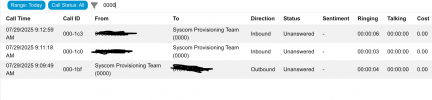
We are currently working with a client who is running version 20.0 Update 6 (Build 724 Release). The issue we are encountering is that while calls are appearing in the call log under the Reporting section of the Admin Portal, they are not visible within the user’s web portal or desktop application.
One detail that stood out to me is that their call history data is currently over 24 GB. At first glance, this appears quite large, although with approximately 50 users, I am unsure whether it falls within the expected range or if it might be contributing to the issue. Unfortunately, we do not have other clients of a similar size to use as a benchmark for comparison.
I would greatly appreciate any insights, experiences, or recommendations that could help point us in the right direction. If you have any additional information, logs, or screenshots that would assist in troubleshooting, please let me know, and I will be happy to provide them.
Thank you in advance for your time and assistance.
I hope you are doing well.
I have searched through the forums and various online resources, but have not been able to locate much information regarding this particular issue. I am not sure if I am using the correct terminology in my search, or if this is an uncommon problem, so I wanted to reach out directly to the community for guidance.
We are currently working with a client who is running version 20.0 Update 6 (Build 724 Release). The issue we are encountering is that while calls are appearing in the call log under the Reporting section of the Admin Portal, they are not visible within the user’s web portal or desktop application.
One detail that stood out to me is that their call history data is currently over 24 GB. At first glance, this appears quite large, although with approximately 50 users, I am unsure whether it falls within the expected range or if it might be contributing to the issue. Unfortunately, we do not have other clients of a similar size to use as a benchmark for comparison.
I would greatly appreciate any insights, experiences, or recommendations that could help point us in the right direction. If you have any additional information, logs, or screenshots that would assist in troubleshooting, please let me know, and I will be happy to provide them.
Thank you in advance for your time and assistance.